Merrill Lynch Holdings
After opening my IRA with Merrill, I setup a connection with Quicken to track my holdings. I update my accounts every 5-10 days. Despite this, Quicken has somehow lost transactions and informs me that my holdings do not match. I've disconnected my connection and reestablished the connection, but the values do not update.
Today I decided to disconnect, but when I reauthorized my account, instead of using the same Quicken account, I told it to create a whole new entry to track my holdings. This time, after downloading my historical data, Quicken is telling me that I have 337 placeholder entries nearly all of them for a single date.
I tried to go directly to Merrill's website to just download the transactions and merge them into Quicken, like I used to be able to do, however Merrill no longer supports that function as Quicken performs all downloads directly.
Short of going through 3 years worth of data, I am at a loss as to how to resolve this issue. How can Quicken download all the transaction fresh and still be missing 337 entries? I've been using Quicken since the 90's. In all that time, I have never had this kind of problem. I wish I could go back to the old model where I would buy a version and using it for 3-5 years with no issues before having to upgrade instead of this awful subscription model where I get features I never asked for or use, but can't use the ones that I want.
Answers
-
Some additional information. I've been investigating the placeholder entries. It seems that Quicken only downloaded about a year of data from the site even though I was able to download CSV files for the entire length of time. I tried using the CSV data to import into Quicken, but Quicken crashed.
Is there an easy way to copy my older transactions from the original Quicken account into the new one?
0 -
So no one knows how I can fix this account? I still want to know how downloading every transaction since the account was opened, Quicken still reports incorrect balances. How is this useful for tracking investments?
0 -
Hello @LordXerxes,
Thank you for reaching out! Financial institutions often limit the history available for automatic download from Quicken. That is likely why only a year's worth of history was downloaded. The placeholders are transactions that Quicken automatically creates to account for missing history. For more information on placeholders, please review this help article: .
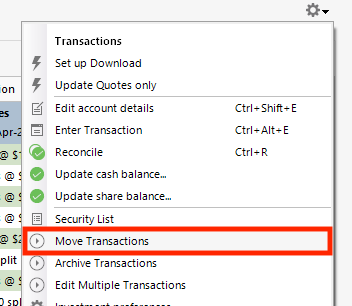
If you still have the original account in your Quicken, the fastest way to fill in the missing history would be to backup your Quicken file, click the settings gear near the upper right in the original account, and select Move Transactions.
In the window that comes up, select the transactions you want to move and select the account to move them to.
Please let me know how it goes!
Quicken Kristina
Make sure to sign up for the email digest to see a round up of your top posts.
0
Categories
- All Categories
- 58 Product Ideas
- 34 Announcements
- 238 Alerts, Online Banking & Known Product Issues
- 19 Product Alerts
- 511 Welcome to the Community!
- 678 Before you Buy
- 1.4K Product Ideas
- 55.3K Quicken Classic for Windows
- 16.7K Quicken Classic for Mac
- 1K Quicken Mobile
- 828 Quicken on the Web
- 123 Quicken LifeHub