Since late last year Morningstar X-ray asset allocations for index funds, ETF's and Money Market Fun

What happened to Morningstar X-ray? Across numerous accounts, large funds from Schwab (SWVXX a money market), Vanguard (VEA an ETF) and iShares (LQD) all now show the majority of their holdings are 'Not Classified". I can still use the Quicken Allocation, but X-ray is pretty useless. The addition of AI analysis, which is flat out wrong, and even contradicts itself, is ludicrous. I hope nobody takes it at face value.
Best Answers
-
Hello @mcski,
Thanks for sharing your observations. Upon reviewing your account internally, it looks like you’re still running R65.29. To ensure you have the latest fixes, please update to R66.12 by navigating to:
- Help > Check for Updates
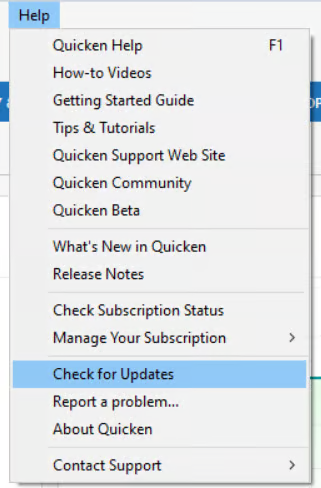
If the update isn’t offered there, you can manually download and install the latest version using this support article.
Once updated, please check to see if the Portfolio X-Ray issue persists.
Thank you!
-Quicken Anja
Make sure to sign up for the email digest to see a round up of your top posts.0 - Help > Check for Updates
-
What got the ETFs working for me was:
- Install R66.12 or newer
- At the top right of the X-Ray page, click on the arrow next to Update and select Quotes
- Select one account
- Select All accounts
- Click on Refresh X-Ray
On a test file, this worked right away. On my working file, I had to repeat steps 2-5 a few times before the Not Classified wedge of the pie chart disappeared and the allocations were correct.
Note that the AI analysis is still incorrect.
QWin Premier subscription1 -
Checking for updates did say no other updates were available. The manual download, followed by Jim_Harman's suggestion worked.
0


Answers
-
Hello @mcski,
Thanks for sharing your observations. Upon reviewing your account internally, it looks like you’re still running R65.29. To ensure you have the latest fixes, please update to R66.12 by navigating to:
- Help > Check for Updates
If the update isn’t offered there, you can manually download and install the latest version using this support article.
Once updated, please check to see if the Portfolio X-Ray issue persists.
Thank you!
-Quicken Anja
Make sure to sign up for the email digest to see a round up of your top posts.0 - Help > Check for Updates
-
What got the ETFs working for me was:
- Install R66.12 or newer
- At the top right of the X-Ray page, click on the arrow next to Update and select Quotes
- Select one account
- Select All accounts
- Click on Refresh X-Ray
On a test file, this worked right away. On my working file, I had to repeat steps 2-5 a few times before the Not Classified wedge of the pie chart disappeared and the allocations were correct.
Note that the AI analysis is still incorrect.
QWin Premier subscription1 -
Checking for updates did say no other updates were available. The manual download, followed by Jim_Harman's suggestion worked.
0