Verify Chase Bank from Quicken on Windows 7
I'm using Quicken Classic Deluxe, version 27.1.65.29 on Windows 7 Professional 64-bit. Quicken works fine. But when I try to download transactions from Chase Bank, Quicken says Chase wants me to verify or validate the account. Quicken opens a tab for Chase.com. However, Chase.com does not support Firefox or Chrome (my default browser) or Edge on Windows 7. Is there a way to use a different computer with Windows 11 to validate the Chase account for Quicken on my Windows 7 computer?
Comments
-
I don't even understand how subscription Quicken even runs on a Win 7 installation. The minimum OS requirements for Windows Quicken is Windows 10 and won't install on anything older than that.
Now, some users have reported as you have that it ran on something older, but those were isolated circumstances and definitely not across the board.
Feel lucky that you got it to work to your satisfaction as long as it did, but unless someone can prove me wrong, you need to get a computer that has Win 11 on it, not Win10 since MS will be dropping support of it soon and Quicken will undoubtedly follow suit and remove it from the officially supported OS list.
-splasher using Q continuously since 1996
- Subscription Quicken - Win11 and QW2013 - Win11
-Questions? Check out the Quicken Windows FAQ list0 -
I'm not using "subscription Quicken."
-1 -
Version 27.1.65.29 is only available via the subscription … and it's NOT QWin 2017 which your profile says you're running.
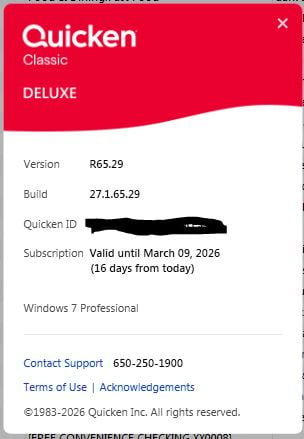
SO, please do HELP, About Quicken and tell us the Product, Version and Subscription info found there.
Q user since February, 1990. DOS Version 4
Now running Quicken Windows Subscription, Business & Personal
Retired "Certified Information Systems Auditor" & Bank Audit VP0 -
Here's the "About Quicken"
0 -
The official name is "Quicken Classic", but everyone calls it Quicken Subscription because since 2018 they dropped the "year" out of the name and you pay by subscription.
As for your original question, I don't think it is possible. They don't give the users all the details, but for Express Web Connect + connections it looks like Quicken uses some kind of special communications with either Intuit (their aggregator) or the financial institution to know when you have authorized the connection at the financial institution. And if that isn't working there isn't any other way to validate a connection.
Signature:
This is my website (ImportQIF is free to use):1
Categories
- All Categories
- 58 Product Ideas
- 34 Announcements
- 238 Alerts, Online Banking & Known Product Issues
- 19 Product Alerts
- 511 Welcome to the Community!
- 678 Before you Buy
- 1.4K Product Ideas
- 55.2K Quicken Classic for Windows
- 16.7K Quicken Classic for Mac
- 1K Quicken Mobile
- 828 Quicken on the Web
- 123 Quicken LifeHub