ONGOING 4/12/26 Bank of America Migration/Something went wrong error

Starting today, 2/24/2026, Bank of America will begin a migration where the following connections will be affected:
- 6312 Barnes & Noble BOA
- 26700 FIA Card Services -
- 9363 World Wildlife Fund Plat. Visa MC
- 23256 AAA Financial Credit Card
- 7377 NEA-R BOAMasterCard
- 40854 Bankcard Services Express Web Connect B Credit Card
- 26757 Bank of America -Quicken
- 7374 NEA BOA MasterCard Web Connect, Express
- 7104 FIA Card Services, N. A. Web Connect, Express
- 6255 Ameritrade BOA CC Web Connect, Express
- 8115 Visa Hawaii Golf BOA CC
- 26760 Bank of America Credit Card
- 7275 Michigan State Univ BOA CC
- 6526 Bank of America-All Other States
- 41562 First Franklin Loan Services
- 9273 University of Virginia
- 21069 Countrywide Home Loan
- 7110 FIA Card Services
- 7113 BOA Lighthouse MC
- 7116 BOA Platinum Plus CC Web Connect, Express
- 6921 Iowa State Univ Alumni BOA CC
- 8424 Countrywide Home
- 6975 JP Morgan Private
If you are currently connected to any of these connections, you will see a "zzz" attached to the front of the name. Please attempt to fix the account connections through the FIX IT FLOW, or disconnect all the accounts connected to that connection option, revoke Quicken's third-party access from the Bank of America website, and reconnect through the ADD ACCOUNT FLOW. You can reconnect your accounts to the "Bank of America" connection option in both Quicken Windows and Quicken Mac.
To be notified of updates as they become available, please click the bookmark ribbon located in the upper right. If you do not see the bookmark ribbon, please make sure that you are signed into the Quicken Community.
Thank you!
(Ticket #12253450)
Quicken Alyssa
Make sure to sign up for the email digest to see a round up of your top posts.
Comments
-
UPDATE 2/26/26
For Windows users experiencing "Something went wrong - We're unable to authenticate you" error at the BofA website during account authorization, please follow the guidance provided below:
- Deactivate all Bank of America BIDs from Quicken.
- In Quicken, go to Account Settings > General tab and remove the Bank of America financial institution name and account number from each affected account.
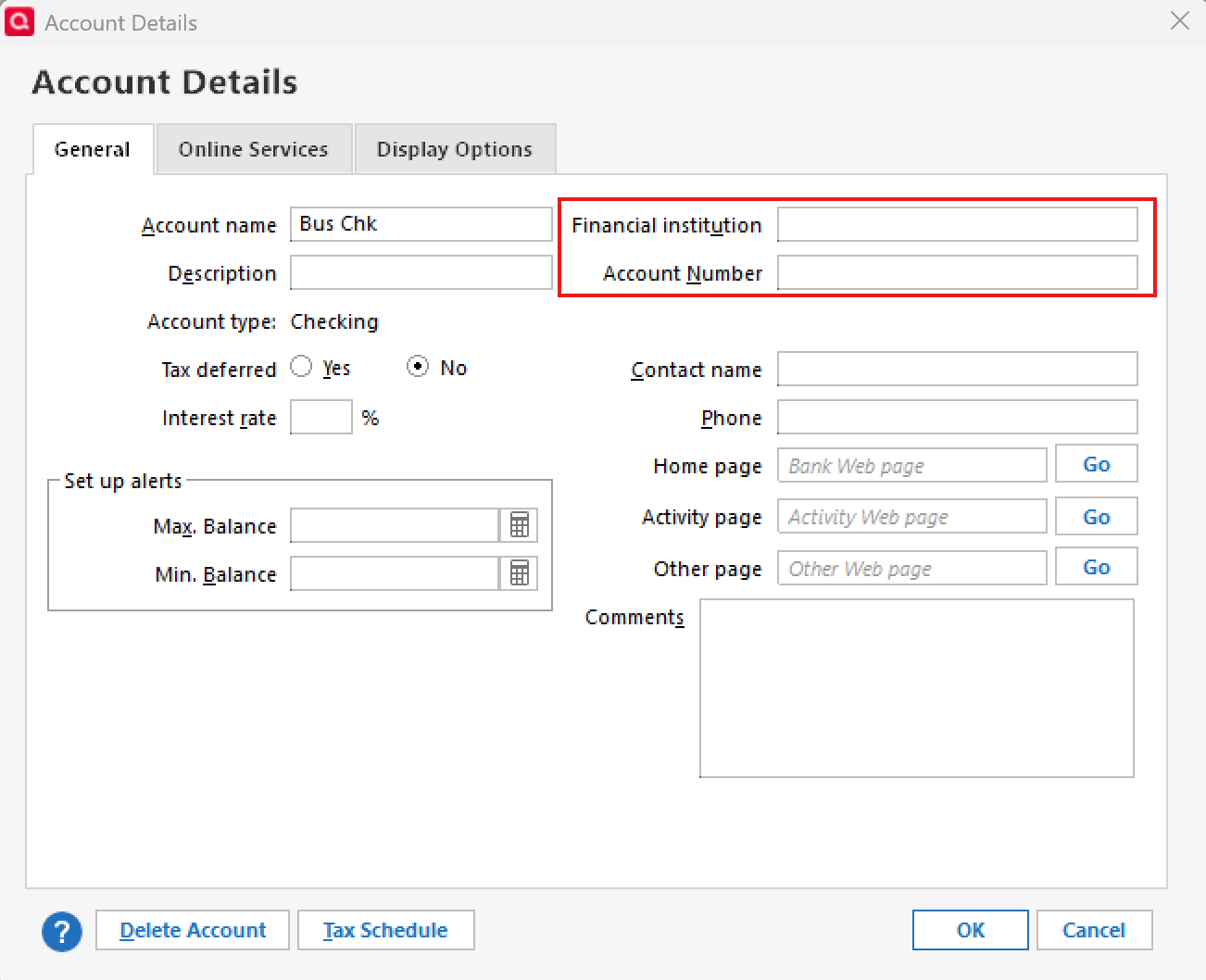
- It is recommended to temporarily rename the accounts using the last 4 digits of the account number to make identification easier during reconnection.
- Log in to the Bank of America website and navigate to:
- Security Center > Overview > Data Sharing > Review.
- Revoke Quicken’s access under third-party access.
- Return to Quicken and complete the Add Account flow to reactivate.
- Tools > Add Account…

- Proceed through the full reauthorization process when prompted.
- Tools > Add Account…
- If you receive the error message “Something went wrong”, or "Sign in to bank of America failed. Please try again." This is likely due to high traffic.
- Please try again during non-peak hours (7:00 PM – 10:00 PM as a reference window).
- If any other errors occur, please contact Quicken Support for further assistance so they can escalate accordingly.
Thank you!
-Quicken Anja
Make sure to sign up for the email digest to see a round up of your top posts.1 -
UPDATE 3/5/26
We do not have an ETA at this time for a resolution for this issue, though our teams continue to work towards a solution. We apologize for any inconvenience and thank you for your patience.
Please continue to refer to the guidance provided above.
Thank you!
-Quicken Anja
Make sure to sign up for the email digest to see a round up of your top posts.-1 -
ONGOING 3/12/26
This issue remains ongoing and our teams continue to work toward a solution. No ETA or further details are available at this time, and this Alert will be updated once more information, updates, etc become available. We apologize for any inconvenience and appreciate your patience.
Please continue to refer to the guidance provided above.
Thank you!
-Quicken Anja
Make sure to sign up for the email digest to see a round up of your top posts.0 -
UPDATE 3/20/26
During Bank of America's migration, some issues were found that caused the following errors:
- Bank of America - HTTP 400 Error
- “User Not Eligible” – Bank of America
- Bank of America - "Something went wrong" error
While some issues are worked out with this migration, we have re-enabled the following connection options that were available in Quicken Classic prior to the migration:
- FIA Card Services - Monthly
- AAA Financial Credit Card
- NEA-R BOA MasterCard
- Bankcard Services
- Bank of America - Quicken
- NEA BOA MasterCard
- FIA Card Services, N. A.
- Ameritrade BOA CC
- Bank of America Credit Card
- Bank of America-All Other States
- First Franklin Loan Services
- Countrywide Home Loan
- FIA Card Services Credit Card
- BOA Lighthouse MC Series CC
- BOA Platinum Plus CC
- 1Iowa State Univ Alumni BOA CC
- JP Morgan Private Client BOA CC
The following connection option will still remain available as well for customers who did not encounter any of these issues:
- Bank of America
Thank you!
Quicken Kristina
Make sure to sign up for the email digest to see a round up of your top posts.
-1 -
UPDATE 3/27/26
We do not have an ETA at this time for a resolution for this issue, though our teams continue to work towards a solution. We apologize for any inconvenience and thank you for your patience.
Please continue to refer to the guidance provided above.
Thank you!
Quicken Carlos
Make sure to sign up for the email digest to see a round up of your top posts.
0 -
ONGOING 4/12/26
This issue remains ongoing, and our teams continue to work toward a solution. No ETA or further details are available at this time, and this Alert will be updated once more information becomes available. We apologize for any inconvenience and appreciate your patience.
Please continue to refer to the guidance provided above.
Thank you!
Quicken Alyssa
Make sure to sign up for the email digest to see a round up of your top posts.
0


