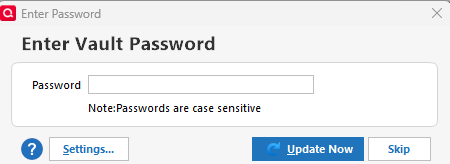
Why does One Step Update stop by Settings when choosing Update Now on Password Vault dialog

LexLuther
LexLuther Quicken Windows Subscription Member ✭✭✭

I see this question has arisen over the years, so I'm hoping I just inadvertently selected a different option somewhere that is causing this behaviour.

In the past, when I clicked One Step Update, it queried for the Vault Password (if not already entered for this session) and I entered it. After entering my password, I had two options:

  • Click Settings if I wanted to stop by settings before launching OSU.
  • Click Update Now if I wanted to, well, update now.

Recently, that behaviour has changed so that the two options do the same. If I click Update Now, it doesn't update now but instead goes to Settings which is almost never necessary. I can understand offering the option from the Password Vault dialog to either go to settings or do the OSU. I don't understand why the "Update Now" button on the Password Vault is still there, but the option to update now was removed.

Comments

  • LexLuther
    LexLuther Quicken Windows Subscription Member ✭✭✭

    No responses? Is no one else experiencing this?

  • Chris_QPW
    Chris_QPW Quicken Windows Subscription Member ✭✭✭✭

    There are multiple things going on depending on your situation.

    If you still have accounts setup with Direct Connect, then the Password Vault is still being used, and the behavior should be when you first start Quicken and do a One Step Update it asks for the Password Vault password and then does the update. If you do One Step Update again without closing Quicken it stops at the One Step Update settings. But in the past some people have reported that in all cases it was stopping on the One Step Update settings dialog.

    If you don't have any accounts using Direct Connect but still have entries in the Password Vault (they will all say that the password isn't needed) it may still prompt for the Password Vault password. If this is the case, then you can delete the Password Vault and it will stop asking for the Password Vault, but that leads to the last situation.

    And that is even with no Password Vault/Direct Connect accounts Quicken still stops on the One Step Update settings dialog. The why? is basically just because that is the way it always has been and they haven't changed it.

    If you want it changed like I do, I suggest you vote this idea up and maybe comment in the thread to bump the idea to the top of the forum again so people can see it.

  • LexLuther
    LexLuther Quicken Windows Subscription Member ✭✭✭

    Let's focus on what happens after you successfully enter the vault password (after first clicking Update after launching a new session). The incorrect behavior is that now (for me, in this data file), the Settings button and the Update Now button do exactly the same thing - it takes you to Settings. Given this behavior, they might as well remove the Update Now button entirely.

    This is new behavior. I've been using Quicken since early 1990s and I don't remember forced to visit Settings upon entering the Password Vault password, no matter whether you hit Settings or not.

    I note in the thread you referred to that there is indication that this misbehavior may vary from one data file to another. So maybe most people are not experiencing this, and that's why there are few comments. I'd be quite happy to find out what may have happened in my preferences or OSU settings that changed this behavior for me.

    image.png
  • Chris_QPW
    Chris_QPW Quicken Windows Subscription Member ✭✭✭✭

    This is new behavior. 

    New for you, but it has been reported as a bug by others. The hope was that they would fix both this bug and the fact that when the dialog shouldn't be in the One Step Update flow at all unless there is a requirement to fill in the passwords.

  • LexLuther
    LexLuther Quicken Windows Subscription Member ✭✭✭

    I've determined that this problem started (for me) between Jan 16 and Feb 1, 2026. If I restore a backup before Jan 16, Update Now from the Enter Vault Password dialog does actually Update Now.

    To be clear, this is upon the first instance of doing an update during a session from the Vault password. This is clearly not the expected behavior as otherwise there wouldn't be two buttons to choose stopping at settings or not.

    The situation of going to settings when clicking Update Accounts after already satisfied the Vault Password is a different scenario discussed in the other thread mentioned above.

  • NotACPA
    NotACPA Quicken Windows Subscription SuperUser ✭✭✭✭✭

    If restoring from a backup resolves the issue, then it sounds to me like a data issue rather than a program issue … because it's the same program before and after the backup.

    And only data, not the program is saved/restored via a backup.

    SO, have you tried to Validate your file?

    Q user since February, 1990. DOS Version 4
    Now running Quicken Windows Subscription, Business & Personal
    Retired "Certified Information Systems Auditor" & Bank Audit VP

  • LexLuther
    LexLuther Quicken Windows Subscription Member ✭✭✭

    Good suggestion but a regular validate found nothing. I did not do a supervalidate (if that's still a thing). See below. I don't think it is database corruption or anything like that. I think there was something related to OSU that happened during that time frame. For example, I'm pretty sure Discover changed access method during that time.

    BUT WAIT! Even though no validate issues were reported, the behavior of stopping at Settings when clicking Update Now in the Vault Password dialog is gone. It now works as intended! Interesting, and thanks for the suggestion.

    QDF:
    Validating your data.
    No errors.

    QEL:
    No read errors.

    QEL:
    All internal consistency checks passed.