Bank of America Reauthorization - Linking to existing account

mvwabc
mvwabc Quicken Windows Subscription Member ✭✭✭✭

I received the message to reauthorize my Bank of America accounts. Followed the instructions and successfully linked the credit card accounts. But, I could not link the checking account, because the hidden accounts showed making the list of accounts to select from too long to show on the screen. There was no way to scroll down the list of existing accounts to get to the correct account.

Anyone else with this problem? Any suggestions?

Comments

  • Quicken Kristina
    Quicken Kristina Quicken Windows Subscription Moderator mod

    Hello @mvwabc,

    Thank you for letting us know you're seeing this problem. To help troubleshoot, please provide more information:

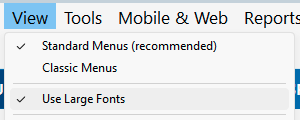
    • Are you using large fonts?
      • You can check this by hovering over the View menu option. If large fonts is on, you'll see a checkmark next to Use Large Fonts. Screenshot 2026-02-27 at 5.22.11 PM.png
    • Are you using any sort of zoom or magnification (usually turned on via your computer's accessibility options)?

    If possible, please provide a screenshot of what you are seeing when you're trying to link your checking account. Make sure to redact any personal information and account numbers. If needed, please refer to this Community FAQ for instructions on how to attach a screenshot. Alternatively, you can also drag and drop screenshots to your response if you are not given the option to add attachments.

    I look forward to your reply!

    Quicken Kristina

    Make sure to sign up for the email digest to see a round up of your top posts.

  • mvwabc
    mvwabc Quicken Windows Subscription Member ✭✭✭✭

    @Quicken Kristina ,

    The first things I tried when the problem occurred were to see if I could scroll down the account list, made sure large font was not checked, the screen resolution of my computer screen, and if I could resize or move the add screen to see the accounts.

    Some additional information since I made the post. The next day I got CC-800 errors on all my accounts using the “Express Web Connect+” connection method.

    One of the institutions that gave the CC-800 error was Fidelity Investments. So, I looked for posts with “Link to existing” problems. I found one discussion and posted at the link shown below.

    You will see from my post about Fidelity, some accounts came up “link to existing” and some came up “add account.” The B of A was identified as “add account.” I thought that maybe I could fix linking my B of A checking by making sure my account name in Quicken matched the account name at B of A site. I changed the account name in Quicken and the checking account then came up “link to existing.” Even though I could not see the account listed in the drop down to verify the right account was selected, I processed and the correct account was linked. This was verified by a downloaded transaction into the checking account. I tried changing the account names in my Quicken to match the Fidelity site account names, but this did not work with the Fidelity accounts.

    My B of A problem is now fixed, so I cannot give you a screen shot for B of A. But, since I now have the problem at Fidelity, I have attached a screen shot using Fidelity as an example.

    For your information, before I made the initial B of A post, I called Quicken help. The Rep seemed to be familiar with the problem, and when asked said others were having the problem too. Multiple times the Rep seemed to be saying this was a B of A induced problem. The rep wanted to walk me through a procedure of adding a new account, and then copying all of the transactions from old account with transactions going back for years, and then past the transactions into the new account. This seemed to me to be a really dumb work around filled with potential new problems, especially since he did not first tell me to back up my file. I said that Quicken needed to fix the problem and insisted on a tracking number (Ticket # 12258794).

  • mvwabc
    mvwabc Quicken Windows Subscription Member ✭✭✭✭

    Chatted and then spoke with Jorge at Quicken this morning on this issue. He assigned a new ticket # 12276532 to the problem. And, Jorge spoke with someone else to have the problem escalated so that a software fix will be done sometime in the future.

  • Quicken Kristina
    Quicken Kristina Quicken Windows Subscription Moderator mod

    Thank you for the follow-up,

    I'm glad to hear that the issue has been escalated, and an escalated team is now working on the issue. Typically, the team will email you if they need additional information or when they believe the issue is fixed.

    Thank you!

    Quicken Kristina

    Make sure to sign up for the email digest to see a round up of your top posts.

  • mvwabc
    mvwabc Quicken Windows Subscription Member ✭✭✭✭

    Appears to have been fixed with R66.28 released today. There is now a scrolling window.