Bank of America and other accounts duplicate and delete the past history

RonaEdwards
RonaEdwards Quicken Mac Subscription Member ✭✭

Hi there,

Quicken lately is full of flaws. It's creating duplicates of Capital one, Bank of america and other accounts but while doing so it's erasing my complete history of my account. One in particular I've had for a very long time - I don't appreciate that BA is erasing the history of my accounts - and they go back far. How do I get it back? The banks only keep a certain amount of years - I want all of it back. Is there a way to retrieve it? Do I have to create a new quicken file with an older backup and then rehook the accounts up again? Or will it do the same thing - erase the many years I had in each account?.


Comments

  • Quicken Kristina
    Quicken Kristina Quicken Windows Subscription Moderator mod

    Hello @RonaEdwards,

    Thank you for letting us know you're encountering this issue. To clarify, is this happening when you need to reauthorize and/or reconnect an account?

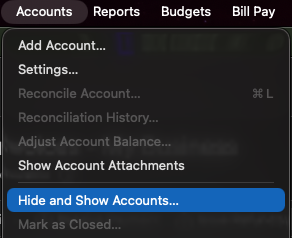
    If that is when the issue is happening, then I suspect the accounts are getting added as new instead of linked to the existing account. The new accounts would have only as much history as the financial institution makes available for download, but the original accounts would still have all the history. To check for this, navigate to Accounts>Hide and Show Accounts.

    Screenshot 2026-02-27 at 3.32.50 PM.png

    In the window that comes up, review the listing of your accounts and confirm if there are any duplicate accounts.

    If there are duplicate accounts, there are a couple ways to resolve the issue.

    First, backup your Quicken file. Then, depending on your preference, follow the steps from one of these options:

    Option 1 - If you want to keep the newly added accounts

    1. Determine how much history is missing from the newly added account.
    2. Go to the original account.
    3. Select the historical transactions that are missing from the newly added account.
    4. Drag and drop those transactions into the newly added account.
    5. Review to ensure all the history you need is in the new account and everything is correct.
    6. Once you have confirmed the new account is good, delete the old account.
    7. Repeat this process for each duplicate account.

    Option 2 - If you want to keep the original accounts

    1. Delete the newly added duplicate accounts.
    2. Deactivate all accounts with the problem financial institutions.
    3. Navigate to Accounts>Add Account and follow the prompts.
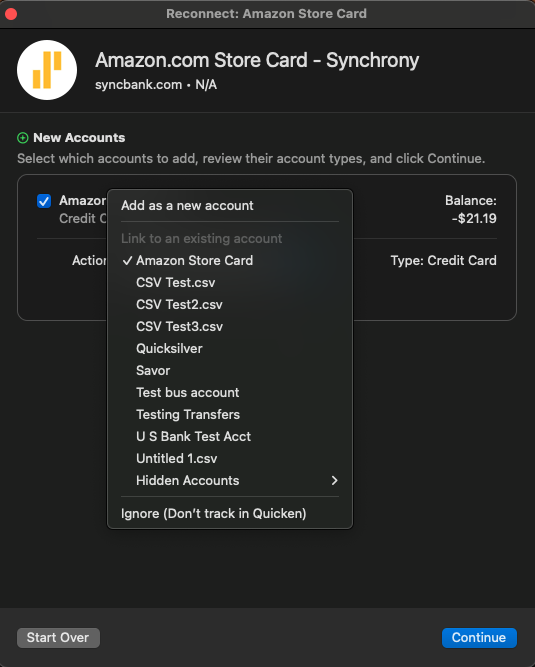
    4. When you get to the Add/Link screen, carefully link the accounts to the existing account in Quicken. Add Link screen QMac.png
    5. Repeat steps 3 & 4 for each financial institution this issue happened with.

    Please let me know how it goes!

    Quicken Kristina

    Make sure to sign up for the email digest to see a round up of your top posts.