Cannot log into Bank of America (BOA) to Add Account
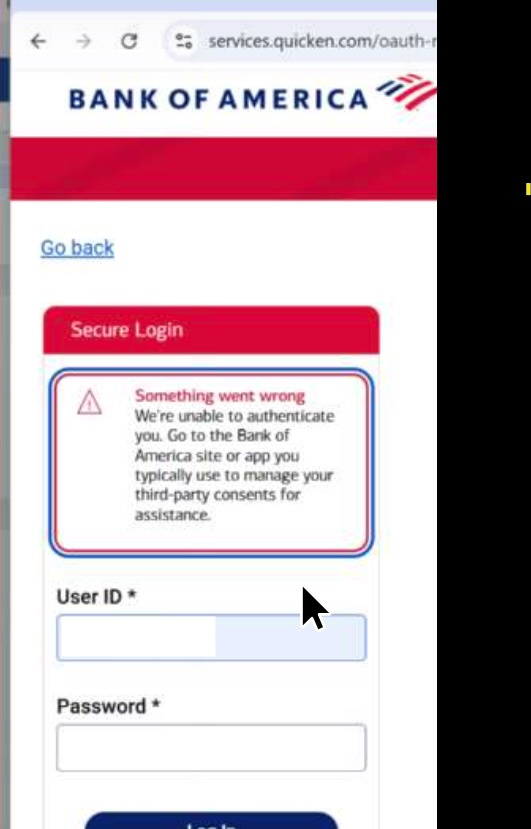
Quicken Classic Ver R66.18, Build 27.1.66.18 on Windows 11 told me I couldn't do a One Step Update for my BOA accounts until I updated my online connection (probably because BOA is moving to EWC+). Quicken support told me to go to Tools/Account List and deactivate my Online Services for my BOA accounts and then go to Add Account and set up BOA again so it would default to EWC+. However, after selecting BOA in Add Account it won't allow me to Sign In through BOA's Secure Login Screen. After entering my User ID and Password it says "Something went wrong. We're unable to authenticate you. Go to the Bank of America site or app you typically use to manage your third-part consents for assistance." I spoke to BOA support and they said that since I could log in directly, the issue was with Quicken. I also cleared cookies and extensions on my Edge browser as suggested but still receive the same login error message when I try to log on to BOA as part of the Add Account process. Looking for a solution to the login problem.
FOUND SOLUTION: In BOA account Profile/Security Settings removed Quicken from Data Sharing. Logged out and then logged back in. When it still asked to Confirm Access to Quicken I selected Decline Access. The next time I logged in it no longer requested the Confirmation. Went back to Quicken to Add Account. Selected Bank of America and this time it accepted the password, sent a confirmation text, and I went through the account linking for 6 accounts. After linking it did not show a complete list of accounts but when I checked Account List all 6 were now reflecting EWC+. I had to make some balance adjustments but now One Step Update works.
Comments
-
This is the same problem I have . Followed the "https://community.quicken.com/discussion/comment/20540086#Comment_20540086" for reference and the problem still exist. BOA insisted I change my password to correct the problem but that did not work.
0 -
I have the same problem using Quicken current Windows version.
I revoked Quicken data sharing on the BOA side, even changed my BOA password.
From Quicken, cannot log into BOA.So frustrated. Finger pointing going on.
Hoping BOA will get their act together with new com software.
0 -
Hello @robertfellows109,
Thank you for sharing your experience! Hopefully it will help others encountering similar issues.
Hello @bdickins1 & @Qknmep,
Thank you for reaching out! To help troubleshoot, please provide more information. What is the exact error message/code that you see? If possible, please share a screenshot of the error you are seeing (make sure to redact any personal information). If needed, please refer to this Community FAQ for instructions on how to attach a screenshot. Alternatively, you can also drag and drop screenshots to your response if you are not given the option to add attachments.
I look forward to your reply!
Quicken Kristina
Make sure to sign up for the email digest to see a round up of your top posts.
0
Categories
- All Categories
- 44 Product Ideas
- 34 Announcements
- 245 Alerts, Online Banking & Known Product Issues
- 23 Product Alerts
- 512 Welcome to the Community!
- 679 Before you Buy
- 1.4K Product Ideas
- 55.3K Quicken Classic for Windows
- 16.8K Quicken Classic for Mac
- 1K Quicken Mobile
- 828 Quicken on the Web
- 123 Quicken LifeHub