Deactivation of BofA Accounts in Quicken Issues

I am unable to deactivate my BofA accounts in Quicken. I click the Deactivate button only to get an endless cursor spinning, and have to use Task Manager to close Quicken. I went into BofA online and deactivated my Quicken / Inuit connection in Security Settings, and also Decline Quicken Connections on BofA login page. But each time I reopen Quicken to deactivate the Express Web Connect+ for my BofA accounts so that I can reconnect with the newer protocol, all I get is endless processing that never completes. I have tried Resetting the account as well. Nothing has worked, and this has been going on since March 1. Either BofA is out of sync with Quicken, or Quicken with BofA. But this migration is a mess.
[Edited-Readability]
Answers
-
Hello @Michael Warren,
Thank you for sharing your experience and reporting the issues you are seeing.
I have some follow-up questions for you:
- Have you tried rebooting your computer?
- Where is your data file located?
- You can see this by going to File and looking toward the bottom of the menu. The first file listed is the one you are currently in. The file location will be shown there, and that is what we are looking for.
- Is your file being synced/backed up by any third-party services like OneDrive, Dropbox, or Carbonite?
One thing we can try is validating your file. To do this:
- Save a backup.
- Go to File.
- Select Validate and Repair file…

- Check the first box labeled "Validate file".
- Click Ok.
Once the validation has completed, it will produce a report of anything it has found/corrected. After this, try deactivating your accounts again, and let us know if anything has changed.
Looking forward to your response!
Quicken Alyssa
Make sure to sign up for the email digest to see a round up of your top posts.
0 -
I've been trying to reactivate my Bank of America downloads into Quicken after BofA changed its connection protocol March 1. I revoked my BofA third-party access to Quicken / Intuit on bankofamerica.com. I finally deactivated my BofA accounts in Quicken (after hitting the deactivate button at night and going to bed since it was taking an EXTREMELY long time to process the request).
Now, I go into Tools / Account List / Edit / Online Services / Set Up Now and Bank of America is not listed as any of the more popular institutions. So I search for Bank of America, find it, select it, click Next / Continue and I get an error message that says "We couldn't Get Information from Bank of America. This account will be set up as a manual account." Well, all my BofA accounts are now manual accounts since I deactivated Express Web Connect+.
Is BofA no longer in partnership with Quicken to access financial information? Or does Quicken software not yet recognize BofA's new protocol? My Chase and AmX accounts are still working with Express Web Connect+. Why can't I reactivate my BofA accounts to download my transactions into Quicken? Very frustrating.
0 -
Thank you for following up.
Please review and respond to my previous post.
After reviewing your connections internally, it appears you are connected to the "Bank of America - All Other States" instance in Quicken. This instance should no longer be used. Please review this Alert and follow the steps therein to try to get this reconnected.
You will want to use the instance "Bank of America" when choosing the financial institution.
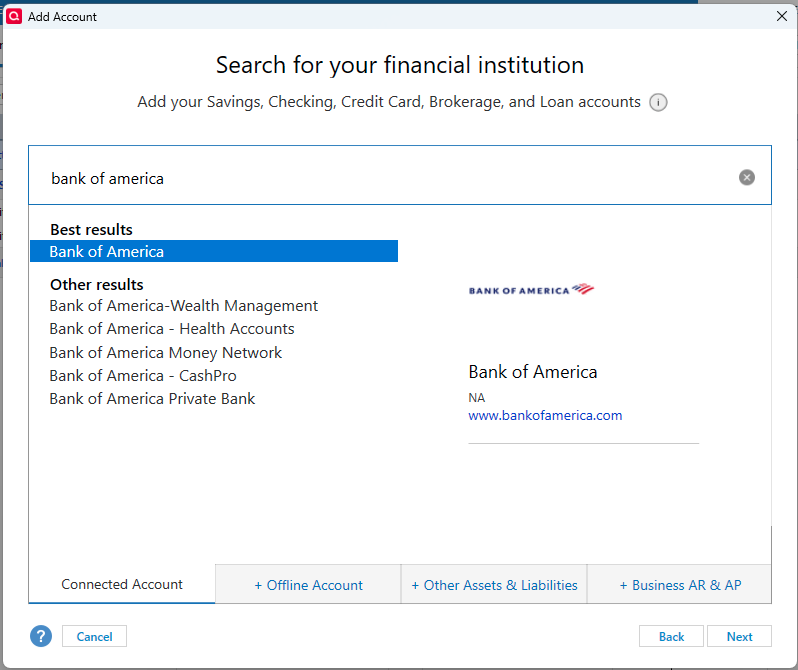
Let us know how it goes!
Quicken Alyssa
Make sure to sign up for the email digest to see a round up of your top posts.
0 -
Just checking in, we haven't heard back from you in a while.
Do you still need assistance?
Thank you!
Quicken Alyssa
Make sure to sign up for the email digest to see a round up of your top posts.
0 -
Hello again,
Checking in once more before this thread is closed.
Let us know if you still need assistance.
Thank you!
Quicken Alyssa
Make sure to sign up for the email digest to see a round up of your top posts.
0 -
Due to the lack of response, I went ahead and closed this post.
If you still require assistance, please feel free to start a new post.
Thank you!
Quicken Alyssa
Make sure to sign up for the email digest to see a round up of your top posts.
0
