Issues with VOYA - again

I have 6 retirement accounts with VOYA Financial. 3 for myself and 3 for my wife. Up until about 3/1/2026 all accounts would update when requested. Shortly after 3/1/2026 only my wife's 3 accounts will update while my 3 accounts have stopped updating. Nothing has changed on our end. It doesn't seem to be a VOYA issue - reason - some updates work. Baffled by this. Has anyone seen this recently ? Suggestions ? All 6 accounts update on the Quicken Classics version on my iMac. This is the same issue I had about a year ago.
Comments
-
Any help from Quicken will be greatly appreciated.
0 -
Hello @dmurad53,
Thank you for letting us know you're encountering this issue. To help troubleshoot, please provide more information:
- Are you seeing any error messages/codes?
- Are your accounts and your spouse's accounts under different login IDs?
- If they are, are you authorized users on each other's accounts?
- Was there anything else that happened around 1 March that may have triggered this?
I look forward to your response!
Quicken Kristina
Make sure to sign up for the email digest to see a round up of your top posts.
0 -
There are no error messages.
The accounts are separate logins
both of us are authorized users.
I don't believe there was any other trigger.
Up until around March 1 updates have been correct
The Mac version of Quicken Deluxe works for both of the accounts with no issues
Thank You
0 -
Thank you for your reply,
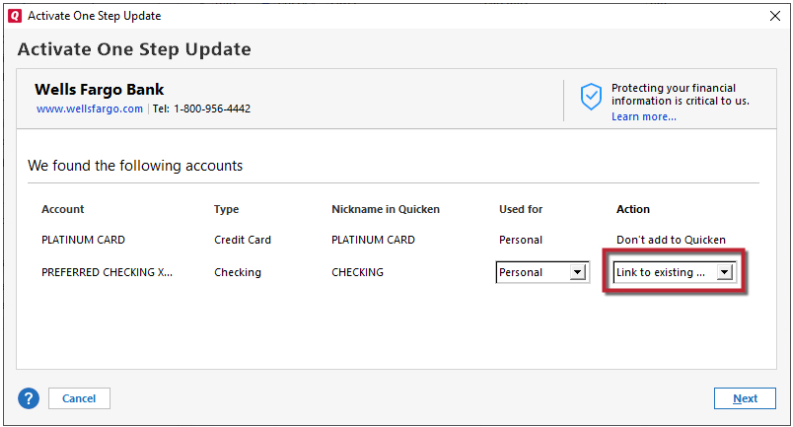
To troubleshoot the issue, backup your Quicken file, deactivate your 3 Voya accounts (if your wife's accounts are under a different set of login credentials, then there's no need to deactivate them), then navigate to Tools>Add Account and follow the prompts. When you get to the Add/Link screen, carefully link your accounts with the correct nicknames in Quicken. If your wife's accounts appear on that screen, make sure "Don't add to Quicken" is selected for those accounts (otherwise, they'll be reconnected under your login credentials, which will likely cause them to stop downloading).
Please let me know how it goes!
Quicken Kristina
Make sure to sign up for the email digest to see a round up of your top posts.
0 -
Thanks I will give it a try
0 -
After following your instructions - this is what came up "Your account has been added. However not all past transactions making up the share balances in your account are present. Quicken has entered place holders to make up the difference?
REVIEW and RESOLVE
suggestions ?
Thanks
0 -
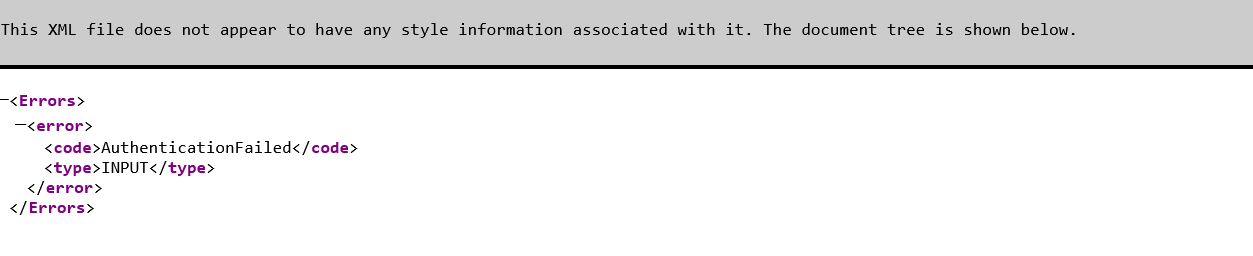
I'm having the same issue with authorizing Voya downloads to Quicken Deluxe. It was working until about April 10. I deactivated online services attempting to fix it and when I tried to reconnect I got the attached error message. Kindly add me to the ticket.
 0
0 -
Hello @Bird Dawg,
Thank you for letting us know you're also affected by this issue. I added you to the ticket.
Thank you!
(CTP-16932)
Quicken Kristina
Make sure to sign up for the email digest to see a round up of your top posts.
0 -
Hello All,
We just received word from our teams that this issue should be fixed. Please verify if it's working and let us know!
Thank you!
Quicken Kristina
Make sure to sign up for the email digest to see a round up of your top posts.
0 -
the issue with Quicken and Voya on half my accounts is still not fixed for me. Using Quicken Deluxe with Windows 11. Mac version works fine
1 -
Thank you for your reply,
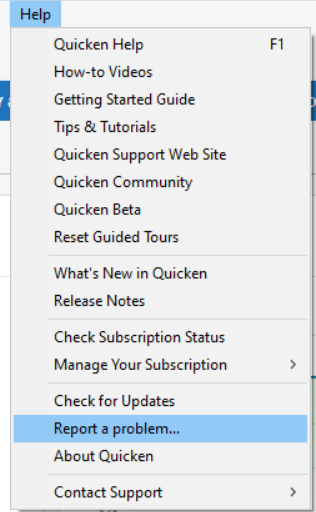
Thank you for letting us know the issue is not resolved. To help our teams investigate further investigate this issue, please navigate to Help>Report a Problem and send a problem report with log files attached.
Please let me know once you've submitted the problem report.
Thank you!
Quicken Kristina
Make sure to sign up for the email digest to see a round up of your top posts.
0 -
the report was just sent
Thank You
1 -
Thank you for sending the problem report,
I forwarded the information to our teams!
Quicken Kristina
Make sure to sign up for the email digest to see a round up of your top posts.
0
