Wednesday 2026-03-25 at 07:03 PDT
Subject: Some downloaded transactions do not match transactions that I had entered by using the Bills & Income bill enter function.
Some downloaded transactions do not match transactions that I had entered by using the Bills & Income bill enter function. Those transactions have a new register line. I entered the transactions in the order that I paid them. I would like to have help to solve the problems. Below, I ask questions to help me solve them.
I entered five transactions on 2026-03-20 in this order:
AT&T Universal Card
DirecTV
Waste Connections
[Redacted] Telecom
Wells Fargo
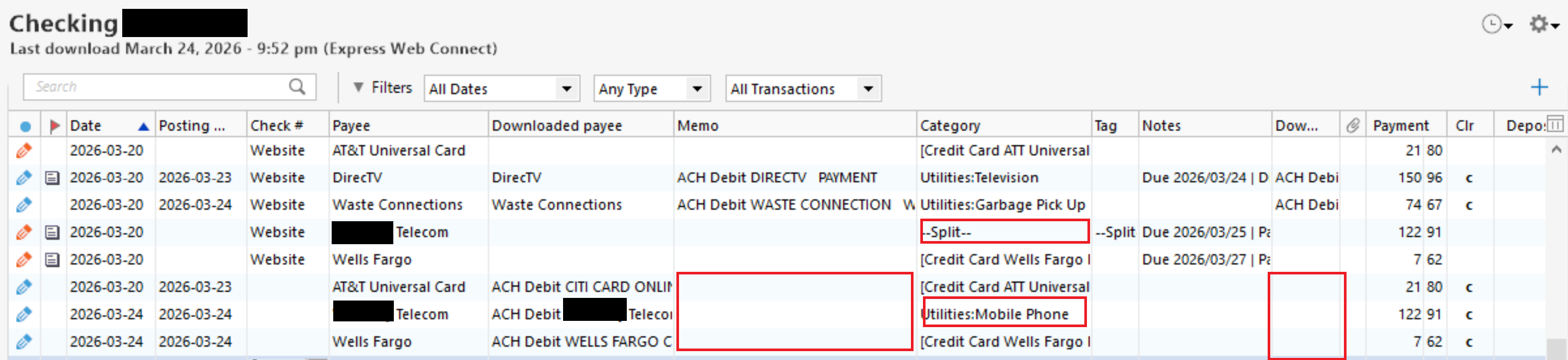
On the evening of 2026-03-24, I did a One Step Update that downloaded transactions. In my checking account register, Quicken correctly matched two transactions, DirecTV and Waste Connections, and incorrectly matched three transactions, AT&T Universal Card, [Redacted] Telecom, and Wells Fargo, which created three new transactions. Those three new transactions are missing the Memo and Downloaded memo. The new [Redacted] Telecom transaction's Category, Utilities: Mobile Phone, does not match the Category, --Split--, from the original transaction. In addition, Quicken created one new transaction instead of matching it to an existing transaction in my AT&T Universal Card account register and one new transaction instead of matching it to an existing transaction in my Wells Fargo account register.
Here is a screenshot of my checking account register that shows the problems:
=====
=====
I tried to edit the Posting Date, Downloaded Payee, and Downloaded memo for the three transactions that I entered to match the three new transactions, but Quicken does not allow that.
1) Why did Quicken fail to match the three new transactions that it did not match in my checking account and why did it fail to match the two transactions in my AT&T Universal Card account and Wells Fargo account registers?
2) Why did those three new transactions not have the Memo and Downloaded Memo? My financial institution's website shows that those transactions have the information that should be in the Downloaded Memo.
3) How do I edit the Posting Date, Downloaded Payee, and Downloaded memo for the three transactions that I entered so that they match the three new transactions? That will allow me to delete the three new transactions.
4) If what I asked in question 3 is not possible, then I think I will have to delete the three non-matching transactions, which will create an order of transactions that do not match how I entered the original five transactions. How will I be able to retain the order of the altered five transactions as I originally entered them?
Window 11 Pro
Quicken Premier Version R66.23 Build 27.1.66.23
.