OL-297a error US Bank

I'm getting a OL-297a error when downloading from US Bank. Is there something I need to do or is it wait it out issue?
Answers
-
Hi @hmday,
Thanks for reaching out to the Quicken Community!
To help us better understand the issue, I have a few questions:
- When did this issue first start?
- Do you know if your financial institution recently updated its security settings?
- Is your Quicken file backed up or synced through any third-party services, such as Carbonite, OneDrive, or Backblaze?
- Are you using a VPN, firewall, or antivirus software? If so, please let me know which one(s).
To troubleshoot the OL-297 error, I recommend the following steps to update your internet security settings:
Update your internet security settings
- 1. Click the Start button and select the Control Panel.
Windows 10: The Control Panel is located in the Windows System folder in the Start menu.
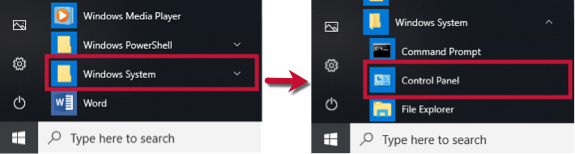
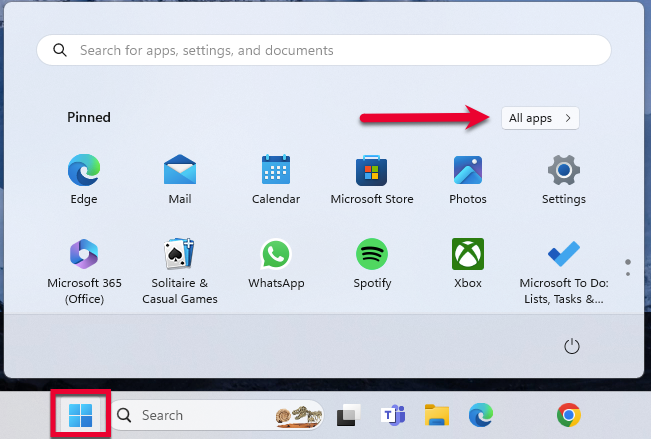
Windows 11: Go to the Start menu and select All apps.
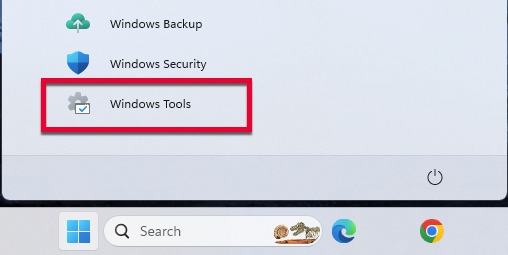
- Then, go to Windows Tools and select Control Panel.
- 2. Select Network and Internet, then Internet Options.
- 3. Go to the Advanced tab.
- 4. Scroll down to the Security Section.
- 5. Verify TLS 1.2 is checked.
- If it is not, check it.
- If it is already checked, continue to the If the issue persists section below.
- 6. Click Apply, then OK.
- 7. Try your update in Quicken again.
Please let me know how it goes. I’ll be waiting for your reply!
Quicken Carlos
Make sure to sign up for the email digest to see a round up of your top posts.
0 -
I also got an OL-297-a, during Scheduled Update of USB, at about 7am this morning.
BUT, when I tried another update just now, there were no problems.
Nothing downloaded, because there was nothing to download, but the effort was successful.
I'm connecting to them as "U.S. Bank - PFM Direct Connect".
Q user since February, 1990. DOS Version 4
Now running Quicken Windows Subscription, Business & Personal
Retired "Certified Information Systems Auditor" & Bank Audit VP1 -
questions: 1) this morning 2) not aware of any changes to the security settings at US Bank, I can still log in as usual to their site 3) no, I use quicken online backup 4) no security software except what is built into windows.
I have completed the internet setting check, still not working same error message
My connection is U.S. Bank - PFM Direct Connect
Maybe I just need to wait (see NotACPA)
thank you
0 -
Connection is back…thank you
0 -
Hi @NotACPA and @hmday,
Thanks for your reply and for sharing more details! I’m glad to hear that the connection is back up and running.I’m here to help if you run into any issues. Just let me know!
Quicken Carlos
Make sure to sign up for the email digest to see a round up of your top posts.
0


Categories
- All Categories
- 6 Product Ideas
- 34 Announcements
- 248 Alerts, Online Banking & Known Product Issues
- 19 Product Alerts
- 265 Welcome to the Community!
- 301 Before you Buy
- 1.5K Product Ideas
- 55.8K Quicken Classic for Windows
- 16.9K Quicken Classic for Mac
- 1K Quicken Mobile
- 834 Quicken on the Web
- 129 Quicken LifeHub