Vancity OL-221-A Issue remains unresolved [Edited]

Boomerang
Boomerang Quicken Canada Subscription Member ✭✭

In spite of what has been posted, I still have the same issue since January 21, 2026 and cannot download into Quicken from Vancity web site.

My error message is the same:

Quicken is unable to complete your request (OL-221-A)

Quicken have been notified countless times about this error code and there appears no fix for it. I am curious who else also has the same issue.

Bob

Comments

  • Karen
    Karen Member

    I definitely have and am getting no answers from Quicken.

  • Karen
    Karen Member

    I have been told to phone Quicken to escalate - but the number seems to be long distance. Does anyone have a toll free number to quicken support?

  • Quicken Kristina
    Quicken Kristina Quicken Windows Subscription Moderator mod

    Hello @Boomerang,

    Thank you for letting us know you're still seeing an issue. To clarify, the resolved alert was for CC-502 errors. Are you getting the OL-221-A error when you're trying to import a QFX/Web Connect file?

    Hello @Karen,

    Thank you for reaching out! I sent you a DM with the phone number. You can view it by clicking the envelope icon near the upper right.

    Inbox.png

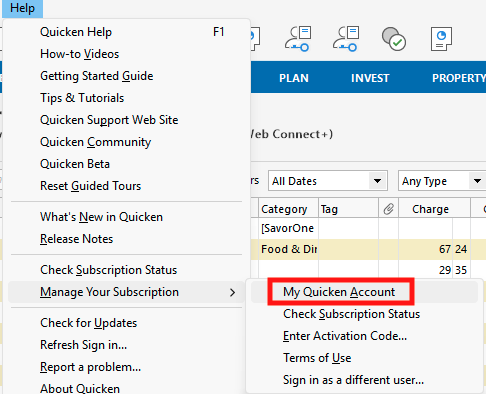
    You can also find the toll-free Quicken Support number in the Quicken program. Navigate to Help>Manage Your Subscription>My Quicken Account.

    Screenshot 2026-03-27 at 5.39.30 PM.png

    The page that appears should show the toll-free number in the upper right.

    I hope this helps!

    Quicken Kristina

    Make sure to sign up for the email digest to see a round up of your top posts.

  • Boomerang
    Boomerang Quicken Canada Subscription Member ✭✭

    Hello @Boomerang,

    Thank you for letting us know you're still seeing an issue. To clarify, the resolved alert was for CC-502 errors. Are you getting the OL-221-A error when you're trying to import a QFX/Web Connect file?

    Yes, from the Vancity web site, when attempting to download a QFX Web Connect file I always get this same error. On March 1st, I was given this information:

    Quicken Error OL-221-A indicates a syntax error in a downloaded QFX (Web Connect) file or a communication failure with a financial institution often caused by incorrect data formatting in the file, server maintenance, or outdated software.

    The third party is Intuit. In situations like this, it is best to get the issue escalated to Quicken’s online banking team, which is easier said than done. If you haven’t done so already, you should report this via Quicken’s Report a Problem feature. Other than that, just keep escalating with Quicken’s support. I’ve had to fight these battles many times and it is no fun. Goodluck!

    Yes, I have reported many times but nothing ever happens.

    Many hours of frustration.

  • Boomerang
    Boomerang Quicken Canada Subscription Member ✭✭

    Karen

    I have been told to phone Quicken to escalate - but the number seems to be long distance. Does anyone have a toll free number to quicken support?

    Quicken does not have a toll free number for Canadian users. It is long distance. I have tried many times and have always ran into this issue. Calling their number long distance most of the times means a 30 plus minute wait before you can speak to any individual. There was a time when you could e-mail the CEO of Quicken and someone would reply to you either via e-mail or a phone conversation. Sadly that connection is now ignored.

    I hope they will take our concerns seriously however I hold out very little confidence that this will materialized.

    Bob

  • Quicken Kristina
    Quicken Kristina Quicken Windows Subscription Moderator mod

    Thank you for your reply,

    I recommend following this guidance from our article on Web Connect troubleshooting:

    If you are seeing an OL-221 error

    This error may be caused by your system date and time settings.

    To adjust these settings in Windows:

    1. Click the Start button, and then click Control Panel. In Windows 10, the Control Panel is located in the Windows System folder in the Start menu.
    2. Click Clock, Language, and Regional, and then click Date and Time.
    3. Click Change Date and Time to set the right time and date settings.

    If you are still receiving this error after adjusting the date and time settings, this could indicate an issue with the QFX file itself. You will need to contact your bank to resolve this issue.

    Earlier this month, another customer shared what they discovered about the issue with Web Connect/QFX files from Vancity importing into Quicken:

    Based on their observations, it sounds like Vancity made an update that changes how the account type displays and prevents Quicken from being able to import it properly.

    Are you seeing this in the Web Connect/QFX files you've downloaded from Vancity?

    Thank you!

    Quicken Kristina

    Make sure to sign up for the email digest to see a round up of your top posts.

  • Boomerang
    Boomerang Quicken Canada Subscription Member ✭✭

    I followed the instructions from tmuirhead dated March 10, 2026 and was successful in downloading all transactions back to January 21, 2026. So the issue is with the Vancity coding:

    • this is where the issue seems to be
    • replace "SA" or "CA" with "SAVINGS" or "CHECKING" as appropriate
    • I assume until Vancity fix this coding issue, it will always require a manual rewrite of the code to enable a successful download.
    • Thanks for the tip and the helpful assistance.
    • Bob
  • Quicken Kristina
    Quicken Kristina Quicken Windows Subscription Moderator mod

    Thank you for the follow-up,

    I'm glad to hear the information @tmuirhead shared earlier this month helped you import the file!

    Quicken Kristina

    Make sure to sign up for the email digest to see a round up of your top posts.