What is the proper way to denote a transfer of funds between savings and checking?

QwikOne
QwikOne Quicken Windows 2016 Member ✭✭

I realize transfers in Quicken use brackets as transfers ( [xxxxx] ).

For a fund transfer within the same bank account (checking to savings and vice versa), the transfer should show in both registers. Correct? Addition of funds to one, reduction of funds from the other.

EXAMPLE: In a transfer of funds from checking to savings. The "payee" in both the checking and savings registers should have the bracketed savings account number. Correct? How is it denoted in both registers where the funds are coming from, in this case, checking?

Thanks in advance.

[Edited-Readability]

Answers

  • Quicken Alyssa
    Quicken Alyssa Quicken Windows Subscription Moderator mod

    Hello @QwikOne,

    Thank you for posing this question.

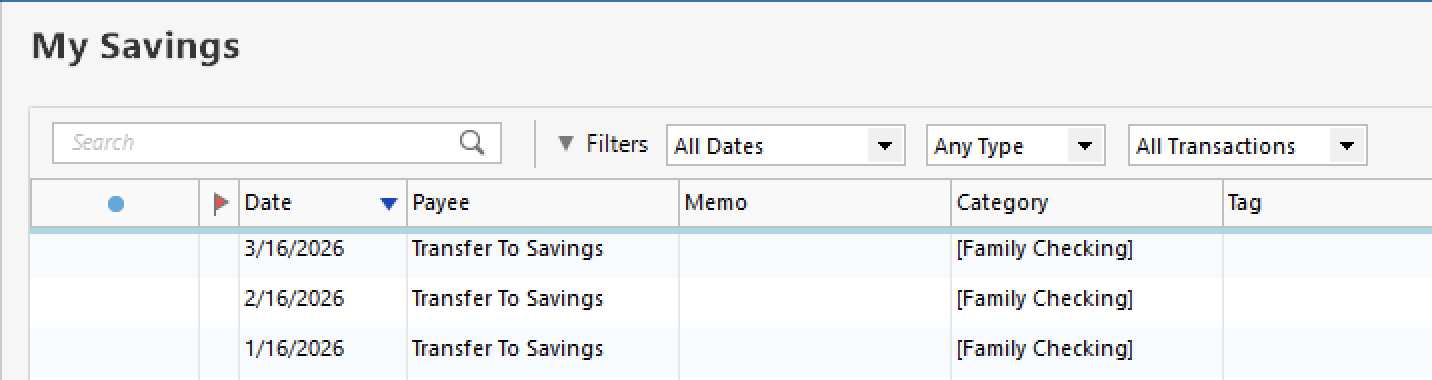
    Using your example, in a transfer of funds from checking to savings, the payee can be any number of things, like "Transfer to Savings", or "Transfer from Checking". The brackets around account names go in the Category field. The transaction in the checking account would show the savings account name in brackets in the category column, and the savings account transaction would show the checking account name in brackets.

    Here is an example of two transfers in my own Quicken. In the image below, you can see two transfer transactions. These are in a checking account. One is a credit card payment, and one is a transfer to savings.

    Screenshot 2026-03-30 at 9.38.22 AM.png

    This is what the same transaction looks like from the Savings account:

    Screenshot 2026-03-30 at 9.40.04 AM.png

    And here it is from the credit card account:

    Screenshot 2026-03-30 at 9.42.17 AM.png

    Does this answer your questions?

    Looking forward to your response!

    Quicken Alyssa

    Make sure to sign up for the email digest to see a round up of your top posts.

  • jacobs
    jacobs Quicken Mac Subscription SuperUser, Mac Beta Beta

    For a fund transfer within the same bank account (checking to savings and vice versa)…

    Just to clarify terminology, what you're describing here is a transfer within one financial institution between two accounts. And the two accounts in your Quicken mirror the two accounts in the real world.

    As Alyssa illustrated, the Payee is not what designates the transfer; the Payee name can be whatever you want, as simple as "Transfer" to as precise as "Transfer Savings to Checking", or the names of the accounts, or whatever. You never need the account number in your register, unless it helps you distriguish between accounts, like "Checking -4321". It's the Category field, with the Quicken name of the account in brackets, that designates the transfer between two accounts. And with the transfer account in brackets, that's what makes this a linked transaction, with the same transaction showing up in the other account.

    Quicken Mac Subscription • Quicken user since 1993