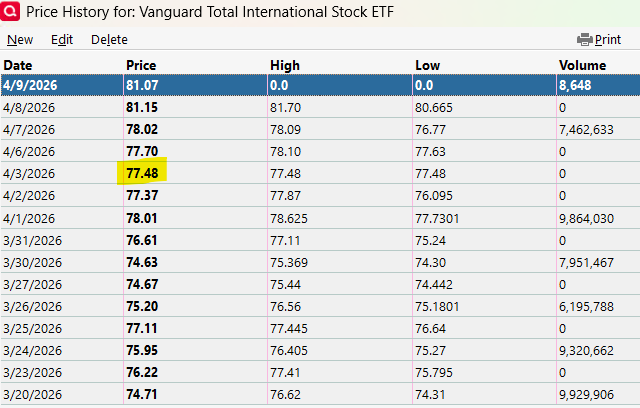
Several of my securities had price updates for April 3, when the markets were closed for Good Friday. I deleted the prices, but when I did a One Step Update today 4/6, the prices came back. This is incorrect! Problem reported in Quicken.
Hi @EvDob,
Thank you for reaching out, and I apologize for the delayed response.
Quicken is designed to download the most recent price data available from its quote provider. If a price entry is deleted, the next update will download that same latest available price again, even if the market was closed on that date. In those cases, Quicken may assign the most recent closing price (from the last trading day) to the current date.
This is expected behavior and can occur on market holidays and weekends when no new pricing data is available.
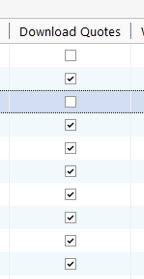
If you prefer not to download price updates for certain securities, you can deselect the Download Quotes option for those securities.
Please feel free to reach out if you have additional questions!
Quicken is designed to download the most recent price data available from its quote provider. If a price entry is deleted, the next update will download that same latest available price again, even if the market was closed on that date. In those cases, Quicken may assign the most recent closing price (from the last trading day) to the current date.This is expected behavior and can occur on market holidays and weekends when no new pricing data is available.
I’m sorry, @Quicken Laura. This issue does not relate to “if a price was deleted”.
The issue is that the latest price available (from April 2 in this user's example) is being provided as if it applied to a date the market was closed (April 3). It is not assigning the most recent closing price (April 2) to the ‘current date’. It is applying to an intermediate holiday date when the market was closed.
This is not the way the program was designed. This is not and should not be expected behavior. This is, in my opinion, a third-party data supplier not doing their job correctly, or some agency in between mismanaging the data. It has not always been this way. It did not used to happen. It seems to have developed in the last 2-4 years.
[Edited]
In my experience, these often incorrect security prices are being downloaded from the brokerage where the securities are being held, not from Quicken's quote provider. Charles Schwab and others have this problem.
The only exception is if you have the Premier and up Real Time Quotes option selected, which will download prices from after hours trading.
See this discussion
There is a security level option to ignore prices from broker downloads, but of course it would be better if they fixed it.
Thanks for the info, folks. I tried again today to delete the 4/3 price, then hit the Update button on the Investing Portfolio page, and the price reappeared (price, high & low were equal, and volume was 0). So this looks like the bug is with Quicken's quote provider, since I did no broker download.
@EvDob
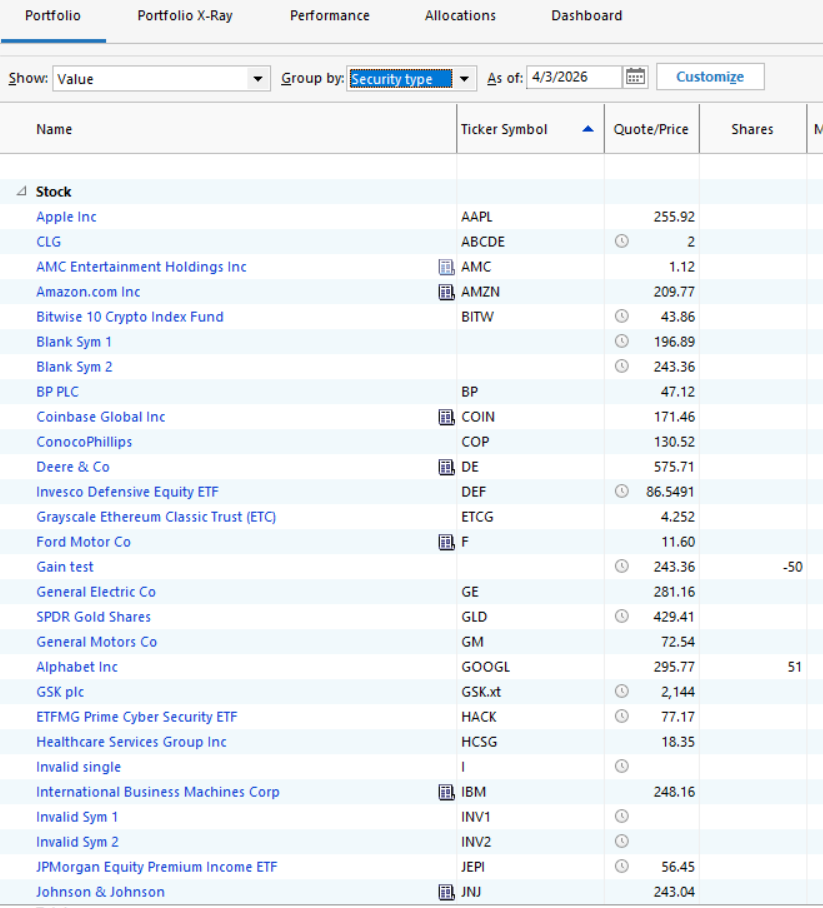
Normally I do not get quotes for days the markets were closed, but I ran a quick test on a test file where quotes had not been downloaded recently and I see that quotes as you describe (H=L=Close, Vol=0) WERE downloaded for 4/3, for individual stocks on my Watch List but not for ETFs or mutual funds. Here is a Portfolio View with the As Of date set to 4/3. In this chart, the securities without clocks in the Price column have entries in their price history.
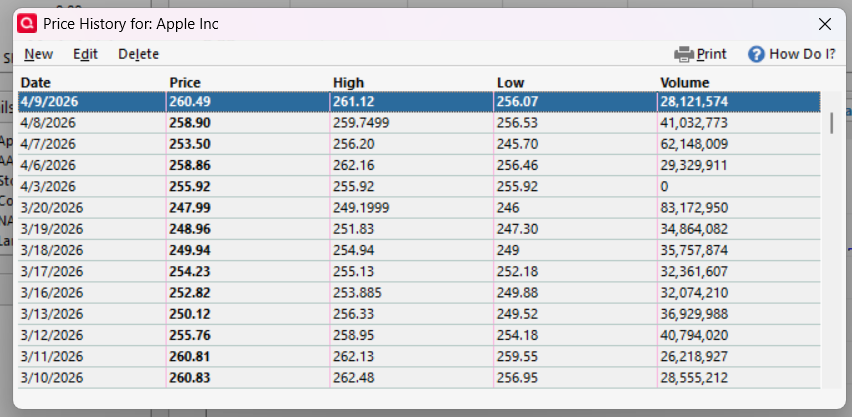
Here is the price history for AAPL in my test file. 255.92 was the 4/2 closing price. It appears that clicking on Update on a Portfolio page only downloaded the most recent 5 sessions. Maybe the issue is that if the market was closed 5 weekdays (or maybe 5 days) ago, it downloads the price from the previous session.
I think 3/20 was the last time I had downloaded quotes for this file.
@EvDob Can you let us know a couple of your affected Ticker symbols? Was it just individual stocks? Had you updated quotes between last Friday and today?
Also if you are a Premier or up user, is the option at Edit > Preferences > Investments > Real time quotes checked? That can also cause unwanted after-hours quotes to be downloaded. It was not checked for my test.
I see this pattern of holiday prices back as far as 1/1/2019. The pattern is that for the holiday date, price, high, and low are the same as the previously business day's closing price. For 2020 and on, the volume is zero for the holiday date. I see this pattern for stocks such as AAPL, GOOG, TMO and others; I did not do an expansive review of the possible securities affected. For a period prior to 1/1/2019, my price records are a result a rebuild I did at some point; the problem may have existed prior to 1/1/2019. The table below was developed from my daily price records for AAPL listing the holiday date, the repeated price and a comment if applicable. Not all holidays are presented.
Note this is not a severe problem; it is an irritating nuisance that should not exist. It actually goes back much further than I would have thought.
@Jim_Harman affected tickers are some Vanguard ETFs such as VXUS & VGIT but not VEXC & VTI. Also affected were stocks IBM, KD & SIRI. I'm not a Premier or up user. I have updated quotes between 4/3 & today.
@EvDob Looking further, I am seeing the same issue in my working file, which gets frequent quote updates. The problem affects individual stocks but not the Vanguard mutual funds or ETFs in my Security List.
As @q_lurker notes, this does not lead to problems with the closing prices, because the downloaded quote duplicates the closing price for the previous market session. This produces the same result in Quicken's reports and elsewhere as if no price had been downloaded, because if the price is missing for a date, Quicken uses the most recent previous price it has in the price history.
@Jim_Harman My downloaded price doesn't always duplicate the previous close:
Hi everyone,
Thank you for the information provided; this is very helpful.
I’m reporting this to the appropriate team for further review. I will share updates as soon as new information becomes available.
Thank you!
(CTP-16977)
@EvDob Regarding the pricing issue in your April 10 screenshot, the incorrect price you highlighted and the multiple zeros in the Volume column are a different pricing problem than the one we have been discussing.
That problem is that for some Vanguard ETFs, the price data alternates between the fund's closing price and its NAV price. See this discussion for an extensive discussion of this and related issues, especially my comment near the end.
I wanted to add some more details to this discussion, since I posted in a separate thread:
The Occam's Razor issue/explanation is: Fidelity is downloading BAD (inaccurate) quotes for non-market days. It would be find if on Saturday and Sunday they just downloaded (i.e. repeated) Friday's quotes, but that's not what they're doing. The quotes they download for Sat and Sun are from a day that is earlier than Friday (e.g. one or 2 weekends back). The negative impact of this is in the Portfolio View: "Day Gain/Loss $" and "Day Gain/Loss %" columns are inaccruate every Sat, Sun, and Mon. To be clear, the quotes for affected securities are wrong in ALL accounts, not just Fidelity accounts. When Fidelity downloading the wrong security quotes, they are saved at the security level. Quicken team: this is clearly Fidelity's issue. Please either have them fix it. They just shouldn't be sending ANY quotes for Sat or Sun. If they can't/won't fix it, then please modify your OLT logic to just ignore Fidelity quotes on Sat and Sun. Thanks! Dan
Here's the issue I posted:
Hi @QuickeDan
Thank you for adding more details to this thread; this is very helpful. I’ve added the information to the open case for further review.
I’ll keep you updated here as soon as I have any new information.