Detailed transaction report within business account (Q Mac)

Hello -
I am using Q Classic Business and Personal 8.5.1 for Mac.
I want to generate a detailed transaction report - but confined to those transactions specific to the business account.
I can generate a detailed transaction account - but there does not seem to be a "business" filter in the customize options.
And the reports generated in the "business" dashboard all seem to be summaries unlike the detail in the usual transactions report.
Any suggestions to get the same detail of transactions in a report solely within the business?
Thanks!
Best Answer
-
Hi @brucknerdoc,
Thank you for reaching out! In the transaction report, you can customize the view to display only your business categories and add additional columns for more detailed information.
To select specific categories:
- Open the Transactions report (for example, Transaction by Category).
- Click Edit.
- Go to the Categories tab.
- Select the business categories you’d like to include.
- Click OK.
To add columns:
- In the report, click the View menu.
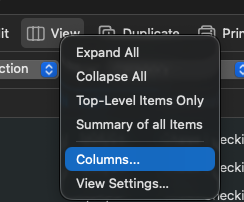
- Select Columns.
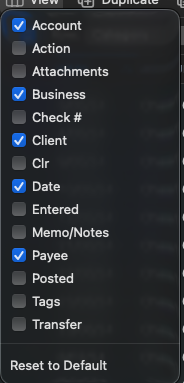
- Choose the columns you’d like to display, such as Business or Client.
Here is more information about business reports:
I hope this helps!
Quicken Laura
Make sure to sign up for the email digest to see a round up of your top posts.
0

Answers
-
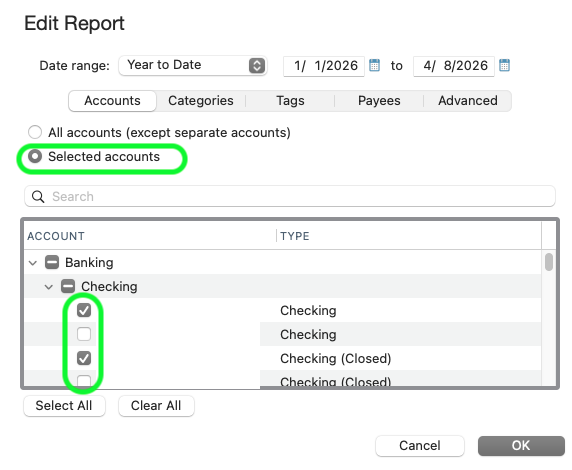
In the report customization, click the Accounts Tab. Click the Clear All button, then select only the account(s) associated with the business. Will that do it for you?
 Quicken Mac Subscription; Quicken Mac user since the early 90s0
 -
Thank you, RickO -
Unfortunately no - my business transactions are spread across different accounts that are also used for non-business transactions.
When selecting "edit" for a business report, "business" appears in the options - but that seems missing from a general transaction detail report.
I have my transactions labeled for the business - there just does not seem to be a way to use that as a filter.0 -
Hi @brucknerdoc,
Thank you for reaching out! In the transaction report, you can customize the view to display only your business categories and add additional columns for more detailed information.
To select specific categories:
- Open the Transactions report (for example, Transaction by Category).
- Click Edit.
- Go to the Categories tab.
- Select the business categories you’d like to include.
- Click OK.
To add columns:
- In the report, click the View menu.
- Select Columns.
- Choose the columns you’d like to display, such as Business or Client.
Here is more information about business reports:
I hope this helps!
Quicken Laura
Make sure to sign up for the email digest to see a round up of your top posts.
0 -
Thanks Laura -
That works :-)
I'd like to have a report with just the business transactions listed - but I can edit this to get what I need.
Thanks for the help!
0 -
I'm glad to hear that works for you!
If you wish to submit an official request for this feature to be added in the future, what you can do is create an idea post. This way, other users who have the same or a similar request can vote on your idea.
Feel free to reach out if you have additional questions!
Quicken Laura
Make sure to sign up for the email digest to see a round up of your top posts.
0 -
Removed
Quicken Mac Subscription; Quicken Mac user since the early 90s0 -
@brucknerdoc None of the "regular" Quicken reports have yet been modified since the addition of the business features two years ago. So a transactions report doesn't include any filters or selection criteria which are aware of business fields. It is my understanding that the developers do intend to change this at some point, but how quickly this will rise to the top of their priorities list is unknown.
Quicken Mac Subscription • Quicken user since 19930 -
Thank you, Jason -
It would seem a simple matter - the option already exists in the "business" reports - but without the transaction detail.
So adding the "business" option to the edit options of the transaction detail reports would seem straightforward.
0
