How can I fix unmatched/mismatched transfers?
For a while I have been having problems with credit card payments. Instead of matching the two transactions and creating a transfer, it sees it as a transfer but creates a new corresponding transaction in another incorrect account, for both sides of the transaction.
I can of course delete one, but then the description and date are wrong on one side. The description can be updated but the date can't. I can delete the "transfer" and just leave the real transactions, but I don't believe there is any way to manually match transactions, which is inexcusable.
Anything else I can do?
Answers
-
" Instead of matching the two transactions and creating a transfer…"
I assume the "two transactions" refers to the payment out of the Check Account to the Credit Card Account?"
That word "matching" suggests to me that you are entering the payment manually, making a Transfer entry of:
Debit (Decrease) Credit Card Account $XXX
Credit (Decrease) Checking Account $XXXand if indeed that's exactly what you are doing then, most commonly, the download to the Credit Card Accounts finds the correct entry and Matches it and, separately, the download to the Checking Account finds the correct entry and Matches it. These matches can happen on different days depending on which financial institution processes the transaction first. That's how a Transfer works in Quicken if you manually enter the payment when you make it.
If that's the case then you wouldn't expect Quicken to "create a transfer", it's already there!
So, I'm guessing that you're not making a manual entry for a credit card payment, you're relying on Quicken to figure out that these two entries are related and expecting Quicken to make the entry for you?
Could you clarify the situation please?
If you are expecting Quicken to piece together two entries in two Accounts and "understand" that they are related and create the accounting entry "for you", all I can say is that Quicken's track record is somewhat hit an miss in this area. I have seen Quicken try to make a Transfer entry by entering the dollar amount of the Transaction in two Accounts but instead of making a valid Transfer it makes the entries in the two Accounts unconnected to one another; the Category show in each Account is the same Account in which the entry is made.
Your statement "it sees it as a transfer but creates a new corresponding transaction in another incorrect account, for both sides of the transaction" seems to be a variation on the behavior I described in the last sentence above.
"I can of course delete one, but then the description and date are wrong on one side."
I know you're talking about deleting one of the two erroneous you've described but I don't understand the rest of the sentence. Any entry in Quicken can be deleted and the date adjusted. A Transfer is entered into Quicken with both Accounts having the same date.
0 -
What I do for making credit card payments in Quicken:
- Schedule the payment in the online credit card account.
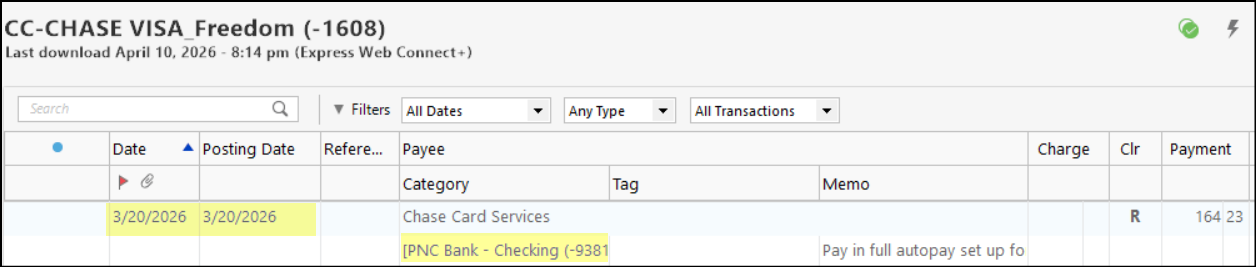
- In the credit card account in Quicken (BEFORE THE PAYMENT TRANSACTION IS DOWNLOADED): Enter the scheduled credit card payment amount and date. Also, in the category field, enter the account where the payment will be made from (checking) as a transfer…i.e., the checking account name in [brackets]. This will then enter the corresponding payment transaction into the checking account….the date of the transaction will be identical to the transaction date entered into the credit card amount.
- During OSU, the credit card payment transaction will typically download from the credit card company on the date it processed the credit card payment (usually the same business day or the following business day). Quicken will then match this downloaded transaction to the previously entered manual transaction.
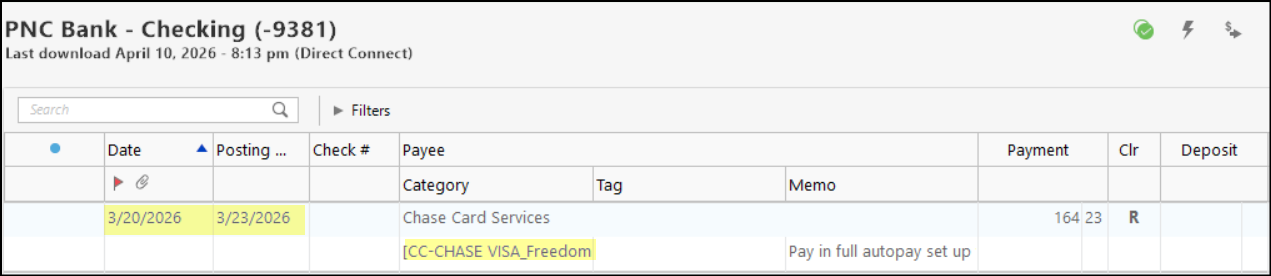
- During OSU the checking account will download the payment transaction on the day it posted that transaction. This can be 1-3 days after the date of the manually entered transaction in the credit card account. Quicken usually does a pretty good job of matching that downloaded transaction to the previously entered transaction. If it does not, Quicken provides the opportunity to match the downloaded transaction to the previously entered transaction. Yes, the date in the checking account will usually be different from the date in the credit card account but that reflects the reality of the ACH process.
Following are pictures of an example of one of my credit card accounts and my checking account showing how this will look.
A few additional comments:
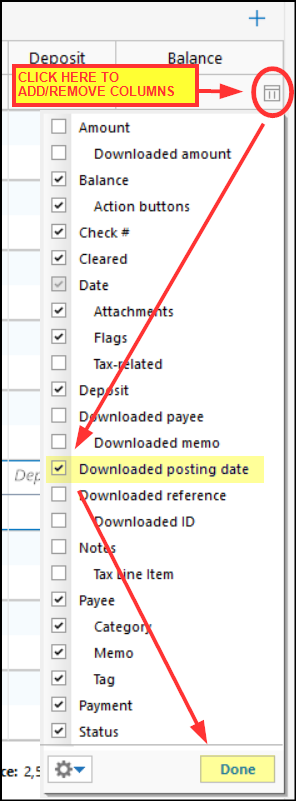
- Posting Column: If you are not seeing this column in your register, you can add it by doing the following above the Balance column in the account register:
- Instead of manually entering the payment transactions each month, I set up a recurring Bill Reminder for the credit card account. Then each month I will enter the Bill Reminder for that month making sure to edit the payment amount….BEFORE THE PAYMENT TRANSACTION IS DOWNLOADED. The payment can be scheduled in the online credit card account as soon as the credit card statement is received and then the Bill Reminder can be entered in Quicken. Once this is done, the payment will show up in both the credit card account and in the checking account registers.
- This process can be streamlined some if you pay off your credit card bill in full each month. Then you can set up auto-pay in your online credit card account so you don't need to manually do anything in that account each month regarding scheduling payments. All you need to do, then, is enter the Bill Reminder in Quicken making sure to edit the amount to be paid to match the statement ending balance.
By managing credit card payments this way largely eliminates transfer transactions matching issues.
Quicken Classic Premier (US) Subscription: R66.23 on Windows 11 Home
1 -
I'm sorry for the confusion. Yes, I'm talking about a payment from a checking account to a credit card account. But I'm not entering anything manually. The two sides of the transaction are downloaded from their respective financial institutions. Historically, and sometimes still, Quicken matches them together correctly without asking and turns them into a transfer; sometimes it asks me to confirm the match first. In either case it doesn't do anything to the transaction date or description (which are of course different), but just links them.
But often it doesn't do either. It sees the transaction on the credit card account and knows it's a payment somehow, so creates a transfer from my checking account, which creates a new transaction in the checking account. Then in the checking account it sees the actual payment transaction and creates a transfer to a random credit card account, creating another transaction. So I end up with two pairs.
I've been using Quicken for 13 years and never had a problem with this until the last few years. It first started creating those "transfers" you mention where the category was the same account the transaction was in. I had other problems too though and worked with support a couple times; we had to wipe out some files and start over.
As far as the last part, since the dates and descriptions of each pair are copies, one side is wrong. I can delete one of the pairs and edit the description on the appropriate side without affecting the other, but it's annoying and if you change the date on one side it changes it on the other. Normally when it matches the transactions the dates and descriptions reflect the actual transaction in that account; Quicken doesn't change anything and the dates are when it actually occurred in that account, which may be a few days apart.
The other option is just to delete the category; that deletes the duplicates and everything is correct, except they are not linked and I would have to assign it a category such as credit card payment, which will show up in expense reports (although with a net of 0).
0 -
How far apart are the as-of dates of the checking payment and the card receipt of payment?
And, when the 1st of the 2 downloads, what shows in its Category field?
If NOT the name, enclosed in square brackets, of the other account … Q won't know it's a transfer and will think it's a new transaction.
That's why it's generally advised, when you're reconciling the card account, to record the future-dated payment right then so that they WILL match when eventually downloaded.
Q user since February, 1990. DOS Version 4
Now running Quicken Windows Subscription, Business & Personal
Retired "Certified Information Systems Auditor" & Bank Audit VP0 -
I used to do this; I had all my payments scheduled so I could see my cash flow forecast, but that got to be a bit of work and my life was pretty busy so don't do that anymore. I'll have to think about that. I do pay off in full each month and have autopay set up. Interestingly I generally only have this problem with my Chase accounts (I have 4).
I didn't realize there was a downloaded posting date field, thanks!
0 -
For the one that happened last week, 1 day. I know there is a max that it will use when trying to match, I think 3 but maybe 5.
I will have to pay more attention to what happens. In the case where it doesn't work, I think it creates the transfer immediately when one side is downloaded. To me that would make sense why it doesn't match the other side when it downloads, as the other side is already "matched'.
Usually though, like yesterday, it downloaded one side of a payment and just left the category blank. Then today it downloaded the other side and matched them.
I need to pay attention to whether it makes a difference if both side download at the same time or on different days. I usually download every day so chances are they are on different days.
It's not rocket science. Simply look for an opposite transaction in another account within the date range and prompt. Why on earth would quicken create a transfer from a single transaction? Not sure why it would flag something as a transfer without a corresponding match. Seems like it's trying to be too smart for its own good; is it reading the description and acting on that?
0 -
Regarding the one from earlier this week that spawned this — I was able to actually match them manually. After deleting the categories, I then chose transfer again and after I selected the account it prompted me to ask if it was a match to the existing transaction. I forgot that I have seen that before but rarely.
0 -
Re: "rocket science". I don't want Q making decisions re: my transactions. I simply don't trust it's decision making that much.
I'll make the decisions and let Q record them.
Q user since February, 1990. DOS Version 4
Now running Quicken Windows Subscription, Business & Personal
Retired "Certified Information Systems Auditor" & Bank Audit VP0 -
Well yes I'd still want it to prompt me.
I see you've used Quicken for a long time! First I used Managing Your Money (DOS), then Microsoft Money, then Quicken. I tried switching to Mint but quickly bagged that. I have not been impressed with Quicken though.
0 -
Where part of that decision making problem arises is when there are multiple transactions with the same amount, such as ATM withdrawals.
OR, occasionally, I've even had utility bills for the same amount.
It's just easier, and more successful, to record the payment (which Q can do automatically) when you reconcile the card account.
Q user since February, 1990. DOS Version 4
Now running Quicken Windows Subscription, Business & Personal
Retired "Certified Information Systems Auditor" & Bank Audit VP0