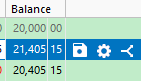
The most annoying aspect of the registers is when you highlight a line, the balance value/numbers go dim. Does anyone know how to fix that.
I hadn't noticed that before, but I now see the same thing … and I have no idea what to do about it.
Seems to only happen in checking type accounts.
Hello @site22 & @NotACPA,
Thank you for letting us know you're seeing this. To clarify, what do you mean by dim? Are you referring to the number switching from black on a white background to white on a blue background?
If that is not what you are seeing, please provide more details and/or a screenshot. If needed, please refer to this Community FAQ for instructions on how to attach a screenshot. Alternatively, you can also drag and drop screenshots to your response if you are not given the option to add attachments.
I look forward to your reply!
@Quicken Kristina Notice the difference in "color", "brightness", (I'm not sure what the proper term is) between the highlighted transaction and the other. And the difference appears in both the Payment and Balance columns.
I can't say I never noticed this but this is the way I expected it to work.
Note @Quicken Kristina has her row style as Outlined and Display 1 Row, while NotACPA and Site22 have their row style as Shaded. In any register, Click the Gear icon (upper right), then Selected Row Style near the bottom of the list.
I use Shaded and 2 row. When I select a row, the values I entered are Black, the Deposit and Balance columns remain Gray, when I look at a payment. When I look at a deposit, the Payment and Balance remain gray. Makes sense to me since the deposit field is blank on payment (and vice versa) and the balance field is calculated (not directly editable). I think the perceived "dimming" is due to the contrast (or lack of) while the background is blue and the values remain Gray. There's a setting in Preferences to turn reconciled transaction Gray. This will affect all the other values, except the balance.
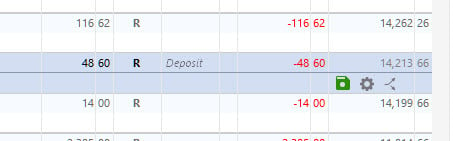
Here's a small clip of mine. Note, I also use the Amount Column in my registers.
Thank you for the additional information,
It's hard to tell from the screenshot, but it seems like the dimming may be a difference in contrast caused by the row being highlighted. Does this happen only with reconciled transactions?
Thank you!