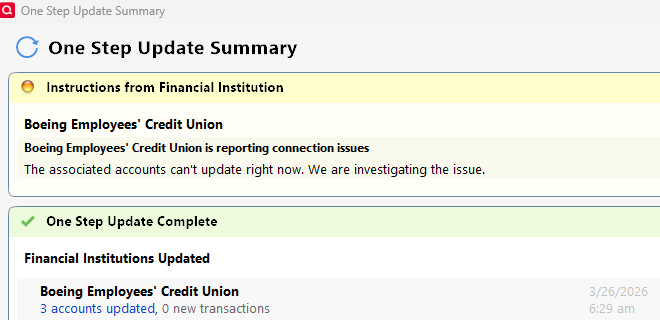
Quicken is unable to complete your request. Please try again later.
Thank you for the follow-up,
Thank you for trying. Unfortunately, it sounds like you won't be able to clear that CC-800 error until the connection issue with BECU is resolved.
Thank you!
I tried the deactivation and reactivation on all of my BECU accounts. It downloaded one of the accounts correctly but since that time it has continued to fail. The error is BECU is reporting connection issues. The associated accounts cannot update right now. We are investigating the issue.
I tried using the improve connection, but get the error OL-294-A
Hi @John Ladd,
Thank you for reaching out!
We’re aware of a connectivity issue with BECU, including the OL-294-A error you’re experiencing. An alert has been posted for this issue, and we recommend monitoring it for the latest updates. As new information becomes available, the alert will be updated accordingly:
We appreciate your patience in the meantime.
Honestly, BECU need to fire the IT team for this annual issue and hire some people who can actually code and fix the software. It happens each year for two months and we get no updates from BECU about progress and it appears from the customer standpoint, that there is one guy in the basement in cargo shorts trying to figure out something he doesn't understand. It shouldn't happen annually for two months at a time.
I am still seeing a general error message, but my EWC downloads have again been successful for the past 2-3 days. There were no transactions to download this morning, but there were yesterday, and they came through fine. I'm not going to try Direct Connect until I read that things are working on that front.
I heard from BECU that the error correction is in the hands of Quicken to fix. I was told there were attempts to access and manipulate account data which was being explored and had to be fixed by quicken. After repairs are accomplished, BECU will remove the block and allow access. Where does the truth lie ? I just want it fixed !
So from the beginning, this error is still happening. Is there a fix or update coming.
Hello @rdkam1,
Thank you for letting us know you're also seeing this issue. It has been reported, and our teams are working with the financial institution to resolve it. We do not have an ETA. If you haven't done so already, I recommend bookmarking the Community Alert to be notified of updates and to know when the issue is resolved.
(Ticket #12251443/CTP-16385)
Since BECU has established that the error correction is in the hands of Quicken to fix (given there have been attempts to access and manipulate account data that must be fixed by Quicken) - At a point very soon I will be requesting a partial refund on my annual Quicken subscription. The service is to get data from BECU. That is what I'm paying for, and for almost 2 months now the service has not been delivered.
Quicken Kristina - Can you give me an update on resolving the connection with BECU? I was just charged for my annual Quicken subscription and I can't use it…..Absolutely not happy right now
Thank you for your reply,
There are no new updates yet. If you haven't already done so, I recommend bookmarking the Community Alert to be notified of any updates and to know when the issue is resolved.
@Quicken Carlos @Quicken Alyssa @Quicken Anja @Quicken Kathryn Would you kindly tell us the nature of issue? Is it technical or is there a dispute between Quicken and BECU? The lack of transparency, at this point, is disrespectful. Please tell us the exact nature of the service failure. Thank you.
Hello @quidster,
Thank you for adding to this discussion.
The Open Alert contains all the information we have on this issue.
I can tell you this is a Direct Connect error, indicating that it is an issue on the bank's server. The issue was escalated internally, and I can see it is actively being worked on. Outside of that, we have no additional information available.
Hope this helps!
The "Open Alert" hasn't been updated since March 9th!!!! Surely someone at BECU and someone at Quicken are in contact and can provide a meaningful update. Can't they?????
Are there any updates on this issue? After Deactivating/Reactivating all my BECU accounts they are now using Express Web Connect which seems to be working. When I try to setup Direct Connect I still get the OL-294-A error. When will this be fixed?
Hello All,
Thank you for updating this discussion with your questions and concerns.
The Alert for this issue remains open. We do not have an ETA for the resolution of this issue. Unfortunately, we do not have any additional details to share at this time.
We apologize for the inconvenience and appreciate your patience.
Thanks again!
Just a bump to say that as of April 22nd, there is still no resolution to the issue. My last BECU date was in January. That's all I need to point out. The annual duel of finger pointing at twenty paces between BECU and Quicken needs to be resolved.
@Skyking86,
Thank you for updating this discussion.
Make sure you have the Open Alert bookmarked so you receive notifications about any updates or changes along the way.
EWC continues to work for me. I don't know why BECU is taking so long to solve its Direct Connect issues.
I noticed that the top-of-the-page banner about the issue on becu.org has disappeared. I do not know if that means anything. I am not going to try to change my connection method, that's for sure.
The community alert that @Quicken Alyssa mentioned is now 403 (forbidden) as well.
The alert for this issue was marked as resolved. Anyone still experiencing the issue should reach out to Quicken Support directly for further assistance.
I called support and they did nothing other than asking a few questions and then nothing. Quicken is in a feedback loop of not solving this interaction with the bank. A phone call one company to another should be in order.
Confirming that his error is still occurring and was never resolved.
Hello @Skyking86 & @rdkam1,
Thank you for letting us know you're still encountering an issue connecting with BECU. I can see that both the alert and the ticket were marked resolved in April. Are you still seeing the OL-294 error, or has it changed?
If you are still seeing the OL-294 error, please follow the troubleshooting from our article on OL-294 errors:
If you have not yet signed up for the bill payment service provided by your financial institution, but have enabled that service in Quicken, you will get this error. Make sure that your account settings in Quicken match the services currently provided by your financial institution. To do so:
With the convenience of the Password Vault in Quicken comes the opportunity to forget to change your password in Quicken when it has been changed at the financial institution. To update your password in Quicken:
If the issue is not resolved after following the steps above, you will need to contact your financial institution to resolve this issue. Quicken does not have access to the financial institution's servers to correct the problem. This may require you ask to speak with an online services specialist that handles transaction download issues at the financial institution. If your financial institution states they can't assist, an escalation with the financial institution may be necessary.
Much as I know it isn't going to matter to Quicken, for others that come here, I can confirm you are not alone. I am still having the same issue too.
Unrelated to the BECU issue, there is a UI bug where the link to change to a Direct Connect doesn't display properly. You can see it in the screenshot above, where the "click here to find out more and get set up" is overlaying the text about importing from the site. The link isn't visible until you hover over the importing text.
Hello @Chronos511,
Thank you for letting us know you're also seeing this issue. Have you followed the troubleshooting steps posted earlier?
If you have, and the issue persists, I recommend contacting BECU directly for assistance.
For the UI issue, since it is a separate problem, please start a new discussion to troubleshoot the issue.
I followed the troubleshooting steps listed on the May 10 post from Quicken above. There is no resolution to the 294-A error I get when I try to update my accounts. My BECU accounts have not updated since February 19, which is almost three months ago. I see that I am not alone in this.
The issue is not resolved for me.
Edited to add:
When I look at my accounts at BECU online, I see the following message:
"Your BECU account connection to QWIN - Quicken for Windows will expire on May 20, 2026. To continue the connection, please reauthorize it."
When I click on the words "reauthorize it" in the message, the link takes me to a "Connected Services" page with the following message:
"The Connected Services feature is not currently available. To manually export your account activity data for accounting software, please follow the steps below"
The steps that follow are for downloading transactions manually to a format that Quicken will accept.
Hello @smbschrader,
Thank you for letting us know you're also seeing this issue, and for sharing what you saw on their website. Have you contacted the financial institution about this issue? It's likely that the message on their website explains the errors you're seeing in Quicken, but their technical support should be able to confirm whether that's the case.
The thread discussion has been shut down, but I am still not able to download transactions either via one step update or directly from Boeing's website. I don't know where else to go for information or help.
Please advise,
Kelay