Wrong institution when tryiing to update cc transactions

I've let this go on too long . It's way beyond using a backup.
I need to update the Visa card transactions for a card issued by the Maxwell-Gunter Credit Union. When I click on the icon in the upper right corner, I'd taken to the Chase Manhattan site. Now I really need to fix this. How?
Answers
-
Hello @Eric Johnson,
Thank you for letting us know you're seeing this issue. To help troubleshoot, please provide more information. How long has this issue being happening? Are you seeing any error messages/codes when you try to update the account? Is the icon in the upper right that you're referring to the action gear in the account register?

If not, then please provide more detail what exactly you're clicking on and which screen you're in when you're clicking on it.
If it is the action gear, then what options are you seeing/clicking on?
I look forward to your response!
Quicken Kristina
Make sure to sign up for the email digest to see a round up of your top posts.
0 -
- I don't know when it started but it was about a year ago.. I'd always reconciled manually and the statement was correct. Now I'd like to do it automatically as I do with my other accounts.
- No error messages that I recall. When the wrong institution popped up, I just deleted it and stopped trying.
- Yes, the gear icon in the upper right-hand corner. When I click on it with the CC highlighted, I'm offered a menu with the top option "Update" That's what I chose.
What is the "email digest" and how do I select it?
0 -
@Eric Johnson Max Credit Union IS listed in FIDIR.TXT, which lists all of the FIs that support Q.
But they're listed as Max Credit Union, not Maxwell Gunter.
Have you tried the Max CU name? If so, what happened?
Q user since February, 1990. DOS Version 4
Now running Quicken Windows Subscription, Business & Personal
Retired "Certified Information Systems Auditor" & Bank Audit VP0 -
I used the formal name of the credit union. I didn't know there was a specific other name. I'll try it later today.
Thanks for the idea. However, will the name change affect any other instances where the name may appear?
Eric Johnson
0 -
Thank you for your reply,
To answer your question, it should impact only the account that you deactivate and reconnect using that new connection option. Before deactivating/reconnecting anything, please make sure to backup your Quicken file.
There is a chance, if you have more than one account with that financial institution, that the other accounts will show up on the Add/Link screen. If they do, and you don't want to move them to the new connection option, make sure that they are set to "Don't add to Quicken" in the Action column.

That should prevent the other accounts from being moved to the new connection option.
I hope this helps!
Quicken Kristina
Make sure to sign up for the email digest to see a round up of your top posts.
0 -
I really don't understand what you are saying. First, how do you get to the screen you have shown? When I click on Tools I see two references to One Step update. Neither shows the screen you showed and there is no "Activate One Step" that I can find.. Second, what do you want me to do?
a. Backup the files.
b. Activate One Step Backup is I can find it.
c. The, how do I get the existing data into the new file?
I was toying with the idea of simply changing the name on the account to "Max Credit Union" per the message from NotACPA. However, I'm now deep enough in the weeds that I might really screw things up in I take a wrong step.0 -
Thank you for your reply,
To clarify, the financial institution you listed is not showing as a connection option anymore, which may be the cause of the issue you're seeing. To troubleshoot this, please backup your Quicken file, then if the problem account is connected, deactivate it.
If you're not certain whether the account is connected or not, go to Tools>Account List and click the Edit button next to the problem account. In the Account Details window that comes up, click on the Online Services tab. If the account is connected, you'll see an option to Deactivate it.

If it is not connected, you'll see a Set Up now… button.

Once you have made sure the account is not connected, navigate to Tools>Add Account. Search for Max Credit Union.
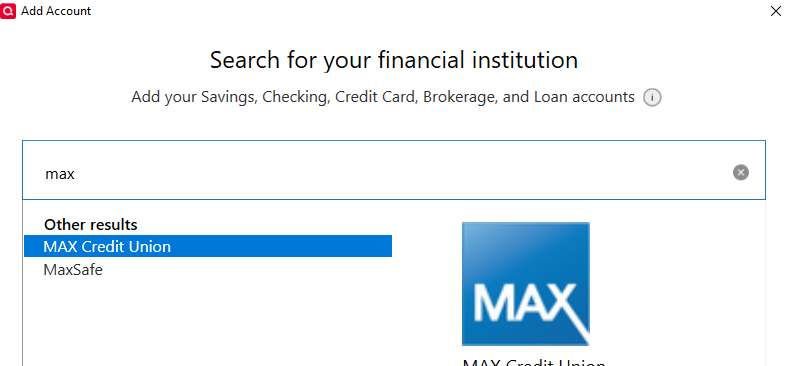
Follow the prompts. When you get to the Add/Link screen in Quicken, carefully link the account to the correct nickname in Quicken.

If there are other accounts that are already connected, and you don't want to change their connection, make sure that they are set to "Don't add to Quicken" in the Action column on that screen (see screenshot above).
Once you have connected the account, test to see if the issue is resolved.
Please let me know how it goes!
Quicken Kristina
Make sure to sign up for the email digest to see a round up of your top posts.
0 -
Hello @Eric Johnson,
I haven't seen a response from you in a while. Do you still require assistance?
Thank you!
Quicken Kristina
Make sure to sign up for the email digest to see a round up of your top posts.
0 -
The Quicken response is not the same as you show. There is no "used for" and I don't have the choice of "link to existing". Here's the screen I get . . .
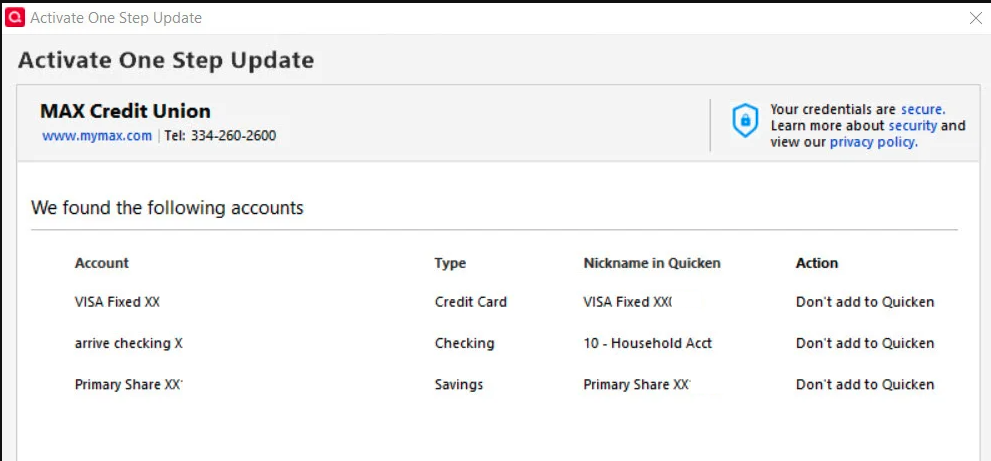
When I chose "next" at the bottom right I get a message . . .
And OKing that just clears the screen.
[Edited - Removed Personal Information]
0 -
So what's next? I've gone through the process 3 times with the same result. Also, there is now a little yellow circle with a diagonal slash through it and clicking on the tip indicates that there is no record of my share account. I'm told to "click here" to add it back. Same process but the account is not added back and I'm back to square 0. There's no way to Add Account.
However, the file column says there are 4 accounts when I click on the icon. However, there are now two share accounts with identical balances, One is named "01 Max shares" which was the original name and used for eons. The other is a new name - Primary Share xx. It shows the same balance. Now there are also 2 visa accounts. One is named MAX Visa and is the original. It's the one that was messed up with Chase. The other is called "VISA Fixed" The balance between the two is not the same because I had stopped balancing the original because of the Chase bank mess up. I didn't use that card much and simply kept the balance in my head.
I hope this explains where I am today in a way you can understand.
[Removed - Personal Information]
0 -
Thank you for your reply,
Your first screenshot indicates that when you're trying to connect your accounts, Quicken is already seeing them connected. That's why the only option is Don't add to Quicken.
Based on your description, is Primary Share a duplicate of 01 Max shares and VISA Fixed a duplicate of MAX Visa? If they are duplicate accounts, and you want the original accounts to be connected instead, you would need to backup your file, deactivate the duplicate accounts, then navigate to Tools>Add Account, follow the prompts, and on the Add/Link screen, make sure you're linking to the original accounts.
Thank you!
Quicken Kristina
Make sure to sign up for the email digest to see a round up of your top posts.
0



