First Mac Bill Paid and need a little help

OK, as I learn Mac and Quicken Mac, I have been running Quicken Windows and Mac in Parallel. Worked perfectly.
- I'd pay the bill in Windows as always. I'd "ENTER" adjust date an amount, send a payment from my Direct Connect Checking Account. Windows Quicken would debit checking, credit the credit card and done.
- I'd then go to Mac, Edit and Mark as Paid and again, debits the Checking, credits the credit card. I "believe" on next update it would pick up the scheduled payment from my bank, allow me to match to the manual payment I marked as paid.
- Everything everywhere now in sync. So far so good
Today I decided to pay my first bill from MAC, then hand edit in WIndows to keep in sync. Many problems.
- I selected "Pay Now" expecting like Windows, to get a dialog where I could edit the amount and/or dates and then commmit to pay from my Checking Account. No good.
It automatically on that first click entered into checking and could not be "undone". It sent the payment instructions off to the bank, did not debit the credit card!
So first, how do I get the dialog to edit dates and amount before committiing? - Mac did not debit the credit card. I had to enter a manual transaction in that register so CC and total balances would be correct. Windows would have done this.
- Now, to further complicate, I had no "Mark as Paid" back in Windows so used "Enter" . Bad idea. That tries to send the payment again, even if I do not select a method to pay. Then Update downloads the real payment info from the bank and the Checking is off by a double payment. I have to delete the "entered" transaction - keepp the downloaded. And again. the CC account is not debited and I have to do that by hand.
So the goal is to run both in parallel for 30-60 days to be sure Quicken Mac all works as I desire and expect. If I pay through Windows, I had it working well. But if I pay from Mac I getthe above.
Can you help me make it work paying through Mac so both still stay in sync and require no hand editing?
Hope I described this clearly enough.
Thanks!
Answers
-
I found this:
So first, how do I get the dialog to edit dates and amount before committiing?
Its select "Edit this Instance". Not intuitive for me not where I would like to see it. Forces me to remember to open this when my instinct is to Pay Now and have that "edit instance" dialog appear. Perhaps there is a setting for that?
I will have to see on next bill I pay from Mac if using this will also debit the CC account.
That and other questions still open.
0 -
OK, so I am reviewing all my options again. Seems I MUST use Bank Bill Pay since that IS what I do. I wish there was an "Edit and Pay" option, not only an 'Edit and Mark as Paid" which is not appropirate for Bank Bill Pay.
That being said, why does this not credit the CC account being paid? If I could solve that, I would have the MAC side of bill paying working. Right now I have to enter the credit manually then match when the payment is actiually downloaded to the register. Must be a better way.
0 -
This is almost solved:
Now, to further complicate, I had no "Mark as Paid" back in Windows so used "Enter" . Bad idea. That tries to send the payment again, even if I do not select a method to pay. Then Update downloads the real payment info from the bank and the Checking is off by a double payment. I have to delete the "entered" transaction - keepp the downloaded. And again. the CC account is not debited and I have to do that by hand.
IF the bill shows as due in Bills and Income in Windows, I get the option to "Mark as Paid". But, it does not always show there. Many reports on issues with this including it picking up the bill (some do not until removed and readded to Bills and Income), when it does, often .01 less than the actual bill due. So in 90% of the cases I can work this. In 10% have an issue as no mark as paid available for the Windows transaction..
So, the biggest part of the problem is how to pay in Mac, debit the checking (it does) and credit the CC account (it does not).
0 -
@Quicken Anja or others, can anyone tell me what I am doing incorrectly when paying a bill though my bank in MAC where the checking is debited, but credit card does not get credited?
Would appreciate it. Bills are coming in and I'd like to pay them.
0 -
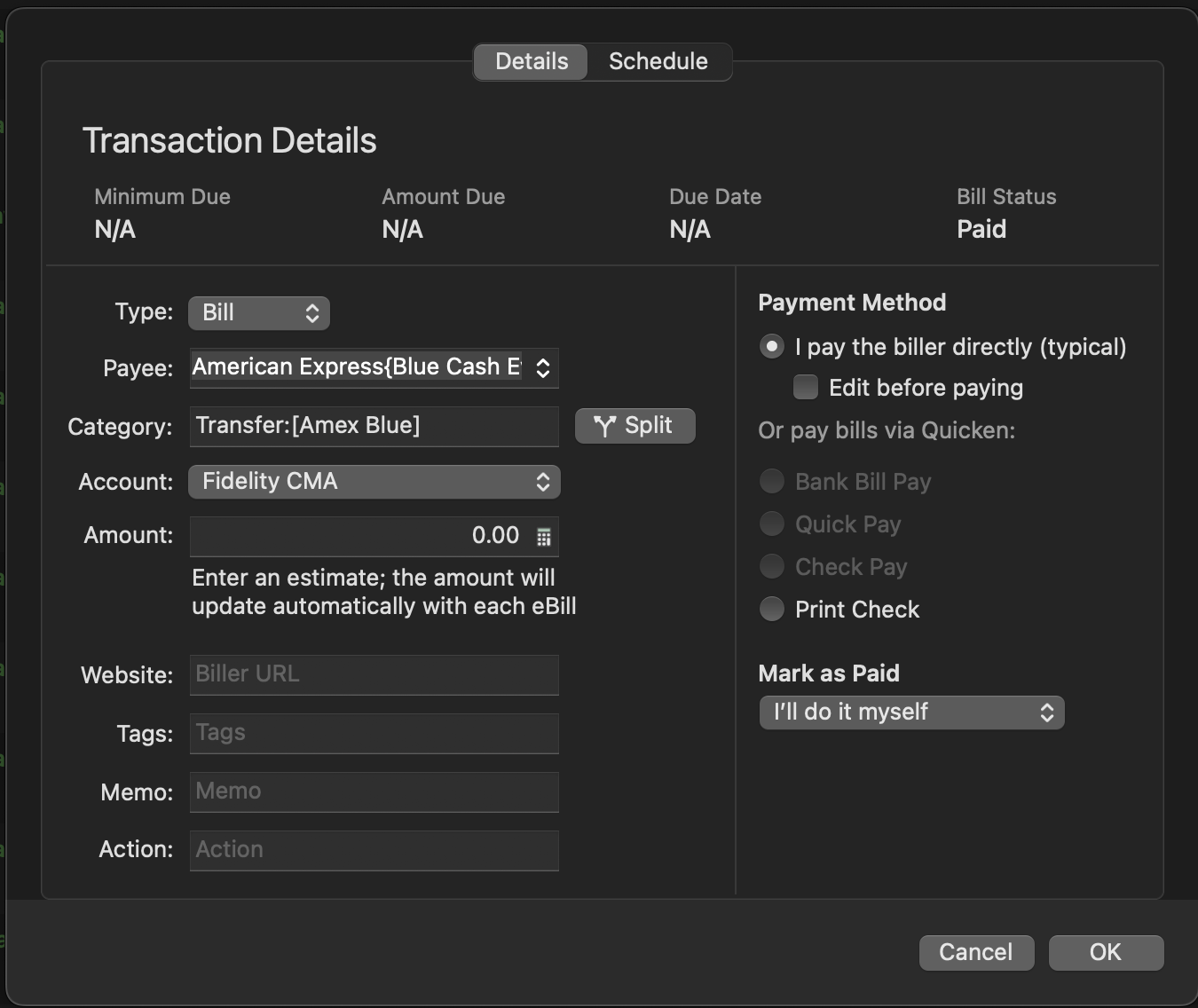
I don't use the bill pay service, but I would assume that you are able to categorize the bill when you pay it. If you enter "Transfer:" followed by the credit card account name in brackets in the Category field it should record it as a transfer from checking to the credit card. For example: "Transfer:[Citi Mastercard]".
0 -
@Bob When you set up your checking account you write in the name of the credit card account your want the money to go . I have an E-bill, for example , that pays Costco. It works fine.
See examples of my , checking account, Credit card account and Bills & Income. I hope that helps.


 0
0 -
The problem is it does not credit the credit card account. Windows does. Balance stays correct. When bill is paid, Windows matches it to the entry in both checking and credit card. But Mac is not crediting the credit card when it is debiting the checking account. These are all set up. Been doing them in Windows for years! Just started in Mac and have this specific issue.
My options are Pay Now or Edit this instance. I see you have set autoenter, but I choose not to do that and I doubt that is the difference.
These were set from reminders. I see nowhere a transfer could be checked. I do not touch my checking account when paying a bill, so very confused about "set up my checking account".
0 -
I don't use any flavor of bill pay in Quicken, which is why I haven't posted anything here, but…
These were set from reminders. I see nowhere a transfer could be checked.
For whatever reason, the scheduled transaction details screen does not include the Transfer field; however, you can specify a transfer in the Category field using the syntax "Transfer:[credit card account]".
Quicken Mac Subscription • Quicken user since 19930 -
Interesting. I think its time for screenshots. Has to be something to make this work. Has to :)
Give me a bit and I will post one that did not work yesterday or the day before propmting this post.
0 -
As I said, I can't help with the bill payments because I don't use 'em. I just wanted to make sure that if this is a scheduled/reminder transaction, you have specified the transfer account.
Quicken Mac Subscription • Quicken user since 19930 -
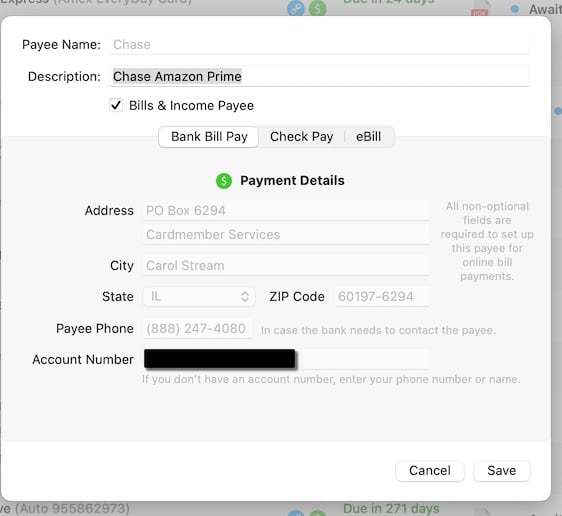
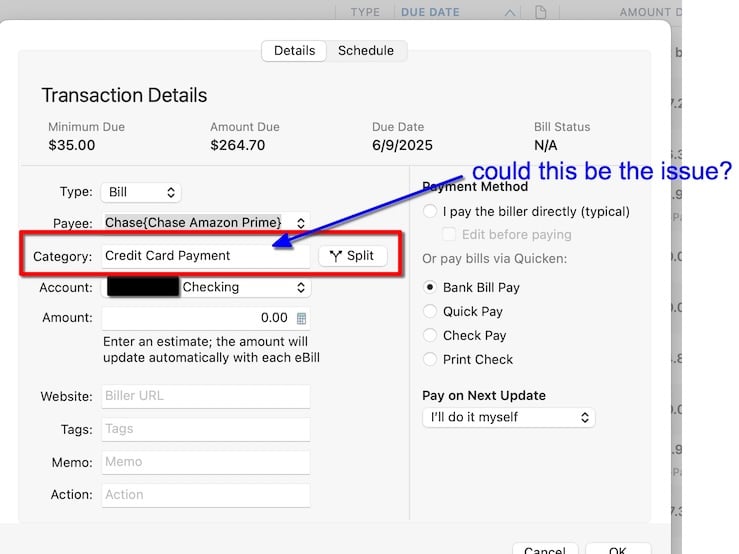
Just looked again in Windows. There is nothing like "transfer" there. Its send online payment, which if they do not connect directly with my bank, they send a check. It always shows as a credit card payment, never a transfer or anything else in the registers or biller in Windows.
Personally, I have a hard time calling a payment from checking to a credit card a "transfer" and not undertanding why that word keeps coming up with this issue. But the highlight above is the only place I can think might require a change. If so, would like to know why.
I'll Google some more as well.
0 -
Just reviewed Quicken Help Mac again! And cannot find anything about this.
0 -
It's called a transfer because that's what it is - you're moving money from your checking account to your credit card account. Change the Category field as I described in my reply above.
0 -
An example from one of my scheduled credit card payments:
 0
0 -
I'll give it a try. Thanks.
Again, I don't see transfer in Windows. Its send or send online payment. And I could understand send, pay or make payment. Never came across transfer in this regard befoee and no idea where I would have found that without this forum. Thanks.
0 -
BTW, my understanding of "transfer" in Quicken Windows is moving money between acounts at the same financial institution. Hence some of my confusion. The other part being nowhere ever "instructed" to do this in the category field.
0 -
BTW, my understanding of "transfer" in Quicken Windows is moving money between acounts at the same financial institution.
Well, wipe that from your brain. 🤣 A transfer in Quicken Mac is the movement of money between one account and another; it doesn't matter whether the accounts are at the same institution, different institutions, or not institutions (petty cash, an asset, etc.). The transfer in Quicken should parallel what happens in the real world. (I thought it worked the same in Quicken Windows, but I have no experience with it!)
Quicken Mac Subscription • Quicken user since 19930 -
@Bob. I hope you don't mind if I interject here. What @Jon describes is exactly how credit card payments are done in Quicken Windows. A credit card payment is a transfer from a spending account to the credit card account.
In both Quicken Windows and Mac, the transfer is designated in the category field. The syntax may be different but the concept is the same.
Also, a transfer in Quicken Windows doesn't only mean a transfer within the same financial institution. You can make a transfer to anywhere that the financial institution allows. I would think that the definition of transfer would be the same for both Quicken Mac and Windows.
I think you may have used Quicken Windows a little differently than most users, and that's ok. It is a tool for you to use any way you see fit. But I think the issue is that when you try to take your understanding of how Quicken Windows works and apply it to Quicken Mac, you hit an impasse.
0 -
Just to clarify here, ALL I did was change the category from Credit Card Payment to Transfer:[Amex Blue]. Expected it to change the existing, not create a duplicate.
Too tired to look further tonight, but hoping deleting the older does not delete andy entries or history.
0 -
Some bills that are transfers end up with two scheduled transactions, one for each account. For example, when I added a manual bill for one of my Citi cards just now, I got two transactions just like you did. On the other hand, my Amex e-bill only has one. I'm not sure why some have two & others just one.
0 -
I agree on the impass. However, no transaction that is not in the same financial institution or investment account has ever said transfer and the ones that were transfers as above were XFER. And I am 90% sure I can not do a XFER between financial institutions. Small cchance I am wrong on that, but sticks in memory sytrongly.
NO online biller in Windows for me have ever had a category set other than Credit Card Payment unless an EFT or a manual payment to a service like a Streaming Service that has no banking account associated with it. I own;t do screen shots of the Windows side, but transfer just is not part of the reminders, online billers, enter paytment process.
And I don't mind at all :)
0 -
Now THAT is very curious. Your Citi is TWO CITI entries, not a Citi and the account tranferring to Citi (see, I'm using transfer :) ?
The two as I see it implies two bills, not two sides of one transaction. And one a transfer and one not.
Maybe someone will come along with some more insight on that.
0 -
@Bob. there are some very knowledgeable Mac users trying to help you, and as a courtesy to them I cannot get involved in this discussion. I only jumped in to try to clarify some misunderstandings about Quicken Windows but the last thing I want to do is cause more confusion. I admire your tenacity, persistence and gutsiness with your desire to learn Quicken Mac. Good luck!
0 -
Also interesting. I just checked this dropdown and two choices of interest. There is no indication of which is selected regardless of which I choose. Perhaps the second is needed? Again, no documentation I can find.
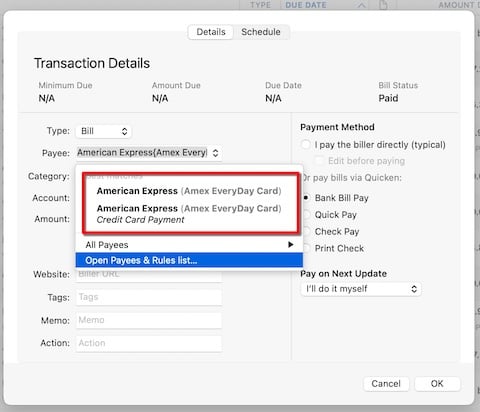
I "tested" a few accounts changing category. None but Amex made the button change from Pay Now to Transfer. Most had one entry. Amex and Wells had two. I stopped there and cancelled out. Something not right nor consistent. Need a bit more help.
0 -
I think you may be confusing/conflating two different things when talking about transfers. One is purely internal to Quicken: a single transaction, a linked transfer, which appears in two accounts to show both sides of a transfer of cash from one account to the other. The other is an action for Quicken to transmit to a financial institution to generate an internal transfer between two accounts at that financial institution.
As for your screenshot showing two American Express options in the dropdown, that's just the standard way Quicken Mac shows Payees in a dropdown list: first just the name of the Payee (the "naked Payee"), and then any QuickFill Rules which exist for the Payee. For instance:
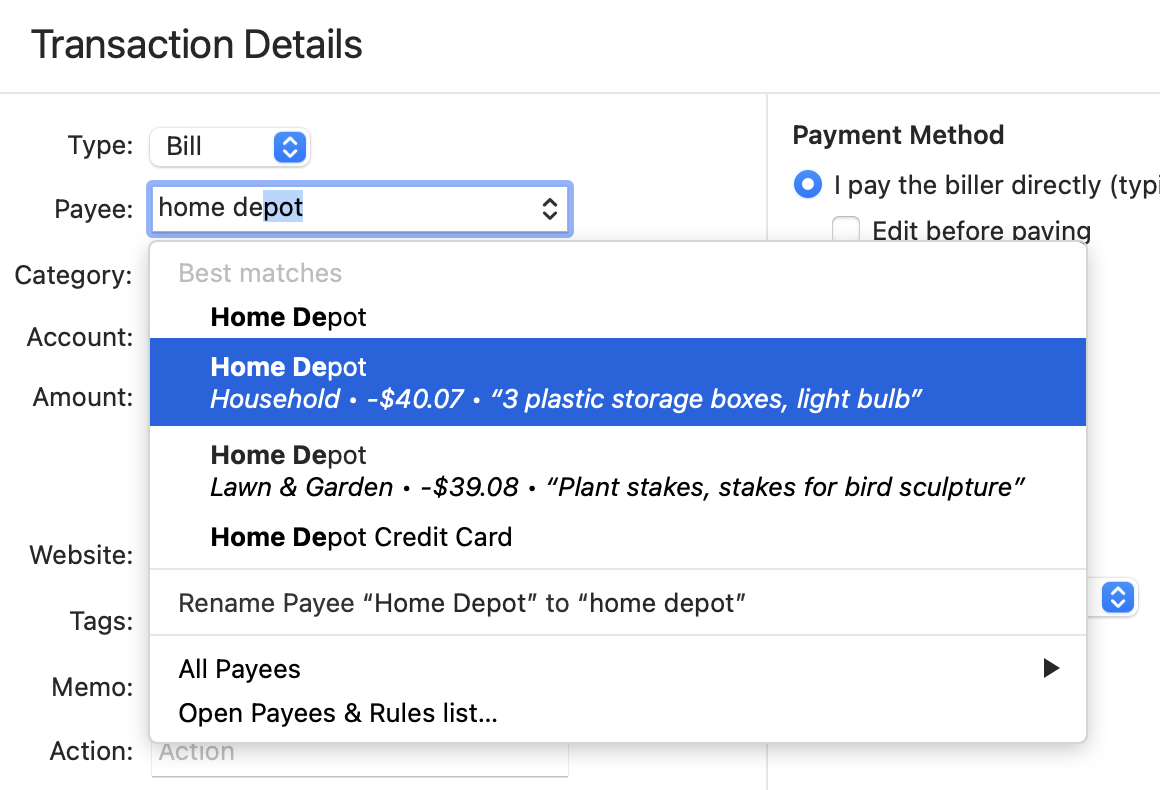
The first instance of Home Depot is just the Payee; selecting it would use that Payee and nothing more. The second instance, which is highlighted here, is a QuickFill Rule for Home Depot which has Category=Household, Amount=$40.07, and Memo="3 plastic storage boxes, light bulb". The third instance is another QuickFill Rule for Home Depot with a different category, amount and memo.
This has nothing to do with payments, transfers, or even schedule transactions. It's the same dropdown menu when you create a new transaction and start typing the payee name. If you create a new transaction and type "American Express", you'll see both the "naked payee" name and the one with the QuickFill Rule with the Category=Credit Card Payment. (You probably should delete or edit that QuickFill Rule, since that's not the category you want to be using going forward.)
Quicken Mac Subscription • Quicken user since 19930 -
@Jon Thanks. So if my top has Pay Now and the bottom Transfer for buttons, which does one clicki? And If ALL online billers had two entries would be one thing, but for me, only two of maybe 8. Just does not seem right.
By chance, did you try deleting the Biller, then adding again and ssetting up the schedule for scratch? I wonder if that might help?
And, at the moment, I feel I cannot pay bills from Quicken Mac and do not know what to do.
0 -
@jacobs Thanks. Very helpful. Good to know not part of my problem.
BUT, as you can see, the problem persists where I cannot figure out what and how to set so that when I use, for example, Pay Now in Bills the bank will send the payment and debit checking (it does) and credit the credit card account (it does not).
Changing category to transfer: [credit card account] creates two entries that are more than confusing for two of my billers and changes 6 to Transfer from Pay Now. Seems possibly right for those but have not tested and hard to unwind when incorrect.
So I truly do not know what to do, what is expected and what is a bug here. I could detail all that for Windows (and have) but this is different ennough I am baffled.
Do you have the same issues? Do you have dupes like my AMEX above? Which one is used to pay and why the two for only "some" billers?
0