Think there's a problem w/OSU?

Noticed issues w/OSU about 2 months ago. I manage several files and run OSU daily with up to 15 accounts being downloaded. Several Chase credit card accounts stopped d/ling w/800 error, had to reauthorize. Since then the Chase accounts and others simply don't download, no error reported. I just manually downloaded 16 transactions from 1 Chase credit card where request charges from 5/7-17/25. I'd run OSU every day during that period….
Upon checking the Community, this is a known issue (although not listed as one in you "Known issues" (or whatever its called) folder. I've used Q for over 30 years. It's obvious to me those reporting similar issues are experienced, intelligent Q users.
Get this problem escalated and solved.
Waiting…
Comments
-
Hello @John Patriarca,
Thank you for bringing this issue to our attention.
Upon reviewing your account, I can see that you are receiving an internal PAUTH_INVALID_TOKEN error with Chase.
To troubleshoot this, first save a backup (just in case), then please follow the steps below:
- Deactivate all Chase accounts in Quicken.
For guidance, please refer to this support article on how to deactivate an account in Quicken. - Once deactivated, go to Chase’s website and log into your online banking account.
- While logged in, click on the menu bar in the top left corner.
- Click on Security & Privacy.
- There should be a box that says Linked apps & Websites. Click it.
- Find and select Quicken.
- Click on Stop Sharing Data.
- After you’ve completed that, return to Quicken and reactivate your accounts.
You can follow this same support article on how to reactivate.
Let us know how it goes!
-Quicken Anja
Make sure to sign up for the email digest to see a round up of your top posts.0 - Deactivate all Chase accounts in Quicken.
-
"I can see that you are receiving an internal PAUTH_INVALID_TOKEN error with Chase." Why am I not seeing that? I'm not seeing any error…transactions just don't d/l.
I already reauthorized/reactivated as I originally stated. [Removed - Disruptive/Rant]
0 -
Hello @John Patriarca,
Thank you for your follow-up. I understand how frustrating this situation can be, and we're here to help you get back up and running as smoothly as possible.
To clarify your question—the reason you're not seeing the PAUTH_INVALID_TOKEN error directly in the Quicken interface is because certain connection or authorization errors occur behind the scenes. These may not always surface in the application's user-facing error messages, but they provide essential diagnostics that help us identify what’s happening in the background.
If you’d like to see internal errors and connection logs, here’s how you can access them:
- Open Quicken.
- Go to Help > Contact Support > Log Files.
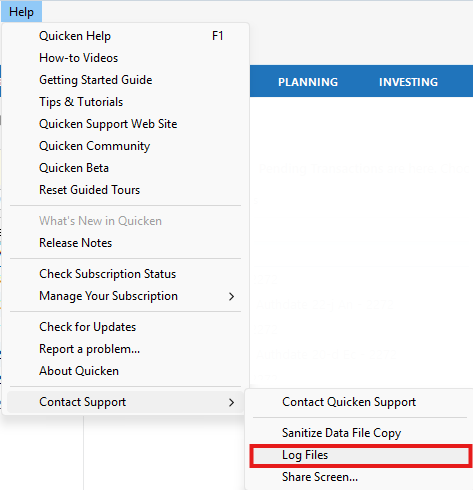
- From there, you can open files such as:
- CONNLOG.TXT – shows connection activity with financial institutions.
- OFXLOG.TXT – displays communications sent to and received from the bank.
- CloudSyncLog.txt – useful if you're syncing to the cloud.
- These files may contain internal error codes like the one we’re referencing, which can help explain what’s occurring behind the scenes.
Regarding the steps Quicken Anja provided, can you confirm whether you followed those exactly, including removing Quicken from your Chase account's Linked Apps & Websites section online before reactivating in Quicken?
Thanks!
-Quicken Jasmine
Make sure to sign up for the email digest to see a round-up of your top posts.
0 -
As I stated in my original message:
"Upon checking the Community, this is a known issue (although not listed as one in you "Known issues" (or whatever its called) folder. I've used Q for over 30 years. It's obvious to me those reporting similar issues are experienced, intelligent Q users.
Get this problem escalated and solved."
Call it a class action or whatever you want…it's not individual users. It's your software. Fix it.
0 -
Hello @John Patriarca,
I understand how eager you are to get this resolved, and I truly appreciate your patience.
Before we're able to escalate an issue, we’re required, per protocol set by our escalations team, to follow certain steps in a specific order and confirm them. This ensures that when we do escalate, we’re providing the necessary details they need to investigate effectively.
Thank you for your understanding as we work through this process with you.
-Quicken Jasmine
Make sure to sign up for the email digest to see a round-up of your top posts.
0 -
I haven't heard from you yet. Are you still needing assistance?
Let me know!
-Quicken Jasmine
Make sure to sign up for the email digest to see a round-up of your top posts.
0 -
Checking in once more before this thread is closed due to lack of activity!
-Quicken Jasmine
Make sure to sign up for the email digest to see a round-up of your top posts.
0 -
This thread has been closed due to a lack of activity. If you are still experiencing this issue, please start a new thread.
Thanks!
-Quicken Jasmine
Make sure to sign up for the email digest to see a round-up of your top posts.
0

