Multiple Financial Institutions Prompting Reauthorization After Every One Step Update [Edited]
Answers
-
In your response, I didn't see if you tried logging out of Quicken. Quicken support had me do this for my two datafile conflicts, although it didn't fix my problem. If you are using Express Web Connect+ (open your account list), it uses tokens created when you Quicken opens your browser and asks you to log into your institution during reauthorization. Tokens are extremely fussy with the institution, Intuit, Quicken, and your datafile involved. Logging out and back into Quicken might clear up issues.
Make sure you know your account login information, then Go to Edit > Quicken ID & Cloud Accounts and click Sign in as a different user. This will log you out. Then log back in.
How many institutions requiring reauthorization do you have? It might be one institution causing the issue. In my case reauthorizing one institution in one datafile can require reauthorizing multiple institutions in the other file. Deactivate all accounts and see if reauthorizing only one institution (with all its accounts) will stay connected. If it does, add another one.
I don't see much about Quicken support helping on this. They should be able to help isolate the cause. Maybe they need to reset something on their end.
0 -
The OL-2970A error is gone, but the CC-901 messages with a reauthorization time-out continue.
0 -
I tried signing out as you suggested. I think Quicken support had me do that a month ago as well. I still get the timeout in Quicken from the reauthorization.
0 -
I posted my issue and had some success in getting both files connected.
0 -
Thank you for your replies @cm_blk,
Have you tried connecting the problem account to Citi Cards using Direct Connect instead of Express Web Connect +? To do that, backup your Quicken file, deactivate the problem account (if it's connected), then navigate to Tools>Add Account. Search for Citi Cards, then click Advanced Options.
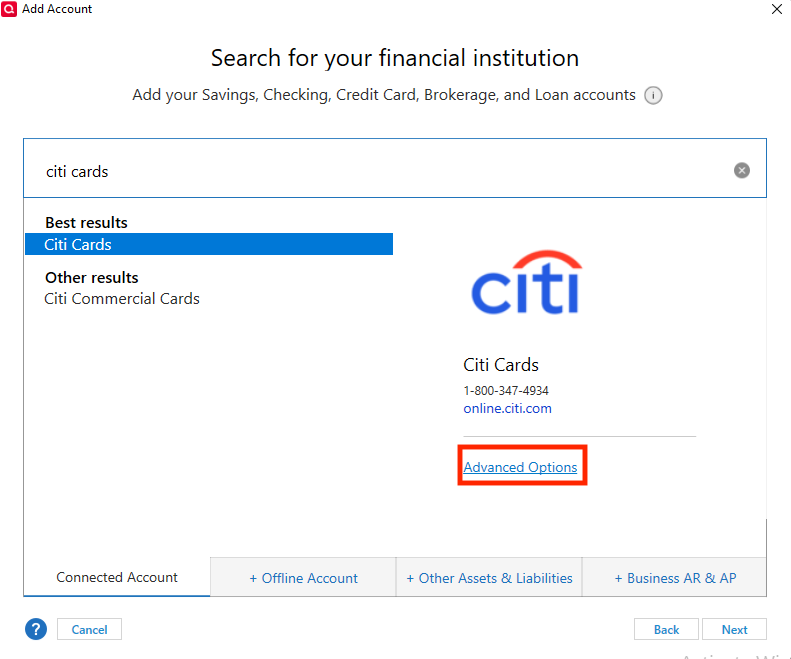
Review the information screen and click continue. On the next screen, make sure Direct Connect is selected, then click Next.

Follow the prompts to connect your account. Direct Connect often requires authorization through the financial institution website. If you get the "It's not your fault" error when trying to connect, make sure to follow the directions it provides to authorize the connection through the financial institution's website.
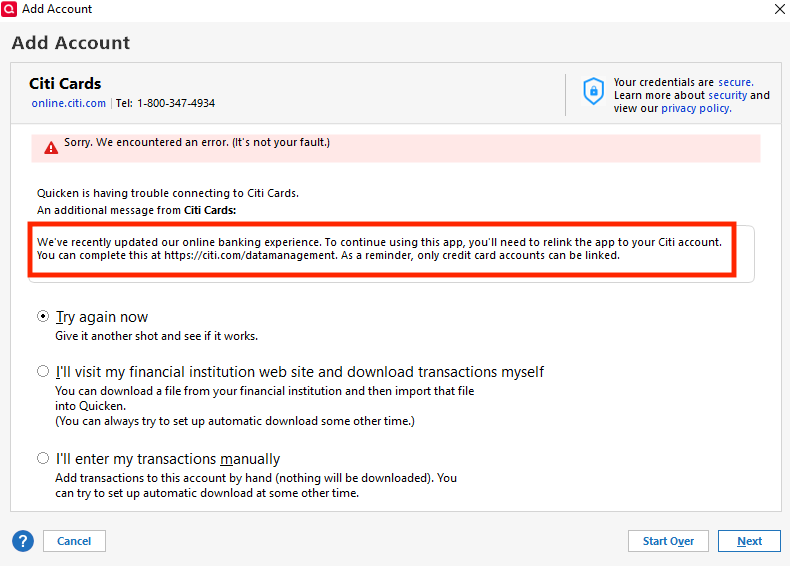
Please let me know how it goes!
Quicken Kristina
Make sure to sign up for the email digest to see a round up of your top posts.
0 -
@Quicken Kristina , when I click "advanced options" it goes directly to the "Quicken Classic uses Intuit to Connect" dialog box. I don't get the option to choose "Direct Connect."
0 -
Quicken Phone Support was able walk me through the solution to re-authorizing the accounts. I'm happy that I can download transactions into Quicken again! Here is the process that support used.
- Accept all transactions for impacted accounts
- Deactivate the online connection for each account
- Run 1 step update
- Add account. (This is the piece that seems to have made it work versus just connecting an existing account)
- Link the accounts in Quicken to the bank connection. Quicken correctly guessed on each of the links to existing accounts.
I'm glad Quicken has phone support, it was pretty easy to walk through the process over the phone.
1 -
Thank you for the follow-up,
I'm glad to hear phone support was able to help you resolve the issue!
If you need further assistance, please feel free to reach out!
Quicken Kristina
Make sure to sign up for the email digest to see a round up of your top posts.
0 -
This is the same process I used to fix my issue.
Multiple Data Files Using the Same Accounts Fail — Quicken
This method seems to be well known by support. Why don't the publish the procedures they use? It would save us a lot of time and lighten the load on support. Better yet - train an AI model using their methodology so we could chat with it online.
0 -
We have been having this issue repeatedly for the past couple of month with all our credit card and bank account. It happens at what seem to be random intervals. This problem with having to reauthorize repeatedly is very frustrating!! It makes me wonder why I am paying for this frustration. Quicken - fix it!!
0 -
I would like to know why restoring from a backup causes this, as well as opening a previous saved version of the Quicken QDF file causes this. What good are backups if you have to re-authorize most or all of your accounts!!!!!!!!!!!!!!
0 -
I have two data files. This morning, Quicken dropped the credit card in Citibank with savings and checking accounts. I use Citibank for all. Other's have to access their Citibank with two logins; Citibank and Citi Cards.
I think Quicken's Express Web Connect+ is the problem. It uses tokens and I think is a mess. Failure of one institution will affect others. If you have different data files, using One Step Update on one can affect using One Step on another. Usually, if I restore a backup usually all connects are deactivated. When I reconnect them, it will corrupt the original file. Repairing one affects the others. Problems ping-pong between files. This makes no sense.
Quicken support has had me detach the data file from Quicken (Edit > Preferences > Quicken ID & Cloud Accounts. Sign in as a different use to detach. Then sign back in. Deactivate all accounts. Then, activate them again. As I have 21 accounts with 9 institutions this is tedious and frustrating.
See my May 30 post above for more details.
0 -
Ray, I use 1 data file. Restore backup causes re-activation. If I save the data file in a separate folder, as a backup, then later use it, it causes re-activation. Seems like everything causes re-authorization. It is Quicken Express Web Connect and EWC+. Everything always worked before either the institutions or Quicken moved from Direct Connect to these, obviously to save money. It is always follow the money and the customer be damned!
0 -
When I renewed my Business and Personal Quicken subscription in March, the agent suggested I use their promo for $103.01 that included bill pay and cloud backup. I didn't need either of the features but accepted it rather than pay the regular renewal without them for around $133.
A few months later, when I had trouble with duplicate files interacting, I asked how could I have Quicken on my laptop too? On my laptop, they had me use File > View/Restore Backup… and select a BU from the Online Backup tab rather than the Local Backups tab. This file was restored on my laptop and all accounts were active. OSU now worked on my desktop computer as well as on my laptop computer. There must be a difference between restoring a cloud backup and my own Quicken backup or copy of the data file.
To me, their security is out of control. The institution, Intuit servers, Quicken Servers, and our desktop Quicken are all involved in token authentication. The path between the account at the institution to each Quicken data file account should be isolated from all other paths. Diagnostics should identify where and how corruption occurs so they can fix it.
One Step Backup is probably the biggest and most active issue in this forum.
0 -
I prefer not to have anything in anybody's cloud. A local backup should work for any software you buy and use. Period.
0 -
This happened to me this morning after the latest forced update. 63.21.
I need to reauthorize nine accounts!
0 -
Brian McDonald welcome to the "Club" This has been going on for about a month, so I am not sure your issue is with the update. Sorry to say, Quicken is silent on this after their standard "fixes" have been suggested. I completely uninstalled Quicken, used Quicken UI (their uninstall utility) deleted every folder on the computer (hidden ones also), and removed all quicken references from the registry (remember to back up, export, your registry first). Once re-installed with a fresh downloaded version, all has been working for about 4 days, which is a new record!!!
0 -
Hello All,
I received word from our team that a fix was pushed for the issue with repeated reauthorization prompts. Is anyone still seeing repeated prompts to reauthorize your financial institution(s)? If you are, which financial institutions are you seeing this with, what specific error messages/codes are you seeing, and how often are you getting these prompts?
Hello @Brian McDonald,
Thank you for letting us know you were prompted to reauthorize your accounts. To clarify, was this a one time issue after your Quicken updated to the latest version, or are you getting repeated prompts to reauthorize your accounts?
I look forward to your response!
Quicken Kristina
Make sure to sign up for the email digest to see a round up of your top posts.
0 -
In One Step Update, I have 3 Citibank institutions: a credit card for Costco, a credit card for American Airlines, and 5 personal accounts (savings, 3 checking and a credit card). Yesterday, Quicken updated to R63.21 build 27.1.63.21. I then ran OSU and had a CC-901 error for my personal Citibank. I used Add Account and added the personal accounts back. It appeared and said it was successful but when I ran OSU again, it failed with a CC-901. This time the error was with Costco. I added Costco back but when I ran OSU again, the personal failed.
I used edit in each of the 5 accounts to Deactivated OSU. Then add them back. I ran OSU again and it was finally error free.
Citibank has failed for years and is by far the worst of my 9 institutions. It's normal to have an OSU failure at least monthly. OSU uses Citi Cards for the American Express credit card and Citibank for the Costco credit card and my personal accounts.
Quicken has a mess with Express Web Connect + and the token system. Fixing one should not corrupt another. The problem is so bad that a month ago, I had to Deactivate all 21 accounts to fix OSU. See
0


