Target National Bank CC-501, Windows

Just so you know, I tried 3 times today, 03/29/25 and still cannot connect to Target National Bank to download my credit card transactions. In the process of connecting, the message says it isn't Target National Bank issue but Quicken server issues. Any updates? Is anyone working on this issue? Thanks.
John
Answers
-
Hello @johnsnegley,
We appreciate you reaching out!
This is a known issue that has been escalated internally, though we do not have an ETA on resolution at this time. While the investigation remains ongoing, please refer to this Community Alert for any and all available updates and information.
We apologize for any inconvenience in the meantime! Thank you.
-Quicken Anja
Make sure to sign up for the email digest to see a round up of your top posts.0 -
Was good for a few days but now once again prompts for email or phone number to authenticate the account
0 -
I'm getting the same thing. Every time I download into Quicken (from Target National Bank), I'm prompted for my cell phone number or email address. After I submit my cell phone number I'm then prompted to enter a code number to authenticate.
John
0 -
I'm getting a request for entering 2FA and when I enter the info I'll get my transactions downloaded. However, this is cumbersome. Is Quicken working to eliminate this additional step?
Also, and equally annoying, when I try to access info regarding Target I get the following message in the Quicken community
Permission ProblemYou don't have permission to do that.
0 -
There are a number of institutions requiring MFA. I don't think Quicken can do anything about it. If the bank issues an MFA request, all Quicken can do is try to coordinate the MFA with you. I turn those off from daily downloads, and download them manually or weekly when I am willing to do the MFA.
Yes, I get the Permission Problem frequently when trying to access bookmarked threads.
0 -
Is there an update on the timing to resolve the issue with Target Credit Card. I continue to be unable to connect to my Target Credit Card via Quicken and I am seeing a CC-501 error. Thank you
0 -
Hello @PBG12,
Thank you for letting us know you're seeing this issue. Since the alert was marked resolved last month, to help investigate the issue, I checked on our end. I can see that you're getting account not found errors. To troubleshoot, please backup your Quicken file and follow these steps from this article on account not found (CC-800) errors:
First, you'll need to deactivate the affected accounts:
- Select Tools > Account List
- If present, select the Show Hidden Accounts checkbox at the bottom of the Account List
- Select Edit on each account with this error and Deactivate them on the Online Services tab
- When finished, close the Account List.
Second, reactivate the accounts:
- Select Tools > Add Account
- Complete the flow of re-adding the deactivated accounts to Quicken, using your bank login credentials and answering any security questions.
- When you reach the screen listing the accounts discovered at the financial institution, use the Action drop-downs to re-link your accounts:
- For accounts you want to re-link, select Link to existing account and choose the corresponding account to re-link with.
- Select Add to Quicken for new accounts you didn't previously track in Quicken.
- For accounts you don't want to link or add, select Don't add to Quicken.
Please let me know how it goes!
Quicken Kristina
Make sure to sign up for the email digest to see a round up of your top posts.
0 -
It appeared to be fixed in April but now in May Quicken is no longer downloading any transactions from Target and it STILL has the annoying MFA step that no other account requires. And, once you work through the MFA process, the Update Summary window shows 0 downloaded transactions for the entire download as though it reset the count when the Target MFA process completed even though multiple transactions were downloaded from other accounts..
0 -
I am able to connect to TNB with 2FA, but, as with previous poster, no transactions are ever downloaded. I have tried resetting the account, but while it found my accounts and linked again, still, no transactions download, though I can see them online at the TNB site. When I tried to circumvent and download a QFX file from the site, I get the message "Quicken is currently unable to verify the financial institution information for this download. Please try again later." Are these two outcomes (not downloading transactions and not being able to read the QFX file) related? Thank you.
2 -
I /think/
1) Target changed banking services for their credit card, and the Quicken servers do not yet know how to connect to the new bank.
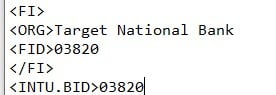
2) The new bank does not know how to connect to Quicken - they have the structure of the QXF data file correct, but don't know what IDs to use. I found another post which indicates that you can/should edit the QFX file with Notepad or similar text editor, and supply the information for ORG, FID, and INTU.BID, save, then use the file as normal. That will stop working once Quicken learns how to reach the bank directly, if they ever do.
 1
1 -
Target National Bank issue is NOT resolved. Quicken for Mac connects to bank, requires MFA on every connection, and then does not download transactions. Worked one time in early May, then stopped working again. I have disconnected and the reconnected account multiple times, to no avail. Please advise when this will be resolved, it has been going on more than 90 days, since mid March.
0 -
Same issue with Quicken on Windows 11. Glad I don't put much spend on the target card.
0

