What determines responsiveness/performance?
Comments
-
IMO, file size and number of accounts has been dismissed prematurely for this OP. He has an almost 300MB internal QDF with 761 categories and 80+ active accounts; ?? closed accounts. Memorized payees in the thousands is really the only size related parameter that has been eliminated by testing and experience in this thread.
The rest of the testing and real-life data file comparisons presented in this thread do not really compare to the OP's data file size and complexity. The OP might review and share some of the generic additional file details in the "More Info" section of the stats window. That may illuminate more of the complexity in the file.
0 -
My new AMD Ryzen 7 5800 PC couldn't handle Quicken Classic; it loaded extremely slowly while everything else flew. After numerous forum troubleshooting steps, including reinstallation and new dummy Quicken files, nothing changed. Tech support suggested my PC was the problem. Even a clean install of Windows 11 Pro didn't resolve Quicken's sluggishness. Persistent weekly event errors led me to a second clean install, this time deleting all previous partitions. Surprisingly, this "heavy-handed" approach was the solution: Quicken now loads dramatically faster, and the event errors have all but vanished. Still puzzled as to why this worked, but it did.
Quicken user since DOS Version 2; Running Premier (US) on Windows 11 Pro.
0 -
Everything that has been documented here is truly an excellent work! Thanks to all the contributors.
I also have been experiencing an extremely slow quicken for many months.
I also have tried everything that's been suggested here over that time period and nothing has made a difference.
You Don't Have to Have a Point, To Have A Point
0 -
@InkPen glad you found a way to improve performance. It could have been that the multiple partitions were causing access issues. Generally, the less partitions, the better the speed. Or, in the process of removing partitions, it cleaned up some disk issues. For a lot of Quicken users here, performance issues still remain a mystery.
1 -
Interesting!
Ok, maybe worth doing an export/import into a clean file. The split transaction treatment is not ideal but I could live with that in exchange for performance.
Looks like my best option, based on the Quicken Windows Help website is a QXF exchange.
Here goes . . .
Very reasonable concern. But, I recently changed PC and there has been no difference in performance. I am cofnident the Windows instal is a good one. Nevertheless, this is a good idea to try when all else have failed (and we are close to that point)
0 -
@guackqui when you export the QXF file, be sure to review the error log that is produced for any accounts that cannot be converted, or any other issues. Also be aware that certain transactions will need to be manually adjusted. For example, "Bought" transactions might come over as "BoughtX".
Run transaction reports before you start the process. It will give you something to look back to if you have any issues or need help reconciling.
0 -
Has anyone actually done a QIF export/import as I suggested?
How about a QXF export/import?
The point of this exercise isn't to use the new data file because to get QIF export/import to 100% correct data file is a very difficult operation. But what it will result in is a data file that is just about as big/complicated as the original and let one know if it really is how big the data file is or some external factor.
The export/import of QFX might be easier and result about the same (it actually has worked for some people to fix a data file, but for others like for me the data file isn't 100% correct), but again if one is trying to separate out a "data file problems" from a system problem this probably the closest you are going to get. An empty data file just really doesn't might behave differently just because it doesn't have much data in it.
1 -
I agree using QIF files is not easy. They are not fully supported and maintained by Quicken so they have errors. And most importantly, they only convert a portion of the data file. Reminders and reports need to be recreated. Security asset class is not converted. Account Type doesn't convert properly. A lot of information needs to be verified and updated manually.
As for QXF files. They work much better, but I haven't worked with them enough to know details about how they work. There is hardly any documentation on them. But from personal experience, they also require some manual intervention. Also, the documentation states that QXF files don't work with investment accounts. From what I have seen myself, I am not sure about that.
No matter what I think creating a new data file using either one of these file types can be a monumental effort not to be attempted by everyone and only used as a last resort for badly corrupted data files.
0 -
I'm just wondering if the people that have said "I tried everything" actually tried this to see if in fact the problem lies with the data file or the system.
If they do either of these exports/imports and everything in the new data file is working fast that points to the data file as being the problem. Validate and Repair and even Copy can't fix all problems. If it is determined that it is the data file at fault, then they can think about how they might want to go from there.
1 -
@Chris_QPW I see. Well from that perspective, yes, I have experienced first hand that creating a new data file using QIF can significantly improve performance of the data file.
But again, I think one needs to exhaust all other options and possibilities before they attempt creating a new data file with QIF or QXF files. There can be a lot of manual work and cleanup that is involved that the uninitiated might find impossible.
0 -
I was having the same slowness problem this past January. And after trying many recommendations to fix my slowness issue to no avail, I got to thinking that maybe network drivers or other config files in Win 11 were possibly corrupted, so I did a….
Settings/advanced options/recovery/Fix problems using Windows UpdateThis reloaded win 11 without affecting data or apps.
Also, using "Driver Booster", I upgraded all out-of-date system / network drivers.
This resolved my issue, and it hasn't been slow since.
My database size is 306mb.
3 -
Until someone like the OP with a data file this large and complex tries the test proposed by @Chris_QPW and reports the outcome most of this thread is of little help in solving the problem.
0 -
You make a very valid point. As you will see below, I attempted a QXF export/import. The range of problems and incorrectly exported/imported transactions make it impossible to use the new file. But I think I did get some performance insights.
0 -
Thanks for the suggestion. See comments in my update below
0 -
Hey folks:
So, a couple of updates.
First, as suggested by various, I did a reinstall of Windows. Good thing to do. But no noticeable impact.
Second, I attempted a QXF export/import. I was astonished as to how useless this is as a capability. The list of things that were not properly handled is almost endless, and makes it impossible to "fix" the new file to match the old one even with massive manual effort. Some examples:
- International transactions: the currency exchange in the original is not retained. So, the amount in either the destination or source account is no longer correct. Each one has to be (painfully) manually re-entered by reference to the old file
- Dividends reinvested: in many accounts, "cash" is not held as cash but as a cash equivalent fund. It is possible to track the share balance but it is easier to treat this as cash. Dividends are recorded as dividends with no security (Quicken allows for this). Every single one of these transactions (almost 4,000 in my case) was converted to a cash adjustment. All dividend history is lost. There is no way to recover this or to do a batch find/replace
- Mutual fund purchases: in investment accoutns where the number of shares is not provided and so the holding has to be tracked as a number of $1 shares, all purchase transactions are treated as additions and not purchases, and the amount is not properly deducted from the cash balance. The purchase is treated as a noncash transaction, resulting in incorrect cash balances in the account. Fixing this would involve a massive number of edits.
These are just the things I have found so far and I am giving up on trying to debug further. I am sure that export/import is an exceptionally hard thing to implement, with infrequent use and limited payback for Quicken, but that it be so completely useless is nevertheless shocking to me, especially as it is proposed as a solution, by Quicken, for data file corruption issues or to transfer files.
As I previously mentioned, Copy, is also basically useless, as it does not properly exclude certain types of transactions outside of the dates provided for the Copy process.
So, there really is no way to create a new version of a set of accounts. Or at least not of one that is complicated enough that this feature would be required.
Having said all that about the export/import, as @CaliQkn and @Chris_QPW suggest, the export/import and the resulting file, even if "inaccurate," should give us considerable insight into the source of performance issues.
And the answer is . . .
Some imporvement!
Posting a transcation is now taking approximately 7-8 seconds instead of 13. Account switching seems to still be very slow with no improvement. Starting Quicken shows no improvement with the new file. I am going to do more research, and also make sure I've done everything suggested above, and will provide further updates.
Keep the suggestions coming, if nothing else we are hopefully having some fun getting to know Quicken's innards a little better. But that export/import debacle . . . boy, I really think Quicken should do better than that. And I also think despite @Quicken Anja original engagement, that the extent to which support washed their hands of this, is disappointing
Thanks all
0 -
Thanks for the thoughts @markus1957. I agree that it seems like this is a big file, but others have reported no performance problems with similar or larger-sized files.
I could look at the Categories and try to delete those that are unused. Largely, I don't use the Quicken standard categories as I do not find their organization or names helpful. I will report back.
I can't really cut down on the accounts. I know it seems like a lot, but I have a large number of investment accounts that I need to track separately; the good news is that many of them have very few transactions in them. I do have a lot of closed accounts, but can't really delete those because of transfers in/out of still-active accounts.
As noted, I have deleted all Memorized Transactions (not fun). I could also delete all Memorized Payees? I do use Tags extensively.
To me, the puzzle is why do I have a 300MB internal QDF file. It's not the number of transactions, according to others' reports. But my Quicken file may be disproportionately investment and asset accounts, and maybe these transactions cause the size? I have virtually no loan or liability accounts, if that's helpful.
Happy to perform any analytics you suggest. I appreciate the input.
0 -
I agree that it seems like this is a big file, but others have reported no performance problems with similar or larger-sized files.
I have to disagree with you. No one in this thread has come close to your internal file size or the number of investment accounts/investment transactions. My guess is that Quicken's underlying database structure and/or methods of querying the data to render a row just gets bogged down when encountering the size and complexity of investment accounts in a data file like yours.
As @Chris_QPW pointed out, large numbers of transactions in spending account registers do not impact performance like they do in investment registers.
If you need an example of how inefficient Quicken can be at retrieving and rendering data, try running a Find from the Edit menu or a transaction report from Banking or Investments. Be careful because with a large data file, you may spend hours waiting for the reports to render. Pick off small chunks of data and gradually expand the search size to see how slow it is.
I just did a simple Find all transactions before 2010, it turned out to be over 12K transactions and it took over 30 minutes to complete the find. It reported the number of records found in a few seconds but took the rest of the time to render the list. I have just over 50K transactions so if I would have done a find before "today" that would have been 2.5 hours.
A banking transactions report set for Include All Dates, took 15 minutes to render.
So, while you may have some corruption in your file, 300Mb is a lot for 70K transactions, Quicken is just slow at retrieving and displaying data when compared to modern databases.
0 -
I have similar bad performance as you do when running a banking transaction report over a lot of data but exporting all my transactions to QIF takes 8 seconds. Which BTW is about the same amount of time the "searching" is reported during the report generation, which I believe is the actual database search.
On the 300MB file it might be interesting to see where all that space is actually used. If you open a copy of your database in 7-Zip (which is free) you can see the individual files.
My data file:
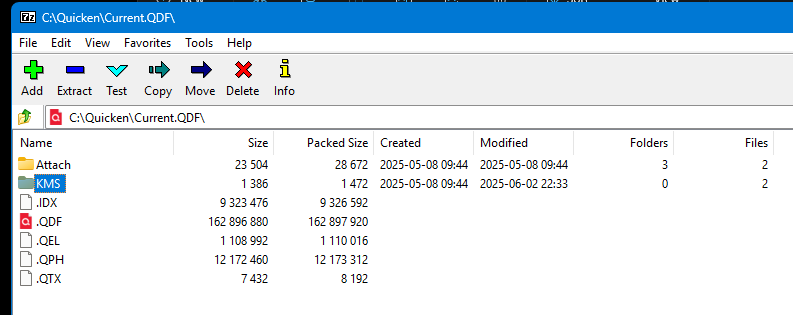
Performance of the banking transaction report, 5 years:
Search: 2 seconds.
Display: 60 seconds.
Number of transactions: 11,031.
Transactions per second: 183.85.
_____________________
Report for 10 years:
Search 4 seconds:
Display: 14 minutes.
Number of transactions: 39,028.
Transactions per second: 46.46.
___________________________________
After exporting and importing using QIF.
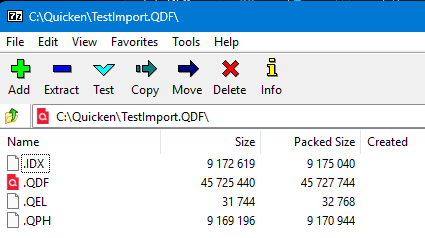
Performance of the banking transaction report, all transactions:
Search: 8 seconds.
Display: 42 seconds.
Number of transactions: 56,885.
Transactions per second: 1,354.40.
2 -
This is the info on the contents of the QDF file
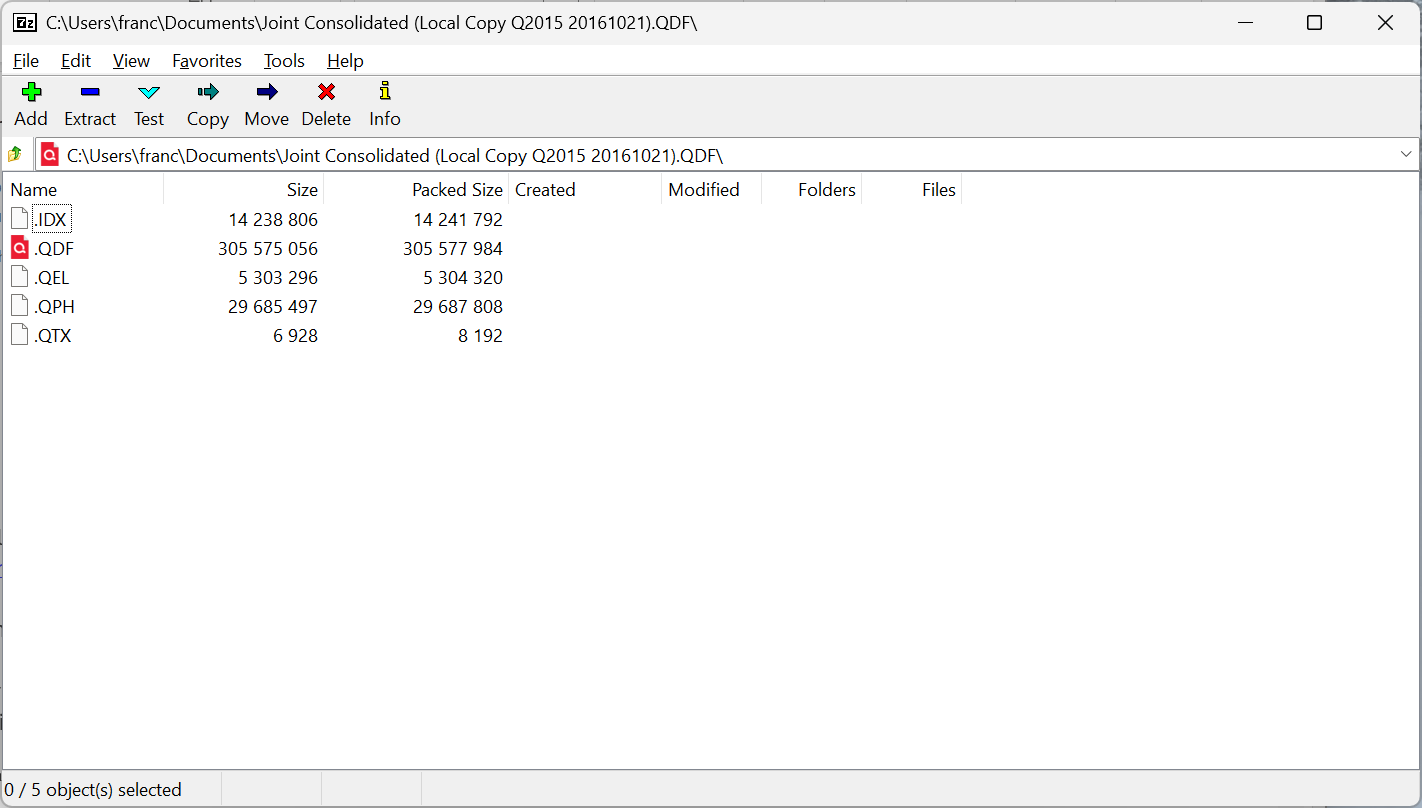
I think @markus1957 that you are right: fundamentally, I bet it is the investment transactions that are crushing performance. Problem is, there is not that much I can do about it. I wonder if it would help to remove/add shares from "old" account into a "new" account (hopefully that would preserve investment lots and cost basis) and then I could Close the old account. There's not that many accounts I'd have to do it for; maybe worth trying? How else could we lighten that investment account load?
(BTW, I think Quicken functionality for investment accounts is really really good, and it is not a simple topic. While I am critical of many aspects of Quicken they deserve equal plaudits for the investment functionality.)
0 -
I wonder if it would help to remove/add shares from "old" account into a "new" account (hopefully that would preserve investment lots and cost basis) and then I could Close the old account. There's not that many accounts I'd have to do it for; maybe worth trying? How else could we lighten that investment account load?
This is essentially what Quicken calls "Archiving" an investing account, which I think we have not discussed yet. This will move the transactions that correspond to securities you no longer hold to a new archive account. Because the active account will generally have many fewer transactions after the move, it should perform significantly better. All of your history will still be in the data file.
To do the archive, first back up your data file in case you do not like the result, then click the gear at the top right of the account and pick the Archive transactions option. Read the instructions carefully.
If you decide to try the archive, please let us know how many transactions are in the active account after archiving and measure the before and after speed, to help us advise other users.
QWin Premier subscription0 -
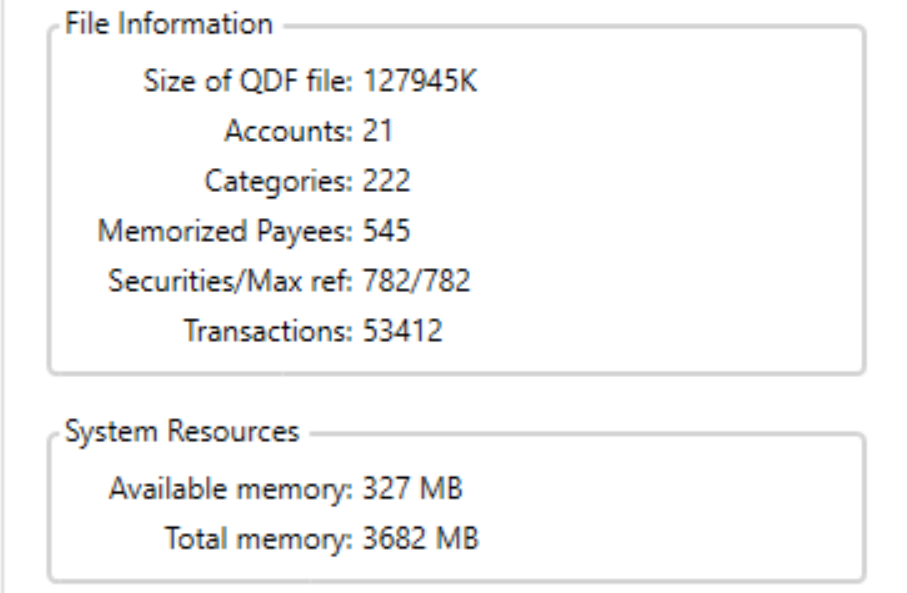
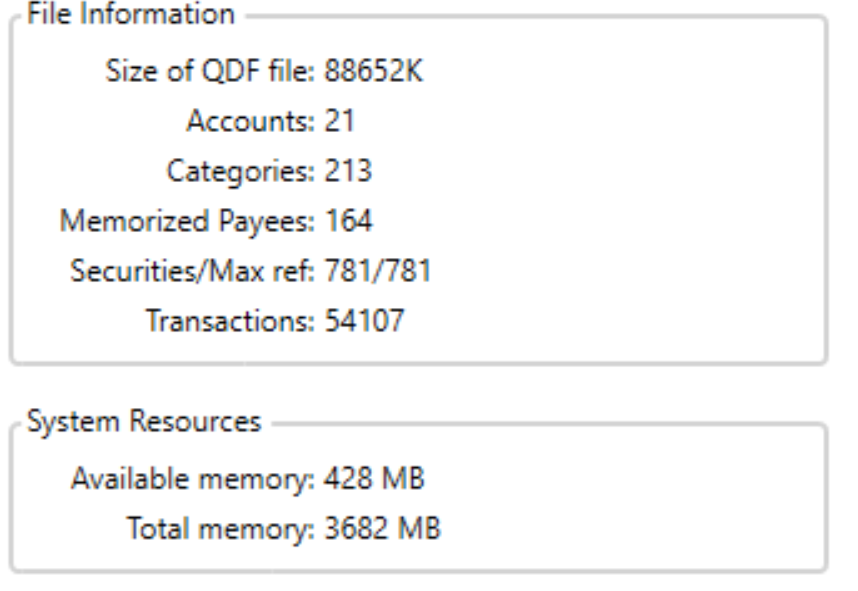
This was after a qxf export/import to a new file. I got several lines of duplicate transfer warnings, but my spending accounts seem to be intact. I need to spend some time on investment accounts as they are off. Based on transaction count, I gained transactions which may be the result of broken transfers.
In any case, the file size bloat does not seem to be associated with transactions. I doubt if we can make any real headway without developer interest. The bloat can't help performance, but there are query structure and rendering issues that Quicken does not seem interested in pursuing to a remedy.
0 -
In general, the symptoms of bad performance for investments accounts are generally restricted to working in a given account. Quicken doesn't open an account until you access it. Once you access it, then it caches it in memory.
This is the basis for the old workaround where people would transfer closed securities to another account that they wouldn't access as much. This method uses Remove Shares/Add Shares, and does keep the cost basis correct, but not the calculated values that depend on "return" since that is calculated using the transactions.
Archive is a new feature (about a year I guess) that has similar results but does work differently. They actually move closed lot transactions to the new archive account that is created. There aren't any remove/add shares transactions with this method since the actual transactions are moved. There is also the new Move Transactions that works in similar manner as archive (it was introduced at the same time Archive Transactions was).
EDIT: BTW this the very reason that in general SuperUsers don't recommend "Active Traders". If you are generating tons of investment transactions Quicken's performance in those accounts will certainly suffer.
1 -
This is the basis for the old workaround where people would transfer closed securities to another account that they wouldn't access as much. This method uses Remove Shares/Add Shares, and does keep the cost basis correct, but not the calculated values that depend on "return" since that is calculated using the transactions.
FWIW: my “before Archive” approach moved opened positions (not closed) to a new account as of a specific date. (I chose Jan 1.). The historical transactions in the old (original) account are rarely accessed. I took that approach twice when one particular account was slow in responding with 7-10k transactions in the account. As @Chris_QPW has elsewhere pointed out, number of securities and number of lots can also be a drag on performance in a single specific account. Other smaller investment accounts responded promptly, as did all non-investment accounts.
Because the OP seemed to see across the board slowness, I am skeptical that this type of account size is a complete answer to his issue.
1 -
I'm also skeptical like @q_lurker given the overall slowness.
I have noticed something really strange, if I do a bank transaction report for all dates in my real data file, lots of minutes will tick away before it finishes (and me just killing it). If do either a QIF or QXF export into a new data file and do the same report it is a bit more than 1 minute. But if I setup my Express Web Connect + accounts for downloading, it back to lots of minutes and me killing it.
Also, in both cases the size of the data file drops to about 1/3 of the original. So, one has to wonder both what they have done that slows down the report generations when you connect online accounts and what extra junk they are storing in the database that makes it 3 times the size.
Oh, and note I tested with my network disabled and that didn't speed it up. So, I don't think it is because they are querying the server for something during the report generation.
1 -
Adding- Performing a template Copy which disconnects online services also decreases the size of the data file but to a much lesser extent. So, the type of junk removed by qif/qxf export/import may not be associated with online services.
The difference in report generation speed between a qif/qxf file and the original is not explained by the numbers of transactions processed. They both have about the same number of transactions.
The speed slowdown seems to be associated with wading through the "junk" and even that cannot be explained in a linear manner. In my case, the qxf file banking transactions report took 30 seconds whereas the original file took 30 minutes to render a report for about the same number of transactions.
I would further add that it appears the initial query search to determine which records to retrieve takes about the same amount of time in both files. It is the rendering a record string for display process that seems to be the slowdown. I would propose that slowdown could also be problematic in assembling a record string for insertion into an account register.
0 -
I would propose that slowdown could also be problematic in assembling a record string for insertion into an account register.
It has always been my belief that the performance problems in Quicken are almost entirely associated with the GUI, unlike lots of people wanting to blame the database engine. From what I can tell the database engine performs quite well; it just doesn't have the modern features like rollback to make it a bit more robust.
But another possibility is poor use of that database engine, which might be indicated by the "extra crud" we are seeing. Note I expect to see a larger database file than what would be created after a QXF or QIF import just because of all the other possible features that might need to be included as they are used, but increased size of the database shouldn't equate to slow performance. Even if the whole data file was read into memory, it is a trivial amount in today's memory world, but databases don't access their data linearly anyways, they are optimized for seeking to a given part of the data and fetching it.
But bad structure/query designs can certainly slow things down.
But note that GUIs are extremely inefficient, especially when you have a program like Quicken that is constantly trying to refresh everything in the GUI as it does things.
Anyways my current guess at the bloated database is poor handling of some data structures that are never reclaimed when they are no longer needed.
Even then I don't really believe they are the direct cause of all the slowness, and not even the GUI. I believe this for one reason. Performance was good in the imported QIF/QFX file until I connected it to online accounts. That tells me that it has turned on something that takes a long time (maybe a little bit for every transaction).
This is all nice information, but I'm afraid it does @guackqui much good. This is a world away from "everything is slow".
1 -
So the "large" investments accounts you don't think are likely the cause of the slow performance entering transactions into a bank account?
0 -
I know this is silly and anecdotal, but let me mention what happens during the approximately 17 seconds it takes to enter a transaction in a Banking account:
Before I press Enter, the cursor is an arrow
As I hover over the Accept button, the cursor turns to a Hand
After I click accept, the cursor immediately turns to a Rotating Circle, and remains so for a few seconds
Then the cursor seems to be flashing between Hand and Circle, with it being most visible as a HandDuring the approximately 18 seconds that it takes to switch accounts:
The cursor is a rotating circle for the first 15 seconds or so
It then flashes between Circle and Hand, back to Circle, then back to the "normal state" ArrowI am wondering if there are different processes associated with the different cursor states, and whether this could help diagnose what process(es) are taking place that are slow.
0 -
One other thing that I find strange: when Accepting a downloaded transaction, one that is a transfer to another account does NOT take longer than one that is assigned to a Category. I would have thought that (potentially) having to access the database and create two entries in two different accounts should be more "work" . . .
0 -
Correct.
If you could physically time two such operations in a database that would be an EXTREMELY slow database, which Quicken isn't. I do notice that when entering a paycheck with a 401K employer stock match, I get two very separated dings for the transfers to the 401K account, but that I attribute to the slow GUI processes or other "computing" not the database.
Before I press Enter, the cursor is an arrow
As I hover over the Accept button, the cursor turns to a Hand
After I click accept, the cursor immediately turns to a Rotating Circle, and remains so for a few seconds
Then the cursor seems to be flashing between Hand and Circle, with it being most visible as a Hand
It has been a long time since I have used the Downloaded Transactions tab, so I gave it a try to see what I see, especially since even when I was using the Downloaded Transactions tab, I would use the keyboard Enter not the Accept button.
What I get,
Hand cursor over Accept.
Select, ding immediately, Cursor stays as a Hand, after about a second or less it moves to the next transaction, at that time the busy (circle) cursor shows for a second.
During the approximately 18 seconds that it takes to switch accounts:
The cursor is a rotating circle for the first 15 seconds or so
It then flashes between Circle and Hand, back to Circle, then back to the "normal state" ArrowI am wondering if there are different processes associated with the different cursor states, and whether this could help diagnose what process(es) are taking place that are slow.
I want to point out the first time access an account Quicken is reading it in and caching it, which takes longer.
Accessing my IRA account on my quite low powered machine (but with a NVMe SSD) takes about 4.5 seconds on the first time. That account has 963 transactions in it. Accessing it the second time is about 1.5 seconds.
Accessing my wife's 401K account with 2796 transactions takes about 6 seconds the first time, and 1.5 seconds the second time.
I get a busy cursor for all the time I'm waiting for these to open.
It is hard to say if the cursor changing is for a different process or not. It is entirely possible that the code is changing the cursor in all user cases, but because normally it happens so fast that the user doesn't see it, but you might be able to see it because for whatever reason it is going very slow.
0



![[Deleted User]](https://us.v-cdn.net/6031128/uploads/defaultavatar/nTYA6S0SVB4GN.jpg)

