Share count pulled from brokerage account not always correct

Starting a new thread as suggested by someone from another post I made because I asked a few unrelated questions in one post and some got unanswered.
Again, I just converted from windows to Mac yesterday.
I have a number of brokerage and retirement investment accounts. I noticed that for a few securities where the brokerage firms allow for fractional investing (either I bought a fraction or through dividend reinvestments) the totals are not the same as what's in accounts.
On the other hand, my Windows version is able to get 100% correct share counts down to 4 to 5 decimal points. Note QMac did get some of them right, even with many decimal points, but just not all.
Here is an example, the first one is the correct Qwin one, and the second one is the QMac one. It would be too laborious to check through if every Div reinvestment was correctly recorded.


Comments
-
Hello @Adience,
Thanks for reaching out!
Quicken for Mac may handle fractional shares and dividend reinvestments differently than Quicken for Windows, leading to discrepancies in share counts. These differences can arise due to variations in how transactions are imported and processed between the two versions.
Recommended Actions:
- Review Transaction History:
- Examine the transaction history for the affected securities in Quicken for Mac.
- Look for any missing or misrecorded dividend reinvestment transactions.
- Ensure that all transactions match those from your brokerage statements.
- Check for Placeholder Transactions:
- Placeholder transactions can sometimes cause discrepancies in share counts.
- Identify and review any placeholder transactions in your account register.
- If necessary, delete or correct these placeholders to reflect accurate share counts.
- Adjust Share Balances:
- If discrepancies persist, consider manually adjusting the share balances to match your brokerage records.
- Use the "Adjust Share Balance" transaction type to make these corrections.
Please let me know if the issue continues to occur or if you need any further assistance!
-Quicken Jasmine
Make sure to sign up for the email digest to see a round-up of your top posts.
0 - Review Transaction History:
-
I have not heard from you yet. Are you still needing assistance?
Let me know!
-Quicken Jasmine
Make sure to sign up for the email digest to see a round-up of your top posts.
0 -
hi @Quicken Jasmine, sorry for the late replay. I have NOT forgetton about this. I was kinda busy over the weekend.
So my reaction to your suggestion for this topic was that given the amount of dividend reinvestments there have been, it'd be a LOT of work to check them one by one for a fractional difference.
I also checked into the other post I made about my AMEX card not being pulled in eBills (Problem re-adding AMEX as a eBill. — Quicken). I tried your suggestions and got some positive but also some negative results.
thirdly, I also had other issue with the whole migration progress, partly because my original Windows version was probably not setup optimally.
So what I decided to do is let me fix my Windows version, and do another clean Mac migration and see where that gets me this week.
0 -
Thank you for providing more information. I think that is a great place to start, rather than attempting to repair the damage already done, especially with the amount of work it would take from what you mentioned.
Please let me know how the second migration goes and if you need any assistance!
-Quicken Jasmine
Make sure to sign up for the email digest to see a round-up of your top posts.
0 -
Just checking in!
-Quicken Jasmine
Make sure to sign up for the email digest to see a round-up of your top posts.
0 -
coming back to this post since I only just this weekend got the chance to (1) fixed all the issue I had with Qwin (which is now in the best form ever), then (2) did a fresh migration to Mac.
almost everything worked well with the migration.
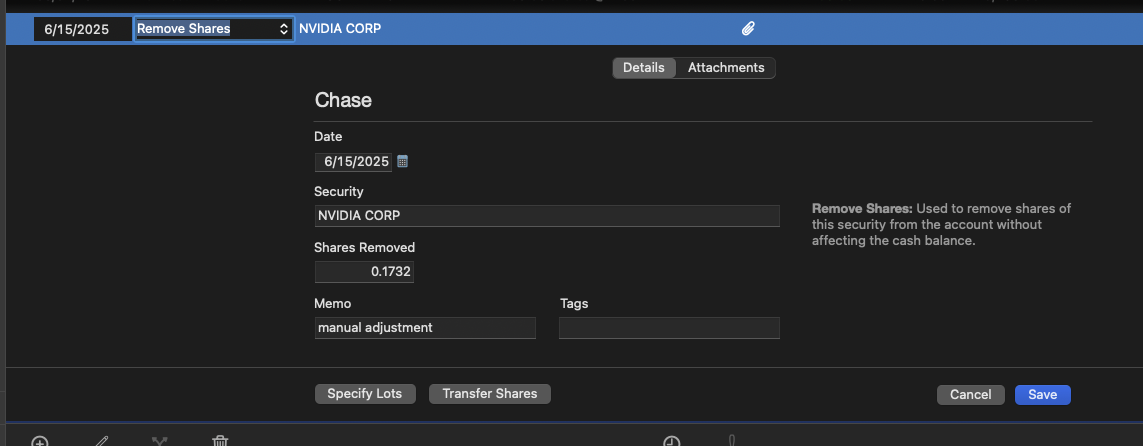
With respect to my investment portfolio, I am still getting some minor discrepancies with 2 securities. I went through the tedious process of comparing all the transaction history I was able to find both on Quicken and the brokerage website, everything actually matched up to the oldest history the website is able to show. So I decided to enter manual "Remove Shares" in Transactions. but after doing this, the total share counts for these 2 securities didn't change, as if the "remove shares" I entered has no effect. Did I not enter it correctly?

 0
0 -
If the Remove Shares transaction had no effect, it's because there is a Placeholder transaction in Quicken which is forcing the share balance to a certain number as of the date of the transaction. Search your transaction history in this account — it may go back to the beginning of time, or be some date along the way — for an Add or Remove Shares transaction which Quicken inserted as a placeholder. Removing said transaction should set things right in your account.
Quicken Mac Subscription • Quicken user since 19930 -
Hello @Adience,
Thanks for coming back to update us!
I do agree with @jacobs and do think that would be a fantastic place to start.
Please let us know what you find!
-Quicken Jasmine
Make sure to sign up for the email digest to see a round-up of your top posts.
0

