Is Truist's Quicken Access Restored as of noon 6/30/25
Answers
-
Thanks Scott, I tried your steps, but still no success. I use Express Web Connect.
- I chose "Truist Online Banking - WC".
- Under advanced options Express Web Connect was already selected.
- I kicked off the connection attempt, entered credentials, requested a security code to my cell phone, entered that code..
- I let the process "Looking for your accounts at Truist Online Banking - WC" go for about a minute.
- I clicked the "x" on the Account List page, as it doesn't seem possible to cancel the process from the active page. The connection attempt ended and left Quicken locked up.
- I used task Manager to close quicken. When i went back in, there is still no connection information..
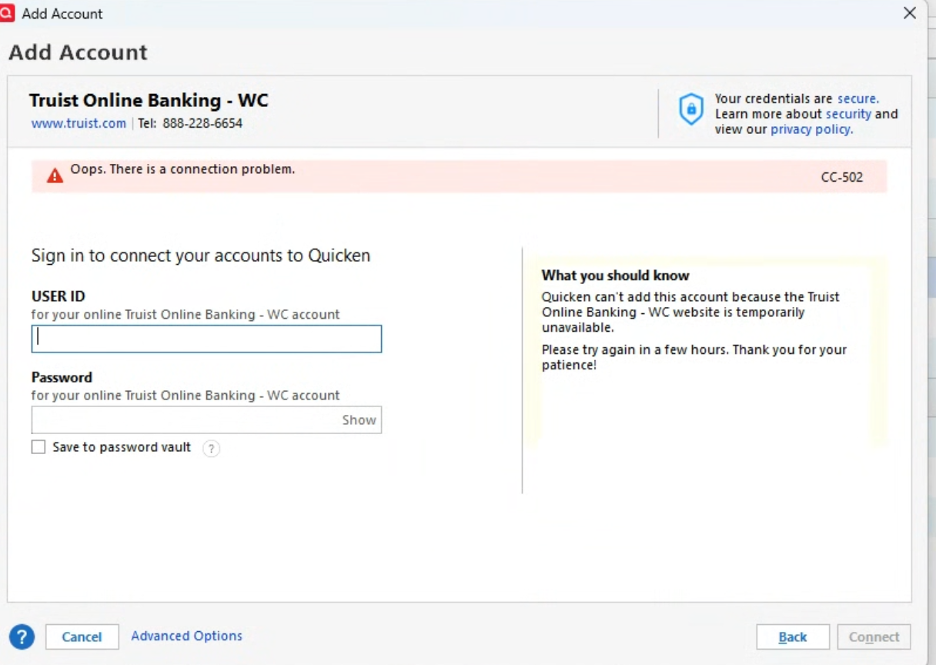
Well, I've tried to connect numerous times for the past few days choosing different "Truist Bank" designations, but it repeatedly fails saying… the Truist site is temporary unavailable.
 0
0 -
Another issue I just found with all of my Truist accounts.. all the balances are off when I try to reconcile. It might be the old issue of opening balances changing. Take note of your balances before you update after connecting.
0 -
Thanks Scott. Yes i have run into reconciliation issue for months now, I have just given up trying to make sense of why balances that always used to reconcile rarely do so now….
I tried to connect again this morning, same results.
I am going to call Truist support today. I don't get the sense that this issue is being worked by anyone at Quicken….
0 -
Does Quicken have any update on this problem? The new alert has no additional information. It is now 7/3 10amE and download with Truist is still not working.
[Removed - Off Topic]
1 -
Hello All,
Thank you for continuing to update this thread and provide more information.
Please keep an eye on the alert for all further updates and information. Our teams are working to investigate and resolve this issue. However, at this time, there is no ETA or any new information to share.
We appreciate your patience!
-Quicken Jasmine
Make sure to sign up for the email digest to see a round-up of your top posts.
0 -
This whole thing is absolutely ridiculous with Truist. Quicken was working great before the update. I am not a computer savvy person. I have tried a number of solutions mentioned above. If I can not get an easy resolution soon, then I will leave quicken and look for another solution to managing my cash flow. Any suggestions as to other programs which may be similar? The frustration level here is high.
0 -
It is frustrating that we are being encouraged to leave this thread, and use only an alert related to the unsolved problem. There is no ability for customers to add comments to the alert. There are no updates in the alert. Quicken gets zero stars for responsiveness on this issue.
0 -
Express Web Connect User here.
I am in the same boat. I tried to Reset one of the accounts and it doesn't work either. I called Truist and they said they are aware of the problem and are working through it. To call back tomorrow or the day after. Not encouraging at all…
BTW Truist Digital Banking's number is 888-228-6654.
0 -
I successfully transmitted a Bill Pay to Truist today. During the OSU, Quicken prompted me to enter details for a new Online Payee (Quicken apparently discarded the previous entry for this Online Payee).
Historically, I guess this was a pretty quick remediation of the various problems by Truist. And thank you Quicken team for whatever influence you may have had in the effort!
Fingers crossed, Truist Direct Connect appears to be working correctly in both directions.
0 -
Thanks for coming back to share!
-Quicken Jasmine
Make sure to sign up for the email digest to see a round-up of your top posts.
0 -
Make no mistake - the problem still exists! CC-502 on attempts to activate online Web Connect connection to Truist.
I ultimately called Truist about this, and was advised that I could enroll in Direct Connect, which was now being recommended by the Truist agents since there appears to be many problems with WC connections including password, etc. I had not experienced any warnings for password errors and always received the necessary 6-digit code for account validation.
I bit the bullet and enrolled in Truist Online Banking - DC. My accounts are now all connected and transactions downloaded.
This may not be the optimal solution for everyone, given the monthly fee involved.
0 -
We understand this issue is still occurring for some users. Our teams are still investigating this issue, please keep an eye on the alert for all further updates!
Thanks!
-Quicken Jasmine
Make sure to sign up for the email digest to see a round-up of your top posts.
0 -
FIXED
Truist Customer Support had no clue - told me there is still some problem and to give it more time (it's been more than a week already). Here are the basic steps I took to re-activate my Truist accounts in Quicken:
- Logged into my account via web interface
- Went to Profile > Settings > Preferences
- Under “Quicken or QuickBooks” I clicked the Manage Subscription button
- Clicked Register Data Files
- Followed instructions to re-register my Quicken data file
- Kept that page open while going through Activation process in Quicken
- Quicken seemed to connect but then hung like it does if you try to download transactions while logged in via web, so I went ahead and clicked the button that said I had registered my Quicken file then logged out of my account on the web
- Finished activation in Quicken – matched accounts found online to accounts in Quicken
0 -
I use Quicken Classic Deluxe.. I don’t see an option to “Register Data Files” that LWood references above. Must be a different product.
I tried again today, following the instructions we were given earlier to link to Truist via OLB account, via the entry “Truist Online Banking – WC” Again it “Looked for accounts….” for about 5 mins then returned the “Oops….” CC-502 error. Still not working for me.
0 -
@Ed Street , the steps that @LWood provided are for your online account with Truist, not for Quicken. Sometimes to get a successful link with Quicken, you need to register or give third-party access for Quicken with your financial institution.
0 -
I was in touch with Truist again, and they don't have any updates. It's a mess. Now Quicken says "Truist Bank is reporting connection issues". :(
0 -
I was following the explicit instructions from Truist to reconnect my Quicken Classic. I have three accounts, and the instructions failed to mention one critical point:
I had "deactivated" all three accounts, and had taken the financial name out of the box in Quicken. I went to Truist online and went to settings/preferences. There was option to connect via Express Web Connect as I had before. (For years I used Direct Connect until Truist got really greedy and started charging a monthly fee.)
The instructions online stated that I should choose the "DC" connection. WRONG! In order to reconnect using Web Express Connect, you should choose the "WC" connection. Once I did that, I was sent a text with a code, and then all three of my Truist accounts were found and I "linked" them to existing accounts.
Among all the many pages of instructions put out by Truist, they failed to mention which specific type of connection to choose depending on which type of connection you desired.
Hope this helps others.
2 -
Doug,
Thanks so much. I changed my connection to "WC" and the problem has resolved. I can connect normally.
0 -
I'm very confused on this problem. The latest official word seems to be "it is a known issue being worked on with no ETA on resolution". That info is from the post below:
The same post directs you to these instructions which i have tried numerous time with no success (CC - 502)….. 1) disconnect your accounts in Quicken Classic, then 2) add them back via your online banking connection choosing “Truist Online Banking – WC”.
But I read that some folks have gotten it to work by doing other steps in Truist OLB first. Is that correct? If that is recommended by Truist and/or Quicken are there instructions on those exact steps?
0 -
@Ed Street As a Direct Connect client, one step that I found necessary (and only briefly mentioned somewhere) was to remove all registered databases on the Truist side. This means logging into your Truist account via web and "discontinue" the Direct Connect service. This removes the connected database(s) list. I logged out, logged back in, re-enabled the Quicken Direct Connect which began the "Register a Database" process. This web page goes into a wait state, waiting for you to connect to Truist via Quicken. Leave the browser window running while you go back into Quicken app:
- Make sure the bank name is blank on all your Truist accounts in Quicken.
- When you enable downloading for a Truist account, select "Truist Online Banking - DC" as the bank.
- Enter your Truist credentials in Quicken when prompted.
- Link to your existing accounts when the Found Accounts list pops up.
- When done, go back to the browser (Truist registration page) and you should see that it has completed the database registration. You only want to see ONE database connection in this list. You can log off of the Truist website.
At this point, I was able to do Truist downloads and Bill Pay uploads once again. Outgoing Bill Payments needed to be re-created and re-saved in Quicken however (just changing the pay date on pending Send transactions worked for me). I received an email from Truist for each Bill Payment saying I had registered a new Payee even though my online Payees within Quicken have not changed. I assume this is a result of Truist's "new" Bank Bill Pay. On the bank site, it now shows those Payees twice (or more) redundantly in the Bill Pay Payee list.
One final note of trivia: When I now login into the Truist website (or use their smartphone app), I can see the pending payments sent via Quicken in the Bill Payments section (in addition to the registered Payees list). I think this is new. In the past, Quicken-originated Bill Payments were not visible on the bank website or app. In fact, normal customer service reps could not see these payments either. You had to speak to a different tech department if you had a problem with a Quicken Bill payment. I like this new system where I can see the pending payments in the bank site and in the app.
0 -
@smutschler Thanks for the very detailed help! However I'm using Web Connect, so not sure if those instructions apply for my type of connection too.
It seems very odd to me that potential solutions to the problem are coming from very diligent customers like you! If these are workable solutions why don't Truist and/or Quicken post them??
0 -
@Ed Street You are correct, I believe the database de-registration and re-registration on Truist is not needed if you are not using Direct Connect. It looks like @Doug and @docskeet (above) were able to get things working with the "Truist Online Banking - WC" (but it looks like you have tried that).
I don't think anything special is needed on the Truist side to set up and perform Quicken Express Web Connect downloads. If you have more than one Truist account, make sure you Deactivate your online connection and blank out the bank name on ALL of these in Quicken before re-activating one of them.
It is indeed odd that some folks have gotten this working again while others have apparently not. Are you using the latest Windows subscription version?
0 -
Thank you for sharing this information with other users!
-Quicken Jasmine
Make sure to sign up for the email digest to see a round-up of your top posts.
0

