How can I get a cash management account to show up in the "Bank Account" picklist?

I have a Cash Management account at Fidelity. I treat it completely as a bank account and use it to pay my credit card balances monthly.
The problem is that when I reconcile my credit card, the "Make Credit Card Payment" box comes up and the Cash Management account is not listed under "Bank Accounts".
I know why this is happening—Quicken is incapable of understanding that an account that could have stocks could also just be being used as a bank account and let it show up in that dropdown list. For that matter, what if I just wanted to pay my credit card from a cash balance in a brokerage account? Why only "banks"?
I also know that I can choose to create a linked bank account and that it would show up, but I do not want to do that because that functionality is broken—when you do that, it auto-accepts transactions into the register, which is a complete mess as the matching logic does not work properly. Until that bug is fixed, I will not take the linked checking account route. (NOTE: This is not my settings causing the autoaccept issue—they are absolutely correct.)
Answers
-
In Q, is this account tagged as "Show Cash in a checking account" (as is mine)?
If so, do TOOLS, Account List, click Edit adjacent to the account, click "Display Options" and under "Account Intent" set it to "Spending".
If not, Fidelity is a brokerage firm, not a bank and investment accounts can't be shown as "banking" accounts.
Q user since February, 1990. DOS Version 4
Now running Quicken Windows Subscription, Business & Personal
Retired "Certified Information Systems Auditor" & Bank Audit VP1 -
Not sure if you have one of these two types of accounts, but really does seem like it ought to be able to be treated as a bank account.
The Fidelity® Cash Management Account is intended to complement, not replace, your existing brokerage account. It lets you separate your spending activity from your investment activity.https://www.fidelity.com/spend-save/fidelity-cash-management-account/overview
-1 -
@smess As I previously stated, Fidelity is a brokerage firm, not a bank … and thus LEGALLY cannot issue a "bank account".
I've also previously explained how to make the "show cash in a checking account" feature APPEAR to be a bank account in Q.
And, even in your quote, Fidelity doesn't refer to it's CMA as a "bank account".
BTW, I'm a Fidelity Investments customer also.
Q user since February, 1990. DOS Version 4
Now running Quicken Windows Subscription, Business & Personal
Retired "Certified Information Systems Auditor" & Bank Audit VP0 -
Thank you @NotACPA, I'm getting a better grasp of this now. I've read in some other threads that you can (perhaps other versions of Quicken( ?), continue to use just the investment type account and use Deposits and Withdrawal transactions without the separate cash/checking account option. Has anyone here done this? Just curious if this creates a "sell" transaction for the money market fund shares automatically?
Thinking through the original post, could the Credit Card payment be a Withdrawal and the category classified as a "transfer" transaction to the CC account?0 -
I will try to expand a bit on what @NotACPA said and try to answer some of your questions.
When connecting to the brokerage account you are always just connecting the one investment account. That is all the financial institution knows about. It is Quicken that gives you the option to create a virtual checking account. The transactions still come in through the investment account download, but "cash transactions" are routed to the virtual checking account. And unfortunately, it’s not treated right in all parts of Quicken.
As for how the mutual fund securities that are used for "cash" are transmitted to Quicken is up to the financial institution, and different ones do it differently.
This breaks down into three possible situations.
- Some don't send the buys/sells of the "cash mutual fund" at all. This results in the cash for your actual investments just come from/to the cash balance in the register.
- Some send the buys/sells of the "cash mutual fund". In this case you will see a sell of the mutual fund for the amount needed for the buy of the regular security, and the opposite on a sell of a regular security.
- The last is #2, but they send something that tells Quicken that this is the "cash mutual fund security" and Quicken will then give you the option of either ignoring the buys/sells of the "cash mutual fund" or getting the buys/sells. The ability to make this decision is currently only controlled by the financial institution. There is this idea to let the user decide that you might want to vote for:
@NotACPA Correct me if I'm wrong, but I believe that Fidelity falls into the #1 category? And as such you wouldn't see the "cash" Mutual Fund buys/sells in Quicken.
In general, if not given option #3 the best way to handle it is to just go with what the broker sends.
Now to address your original problem. The problem seems to be that this dialog will not allow selecting an investment account for the payment account (One might consider that a bug).
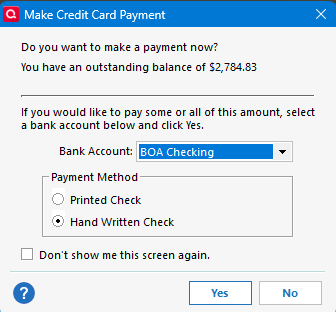
Here is how to work around this problem.
One option is just not use this dialog at all. You can make an entry in your register where the "category" is just [Investment Account Name]. The other way would be to use this dialog with a bank account and then change it to the investment account in the register. Which would result in this entry in the Investment account.

And that should be able to be matched to the downloaded "Withdraw" when it comes in, in the brokerage account.
1 -
@Chris_QPW I'm going to have to get back to you re: how Fidelity handles cash in Q. Both of the taxable accounts use the "Show Cash in a checking account" option, so your question doesn't apply.
And it's so infrequent that there's a cash transaction in the retirement accounts that I just don't remember. All dividends in the retirement accounts are either re-invested to directed to another fund … so the cash never actually appears in the account.
Q user since February, 1990. DOS Version 4
Now running Quicken Windows Subscription, Business & Personal
Retired "Certified Information Systems Auditor" & Bank Audit VP1


Categories
- All Categories
- 6 Product Ideas
- 34 Announcements
- 249 Alerts, Online Banking & Known Product Issues
- 19 Product Alerts
- 266 Welcome to the Community!
- 301 Before you Buy
- 1.5K Product Ideas
- 55.8K Quicken Classic for Windows
- 16.9K Quicken Classic for Mac
- 1K Quicken Mobile
- 834 Quicken on the Web
- 129 Quicken LifeHub