Barclays US | FDP-192 error [MAC]

Dear Quicken Team,
Barclay US (https://cards.barclaycardus.com/) recently implemented "SecurePass" which requires an email code to be sent an inputted for login (2FA). This is non-negotiable, i.e., cannot be de-activated. This results in the FDP-192 error when Quicken tries to sync data from the account. Is the team aware, and is there an ETA once this 2FA is enabled for use with Quicken?
It seems that Quicken has a terrible track record with Barclays and ensuring enablement (see the many previous outages that took ages for Quicken to adress. I am trying to see if this is also low on the priority or if this will be worked on asap.
Thanks,
Answers
-
I am also experiencing this!! There has been CONSTANT issues with Barclays in Quicken.
0 -
Thanks for reaching out!
Upon further review, I can see that you are also receiving an FDP-192 internally with your Barclays US account(s). This error message usually appears because Quicken is unable to update your account because your financial institution is using an unsupported authentication method. Quicken supports most authentication methods used by financial institutions, but some institutions use unsupported methods.
You may need to deactivate or change the secondary authentication method in use on their website before Quicken can update your account. Below are some instructions on how to do so. You can find these instructions and more information in this Support Article. It is always recommended to save a backup before proceeding (just in case).
- Log in to your bank's website and locate the setting that specifies the secondary authentication method in use for your account.
- Deactivate the secondary authentication method, or change it to something else, such as "security questions" (if available).
- Restart Quicken and try again.
If the issue is not resolved, please navigate to Help>Report a Problem and send a problem report with log files attached.
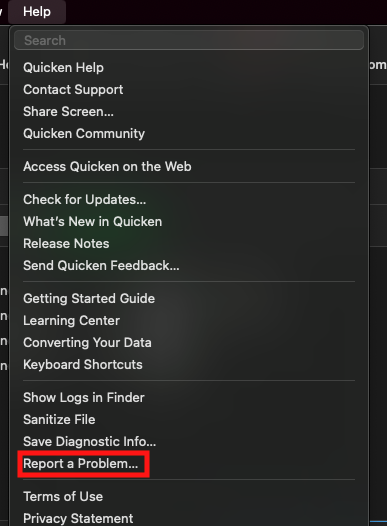
While you will not receive a response through this submission, these reports will help our teams in further investigating the issue. The more problem reports we receive, the better.
When I check our internal tools, it looks like you're using Quicken Simplifi. Is that correct, or are you using Quicken Classic for Mac?
Let me know how it goes!
(CBT-738)
-Quicken Jasmine
Make sure to sign up for the email digest to see a round-up of your top posts.
0 -
Hello All,
Are you still encountering this issue?
Thank you!
Quicken Kristina
Make sure to sign up for the email digest to see a round up of your top posts.
0

