Next scheduled deposit consistently dropped after cloud sync

I have a deposit transaction scheduled for the 15th and the 30th of each month in one of my accounts. The transaction scheduled for the 15th disappears after I do a cloud sync. I did a reset of my cloud data and that did not help. This happens consistently and is very annoying. I am running on Windows 11 and I use the desktop subscription version. This looks like a bug!
Comments
-
Is this reminder defined as a Paycheck Reminder or a "normal" Income Reminder?
Can you show us the complete Edit Income Reminder dialog view for this reminder?Can you please capture one or more images of the parts of your Quicken window showing the issue, sensitive information blacked out as necessary to protect your privacy but annotated to describe the situation, and attach the image(s)here?
How do I post a screenshot in the community from a macHowdo I post a screenshot in the community from windows
Please save images to files of file type PNG or JPG only. They're easier to work with than PDF files.
- Are you Syncing to Mobile/Web?
AND - do you actually use the Mobile app on your smartphone or the Quicken on the Web browser-based app?
The Sync process has been suspected of a number of weird happenings with Quicken. Could your problem be caused by Sync?
If you answer "yes" to the 1st question and "no" to the 2nd question, turn Sync off completely. You don't need it. The Sync process should only be used in conjunction with the Quicken app for Smartphones or the Quicken on the Web browser app. It cannot be used as a replacement for backing up and restoring your Quicken data file.
If you answer "yes" to both questions, try to Reset Sync so that the current cloud sync file is replaced with a fresh complete copy
0 - Are you Syncing to Mobile/Web?
-
Yes I am syncing to Mobile/Web, and yes we are actually using the Mobile App to track spending. As stated, I did the reset and it didn't work.
It's a regular income reminder. I just noticed that it also happens when I one step update. :-(
If I re-edit this dialog and change the "Due next on" back to 7/15, it fixes it until the next time I update or sync. Very annoying! I've tried to remove and recreate the reminder and that has not helped.
 0
0 -
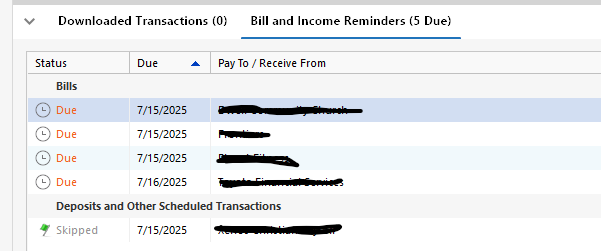
Another thing I just noticed. After I add the correct next date back into the reminder, it mysteriously has a status of "skipped". Not sure if there is any way for me to change that.
 0
0 -
Do you have pending transactions turned on for the account that has the problem income reminder? If so, turn off the pending transactions. There have been previous reports of pending transactions combined with cloud sync causing reminders to be skipped.
Quicken user since Q1999. Currently using QW2017.
Questions? Check out the Quicken Windows FAQ list0 -
There's one other thing I'd try:
Instead of "Remind me 0 days in advance" change to "Remind me 1 days" (or 3 days, the default) and see if that works better.
I suspect that "0 days" may glitch sometimes …0 -
Pending transactions is off for that account.
I set the reminder to 1 days instead of 0 days.
Sadly, neither worked. As soon as I did a "one step update", the transaction disappeared. 😒
0 -
@jvankeuls have you tried doing a data file validate before and after you add back that reminder transaction?
File → Validate and Repair File, and then select "Validate File". Review the validate log for any errors.
Then add the reminder transaction back in.
Then do another file validate.
0 -
I came up with a work-around. I created two bimonthly payments (first and second) as separate payment transactions, and removed the original. It's not the best, but it seems to bypass the problem. I've done this the original way for a long time — don't know what introduced the issue.
I got the suggestion for "Validate File" too late. Validate is successful now.
1 -
Im having the same issue with any month that I have 3 pay periods (My wife and I both get paid every 2 weeks, about 3 days apart). Quicken Classic will drop her or my 3rd deposit reminder. This also pervades into the budget as well and often even when the reminder for the deposit is still in place the month budget does not reflect it.
0


Categories
- All Categories
- 3 Product Ideas
- 34 Announcements
- 249 Alerts, Online Banking & Known Product Issues
- 19 Product Alerts
- 266 Welcome to the Community!
- 42 Before you Buy
- 1.4K Product Ideas
- 55.8K Quicken Classic for Windows
- 16.9K Quicken Classic for Mac
- 1K Quicken Mobile
- 834 Quicken on the Web
- 84 Quicken LifeHub