Edward Jones OL-332a error last two days

Anyone getting similar errors? My passwords are all good. I can sign in to my EJ accounts but Quicken is not updating since 7/13/2025
Best Answer
-
Hello All,
Thank you for taking the time to report this issue to the Community, although we apologize for any frustration or inconvenience experienced.
This issue has been reported to our Development and Product teams for further investigation and resolution. Though we do not currently have an ETA, you can bookmark the Community Alert linked below to get updates when available and to know when the issue is resolved. If you do not see the bookmark icon at the upper right, please make sure you are logged into the Community.
Thank you!
(Ticket #11856272/CTP-13760)
Quicken Kristina
Make sure to sign up for the email digest to see a round up of your top posts.
0

Answers
-
Same error since yesterday (7/13).
0 -
Same here. Same error since yesterday. I reported the problem.
1 -
I am having the same OL-332a problem with Jones today. Can log onto web site fine (which verifies my credentials are correct), but Quicken cannot. Account reset fails as well.
Greg
Quicken Classic Deluxe - Windows
Quicken User Since 2004
1 -
Started getting this just yesterday, and continuing today. Spoke with EJ rep and they said it's a Quicken issue associated with Direct Connect. Wanted to make sure Quicken was aware of this, and is hopefully working on a fix. Have reported the problem through Quicken yesterday and again just now.
[Merged Post]
1 -
Same here. Started on 13 July. Getting OL-332a. All accounts are good outside of Quicken. Please get this fixed soon Quicken.
1 -
Same here. since yesterday. I'm Windows subscription same issue as MAC reported above.
1 -
Same issue from Quicken for Windows unable to connect to Edward Jones. started 713, continuing today 7/14. I am using the correct password, verified by logging in directly at EdJones.
Thanks to OP for raising this with quicken.
1 -
Hello All,
Thank you for taking the time to report this issue to the Community, although we apologize for any frustration or inconvenience experienced.
This issue has been reported to our Development and Product teams for further investigation and resolution. Though we do not currently have an ETA, you can bookmark the Community Alert linked below to get updates when available and to know when the issue is resolved. If you do not see the bookmark icon at the upper right, please make sure you are logged into the Community.
Thank you!
(Ticket #11856272/CTP-13760)
Quicken Kristina
Make sure to sign up for the email digest to see a round up of your top posts.
0 -
Same here. Really annoying. One of many failures in the EJones link.
0 -
Same issue with me. I can log in to the Edward Jones website, but Quicken will not let me access my accounts for updating. Issue just started today. Quicken does not recognize my legitimate login credentials.
0 -
I'm having the same problem. Quicken indicates that I'm providing the wrong password, but I'm using the same login credentials that I use to access the Edward Jones web site. I first noticed this problem on 7/12.
When I try to reconnect my accounts with Edward Jones, Quicken now defaults to Express Web Connect, which is not what I'm looking for since I cannot download transactions.
0 -
Any update to this? Could we at least have an indication that it's being worked?
0 -
Hello @bethwr,
Thank you for reaching out. This issue has already been reported and is being worked on. Please see my earlier post for more information and for the link to the Community Alert:
Thank you!
(Ticket #11856272/CTP-13760)
Quicken Kristina
Make sure to sign up for the email digest to see a round up of your top posts.
-1 -
Same problem here, beginning 7/12/2025.
0 -
Since misery loves company, I have been getting the same error since July 12, 2025. Bookmarked merged issue to get updates.
Windows 11 Home Version 10.0.26100
Quicken Deluxe Version B73.11 Build 27.2.73.11
0 -
Appears to be repaired as of today the afternoon of July 15. Thanks!
0 -
Magically the problem has gone away - July 25 3pm CDT. The Issue, however, does not have an update yet, so not sure what changed.
NEW! 7/14/25 Edward Jones OL-332-A/15500(I'm always using the latest Quicken Windows Premier subscription version)0 -
I was able to reconnect to my accounts Edward Jones to Quicken, but now instead of showing the connection type as "Direct Connect", it shows it as "Direct Connect - Simple Investing". As a result, no investment register and apparently no ability to download transactions. I don't think this problem is fully resolved…
1 -
Hello @Bill Grimmer,
Thank you for letting us know your accounts changed to simple investing. You should be able to change your accounts back to Complete investing by backing up your Quicken file, then clicking the gear icon near the upper right and selecting Edit account details.

In the Account Details window, near the lower left, there is a Tracking Method section.
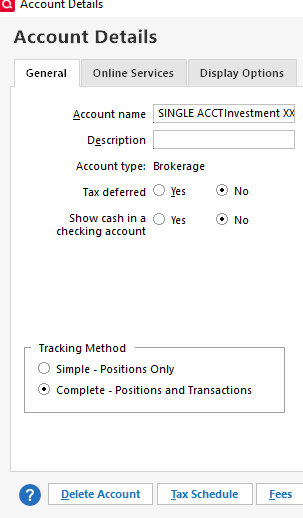
Select Complete, review the information that comes up, click Yes, then click the OK button.
Once you have changed your accounts back to Complete, I recommend that you check your Preferences to make sure default to Simple isn't turned on. To do that, navigate to Edit>Preferences>Investments. Make sure Default to Simple investing for new accounts is not selected.
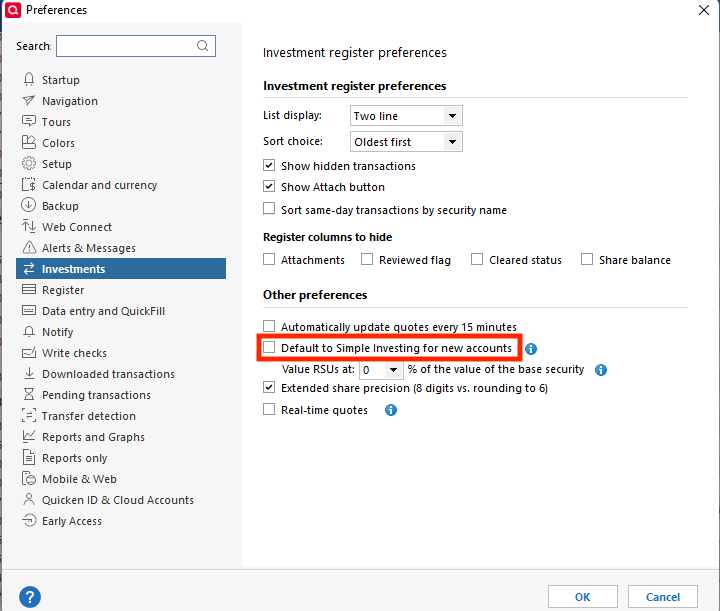
Please let me know how it goes!
Quicken Kristina
Make sure to sign up for the email digest to see a round up of your top posts.
0 -
Thanks, Kristina. I actually discovered the solution for my EJ accounts by accident and was able to change to the Complete view. I have never used the Simple Investing view and didn't even know that it existed until today. I checked Preferences and Default to Simple Investing was not checked.
Thanks again for your prompt reply!!!
1 -
Thank you for the follow-up,
I'm glad to hear you were able to switch back to the Complete view!
If you need further assistance, please feel free to reach out!
Quicken Kristina
Make sure to sign up for the email digest to see a round up of your top posts.
0 -
I was able to download transactions this morning without issue. Like others, not sure what has changed but it worked today.
1 -
I was able to download transactions normally late yesterday, and again today.
Greg
Quicken Classic Deluxe - Windows
Quicken User Since 2004
1 -
Mine has been working well the past 2 days as well, thanks for the quick fix!
1 -
Thank you for the follow-up,
I'm glad to hear the connection is working for everyone!
I am going to close this discussion. If anyone needs further assistance, please start a new discussion.
Thank you!
Quicken Kristina
Make sure to sign up for the email digest to see a round up of your top posts.
0

Categories
- All Categories
- 3 Product Ideas
- 34 Announcements
- 249 Alerts, Online Banking & Known Product Issues
- 19 Product Alerts
- 266 Welcome to the Community!
- 42 Before you Buy
- 1.4K Product Ideas
- 55.8K Quicken Classic for Windows
- 16.9K Quicken Classic for Mac
- 1K Quicken Mobile
- 834 Quicken on the Web
- 84 Quicken LifeHub