Update caused data corruption

When I logged on to Quicken yesterday, I did the standard requested update. I found my data files were completely messed up. Transactions were missing, accounts that were balanced at the end of last month are totally out of whack.
I tried restoring from a backup and spent the morning updating, then two of the accounts went haywire again.
Anyone have an idea what’s going on or what I can do about it?
Answers
-
Hello @rfrd00,
Thank you for taking the time to bring this issue to our attention!
To better assist you, could you please provide the following details:
- Where is your Quicken data file stored?
Is it on your local hard drive (C: Drive) or a cloud-based/external drive (e.g., OneDrive, Dropbox, USB, etc.)? - Aside from restoring a backup, have you tried any other troubleshooting steps? If so, could you let us know what you've already attempted?
Check back and let us know!
-Quicken Anja
Make sure to sign up for the email digest to see a round up of your top posts.0 - Where is your Quicken data file stored?
-
@Quicken Anja If you don't mind, I have some other troubleshooting steps to try that might help.
@rfrd00 - these troubleshooting steps may not apply to your situation, but they might be worth a try, otherwise please continue working with Quicken Anja to resolve your issue.
Do you have SYNC turned ON, and use Mobile & Web? If it is ON and you don't use Mobile or Web, then turn SYNC to OFF.
If it is ON and you use Mobile or Web, try resetting the cloud data -
(Always be sure to make a backup of your data file before doing any troubleshooting.)
Before you reset make a backup of your Quicken Data File and make sure the data file is updated and doesn't have the the missing data issue.
Then reset the cloud data file, following the instructions in the attached Quicken Support help documentation.
Make sure to select the first option (No) when asked to sync to the latest version -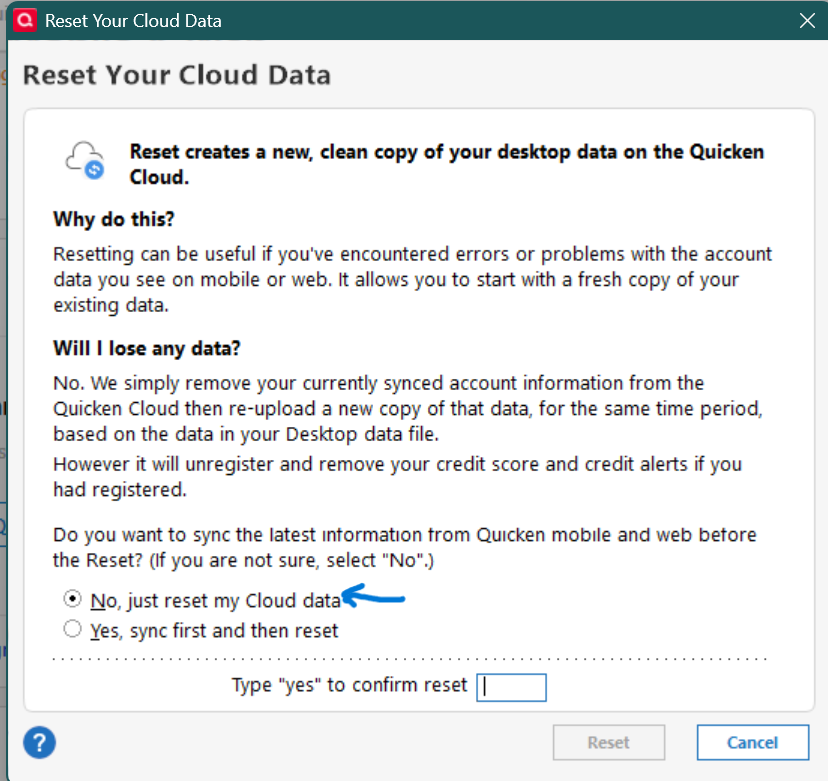 1
1 -
My datafile is located on the C Drive. I save backups in 2 different locations, also on the C drive.
I restored a backup from an earlier date and tried resurrecting data, but when I switch to a different account the account I was working on gets all wacky again.
It really feels like there is some sort of bug in my software.
0 -
It's probably not a systemic Quicken bug as others, including myself, are not experiencing the issue. But, know that all Quicken data files are stored on the "C Drive". However, if you didn't change anything, it's probably located in a Onedrive hot folder. What's the full path to your data file?
0 -
I'm still using QW2014 Premier, but understand the data corruption issue, so I think this has been going on for a long time. I don't often run the validity check, but when I do, I get the same reported issues often on the same transactions that I have corrected before, actually putting my data back to the original content. It is my belief, as a 50-year plus IT guy, that Quicken corrupts its own data. After the validity check and my 'correcting' the same transactions, it will again report the same issues with the same transactions at a later time.
This is one of the several reasons I will not upgrade, and especially not pay a subscription fee for Q. As long as I don't do validity checks, all seems to work pretty well. I almost NEVER have data issues or get errors
I've read that Q currently secretively utilizes a 'container' concept which places all the data structures into a single place, as opposed to the earlier concept of utilizing several files. While this concept is fairly new and likely in response to utilizing cloud storage, it appears to have some design problems that have not been addressed. I have also heard, but cannot substantiate, that the current structures utilized by Q are pretty obsolete.
I am seeing lots of advertising for the new Intuit Credit Karma thing, which I have not looked at, but will say that Intuit should maybe take back ownership of Quicken and make some serious changes. I would even be willing and happy to help them identify problems and make corrections, but of course no one wants to give us access to the structures.
Ó¿Õ¬
Faithful Q user since 1986, with historical data beginning in 1943, programmer, database designer and developer for 42 years, general troublemaker on Community.Quicken.Com0


