Some Capital One accounts are not importing transactions

For the past few months, I have had an issue where 3 of my savings accounts at Capital One no longer import transactions during One Step Update. The online balance for each account gets updated correctly, but no new transactions come in. (My other accounts at Capital One - checking and other savings - all import correctly.) I also tried manually importing a QFX file for one of the accounts that doesn't update. I can see the transactions in the QFX file if I view it in Notepad, but still no transactions get imported when I import the QFX file into Quicken. I have tried resetting the Online connection, as well as reauthorizing sharing from Capital One. Nothing has worked.
Has anyone else seen this and gotten it resolved?
Comments
-
Hello @mtcrotty,
We appreciate you bringing this issue to our attention!
To start with, please take a moment to review and follow the guidance found in this support article.
Hope this helps!
-Quicken Anja
Make sure to sign up for the email digest to see a round up of your top posts.0 -
Hello,
Thanks for your reply. I checked everything in that support article, and it did not resolve the problem. In fact, now I have another account at a different institution that is not downloading transactions, even though it says that the "last download" was today (but there are transactions from 4 or 5 days ago on the credit union website).
0 -
@mtcrotty Thanks for the update!
Could you please let us know the full name of the additional financial institution that’s not downloading transactions correctly? This will help us investigate further.
Looking forward to your reply!
-Quicken Anja
Make sure to sign up for the email digest to see a round up of your top posts.0 -
"State Employees Credit Union - NC" is the additional financial institution that's not downloading anything in the last week. I have it checked in my One Step Update Settings window, but then in the update results, it is not listed. However, on one of the registers from that institution, the "Last download" is listed as today.
0 -
Thanks for the update. While I did see an internal FDP-103(CC-503) error once, subsequent connection attempts aren’t producing any errors on our end and appear to show as successful.
To help us investigate further, could you please submit your log files through Quicken by following these steps?
- In Quicken, go to Help in the top menu bar.
- Select Report a Problem.
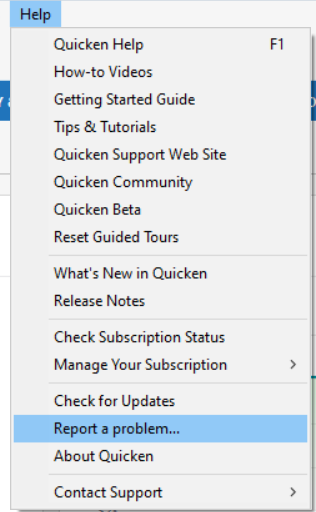
- In the window that opens, include a brief description of the issue.
- Make sure the following boxes are checked:
- All check boxes for each Log File
- Screenshot (if applicable)
- Click Send to Quicken.
Once you’ve submitted the report, please let us know here.
Thanks again!
-Quicken Anja
Make sure to sign up for the email digest to see a round up of your top posts.0 -
"State Employees Credit Union - NC" is now downloading correctly. However, now "Target National Bank" credit card is saying it is downloading correctly, but no transactions are downloaded. (This is using Express Web Connect.)
I just submitted the report.
0 -
Thank you for following up!
If you haven't already, I suggest you try signing out of your data file completely and then signing back in to refresh the registration token for your Online Connected Services. However, I do recommend that you first save a backup file prior to performing these steps.
- Navigate to Edit
- Preferences...
- Quicken ID & Cloud accounts
- Click Sign in as a different user (or it might say Sign in using a different Quicken ID)

- Follow the prompts to Sign Out
- Sign back in using your Quicken ID (email) and password (this screen is not a pop-up box)
I hope this helps!
-Quicken Anja
Make sure to sign up for the email digest to see a round up of your top posts.0 -
Thanks, I just tried that and when I tried the "Target National Bank" account again, it gave me a CC-800 error and then forced me to reactivate one step update. When I do that, it won't let me add the account.
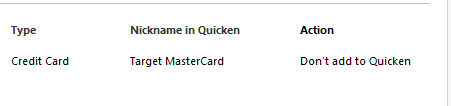
After that, I tried to go through the "Fix this" steps and eventually I think I was able to get downloads working again for this account using Reset Account.
I will check later to see if the Capital One accounts are downloading transactions at all.
UPDATE: the original 3 accounts with Capital One are still not downloading transactions.
0 -
Just submitted a report using Quicken Help, as directed above.
Can't update Capital one credit card accounts for past 3+ months after following instructions from Quicken. Help!
0 -
"State Employees Credit Union - NC" stopped working again. I just ran one step update (two times) and it did not download transactions that posted 2 days ago on the financial institution website. No errors showing up at all in Quicken - it just says that last download was completed a few minutes ago. In fact, there is no indication at all that transactions are not being downloaded!
UPDATE: Doing a Reset Account seems to have fixed this one.
1 -
"Target National Bank" stopped downloading transactions again. This problem seems widespread across multiple financial institutions.
0 -
Hello @mtcrotty,
Target National Bank is a known issue, please see the Community Alert linked below:
Some customers have reported that the transactions download once the statement comes out, but no transactions that happened after the statement cutoff date download until the next statement comes out.
How often is State Employees Credit Union - NC failing to download? Does resetting the account always fix it?
Thank you!
Quicken Kristina
Make sure to sign up for the email digest to see a round up of your top posts.
0 -
Hello @Quicken Kristina,
The State Employees Credit Union - NC accounts fail a couple times a week. Similar to the original problems in this thread with Capital One accounts (still not resolved), although the Capital One accounts that don't update pretty much haven't updated in months now. (But some Capital One accounts do update.)
UPDATE: For some of the State Employees Credit Union - NC accounts that have been failing to download transactions recently, I was able to get them to download, but I had to do a Reset Account on each individual account in Quicken, despite all of the accounts being in the same login with the financial institution.
0 -
Thank you for your reply,
When I check our internal tools, it looks like you created a few test files earlier this month. If your Capital One accounts are connected in any of those files, please deactivate them in the test file, then test to see if the issue persists in your main file.
I can see that you sent logs, but for us to be able to check the logs to verify if the missing transactions are being sent to Quicken, we need transaction information to check for. Please provide at least 3 examples of your missing transactions (date, payee, and amount). If you aren't comfortable posting that information in this discussion, then please use a problem report to send the information, and let us know you sent it.
Did you test your State Employees Credit Union - NC account(s) in any of the test files? If you did, do you recall if the issue persisted in the test file? That information can help determine if the issue is file specific or not.
Thank you!
Quicken Kristina
Make sure to sign up for the email digest to see a round up of your top posts.
0 -
Thanks. I just deactivated the Capital One accounts in the test files. (I didn't test State Employees Credit Union - NC accounts in any of the test files.)
Then I did another one step update in my main file. I just submitted 3 examples of missing transactions in a problem report.
0 -
Thank you for your reply,
Thank you for sending the logs and sample transactions. Just to confirm, were a couple of those sample transactions manually entered in your register? Do you sync any of the problem accounts with the Quicken Cloud?
Thank you!
Quicken Kristina
Make sure to sign up for the email digest to see a round up of your top posts.
0 -
Yes, I have been manually entering transactions into my register because some of these accounts have been missing transaction downloads for months now.
I don't know if I sync accounts with the Quicken Cloud or not.
0 -
Thank you for your reply,
Unfortunately, when you manually input transactions in the register, those manual inputs also show up in the logs.
If possible, please refrain from manually inputting missing transactions until after you have sent the logs along with 3 sample transactions that have not downloaded into your Quicken and have not already been entered into the register.
Thank you!
Quicken Kristina
Make sure to sign up for the email digest to see a round up of your top posts.
0 -
Thanks. I just uploaded another 3 missing transactions. I have not manually added any of these transactions to my Quicken file.
1 -
Thank you for your reply,
I reviewed the logs, and the transactions are there. Since Capital One connects via Express Web Connect + (EWC+), and the transactions you provided are in the logs, but not showing up in your accounts in Quicken, please backup your Quicken file and follow these steps:
- Navigate to the BullseyeSettings.ini file located in the File Explorer and open the file in Notepad.
- The file path is Local Disk (C:) > ProgramData > Quicken > Inet > Common > Localweb > Bullseye > BullseyeSettings.ini.

- If you cannot see the ProgramData folder in the C: Drive window, go to View > Show > Hidden items.
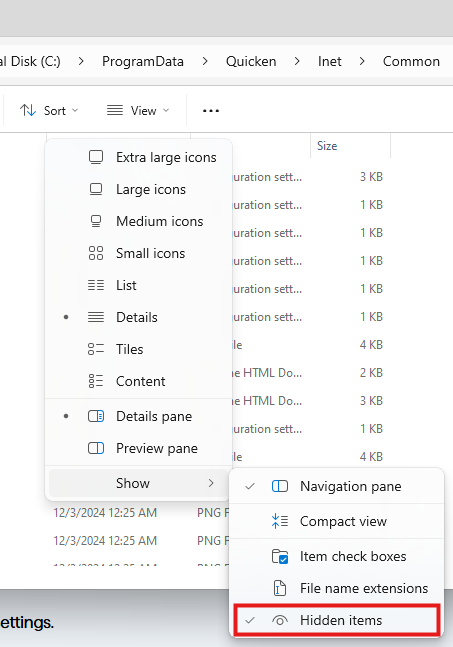
- The file path is Local Disk (C:) > ProgramData > Quicken > Inet > Common > Localweb > Bullseye > BullseyeSettings.ini.
- Scroll all the way down to the bottom of the BullseyeSettings.ini file and enter the following lines of text into the file:
- [Override]
- AllAccounts=1
- OlderTransactions=90
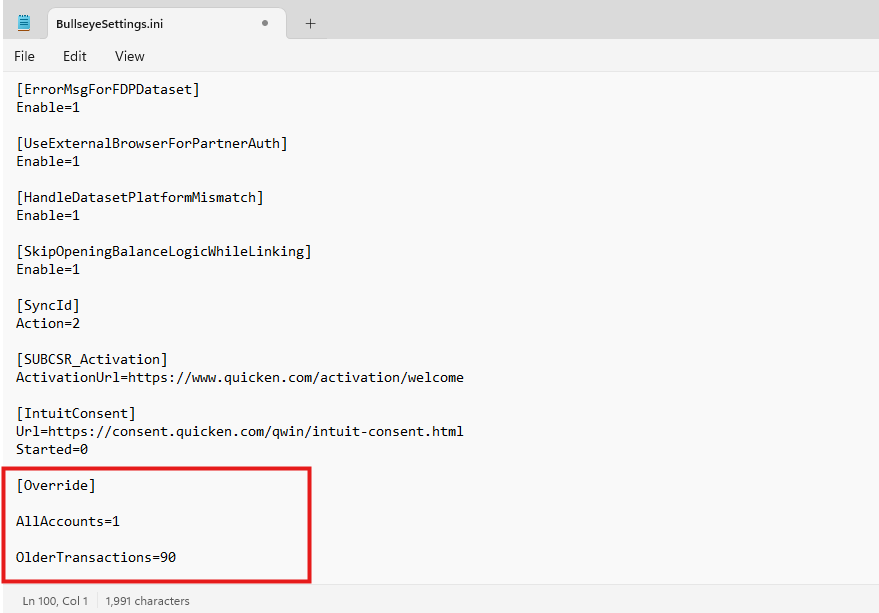
- Go to File > Save.
- After you make the changes to the BullseyeSettings.ini file, run a One Step Update in Quicken.
Please let me know how it goes!
Quicken Kristina
Make sure to sign up for the email digest to see a round up of your top posts.
0 - Navigate to the BullseyeSettings.ini file located in the File Explorer and open the file in Notepad.
-
I began experiencing the same issue about five days with Capital One 360 Checking not downloading into Quicken via One Step Update. I even tried to do a manual download from Capital One into Quicken, but it still didn't pick up a handful of recent cleared transactions. I followed the steps recommended by Quicken Kristina this morning and did a One Step Update afterwards. But, it still did not pick up the cleared transactions.
0 -
Hello @David Gray,
Thank you for letting us know you're seeing a similar issue. You mentioned that you also tried importing a QFX file. Did you open the file to verify if the missing transactions are in that file or not?
If you haven't already done so, I recommend following these steps from our article on missing transactions/new transactions not downloading:
Be sure to follow these steps in order:
- Go to Edit > Preferences > Downloaded Transactions. The option Automatically add to banking registers needs to be unchecked.
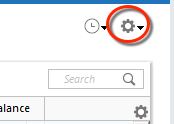
- Refresh your online account information by clicking the Actions Gear Icon on the upper right of the register, and select Update Now. Follow the on-screen instructions to complete the update.
- Confirm that the Sort Order in your account is by Date; just click the top of the Date column in your account register. It's possible the transactions are in your register, but not where you thought they'd be.

- Click the Reset button at the top of the register. This will confirm that there's no filtering in your account register.
- Go to Actions (Gear Icon) > Register Columns > Check Downloaded Payee in the account register. This allows you to search by Payee to confirm the transactions haven't been renamed unexpectedly.
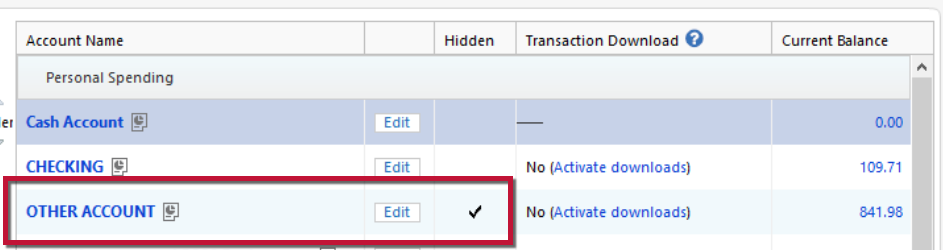
- Go to Tools > Account List and check Show Hidden Accounts at the bottom left. Confirm the missing transactions haven't been added to a hidden account by clicking on the name of any account that appears with a check mark in the Hidden column.
I look forward to your response!
Quicken Kristina
Make sure to sign up for the email digest to see a round up of your top posts.
0 -
Hi Kristina,
I made the changes to the .ini file and did another One Step Update, and I am still not seeing the missing transactions in the register.
Thanks, Michael
1 -
Hello @Quicken Kristina,
I did all that you suggested but, regrettably, the missing recent transactions are still missing and the reported "Online Balance" is also incorrect. Appreciate your efforts to help us through this. I'm wondering if, at some point, I consider deleting the account and re-adding it. I see that as a last resort, but since this is a key checking account for me with a fair amount of activity, I really need to get this restored to a functional condition.
David
0 -
I had an issue with my Capital One 360 Savings account downloads a few weeks ago where it wasn't bringing in any new transactions with One Step Update.
I solved it by setting up a new Quicken savings account with the online set-up using the "Capital One Card Services" financial institution (whereas my old Quicken account was set to the "Capital One - New" Financial Institution).
The first One Step update for the new account brought in all the recent account activity (I forget how days back it went - I think maybe 30?). Then I moved all of the prior activity from my old Capital One Quicken account to the new account in mass using the "Move Transaction(s)" functionality and was back in full balance.
That solved the issue and One Step Update has been working fine since.
3 -
@rjgrichmond Thanks for sharing your workaround solution. It appears like my best option as well. I'll give it a shot and let you know how I make out.
0 -
Thank you for your reply @mtcrotty,
Since the recommended troubleshooting did not correct the issue, please reach out to Quicken Support directly for further assistance, since they have access to tools that we can't access on the Community and they're able to escalate the issue as needed. The Quicken Support phone number can be found through this link here. Phone support is available from 5:00 am PT to 5:00 pm PT, Monday through Friday.
I apologize that I could not be of more assistance!
Quicken Kristina
Make sure to sign up for the email digest to see a round up of your top posts.
1

