How to find my current checking account?

Comments
-
My last checking register that comes up is 5/23/2023?
0 -
Didnt get an answer?
0 -
Hello @vernusald,
Thank you for reaching out to the Community with this issue. To clarify, the Community is not live chat support. It is a forum where users help each other, and there are a few moderators, like myself, who can provide troubleshooting.
If you prefer doing real time troubleshooting with tech support, you can contact Quicken Support via phone or chat. The Quicken Support contact information can be found through this link here. Phone support is available from 5:00 am PT to 5:00 pm PT, Monday through Friday. Chat support is available from 5:00 am PT to 5:00 pm PT, 7 days a week.
If you would like to troubleshoot the issue through the Community, then please provide additional information so that we can help you. Which financial institution is the problem account with? When you navigate to Tools>Account List and check the Transaction Download column, does it show the account connected (if Quicken sees the account as connected, it will say Yes and show the connection type in parenthesis)?
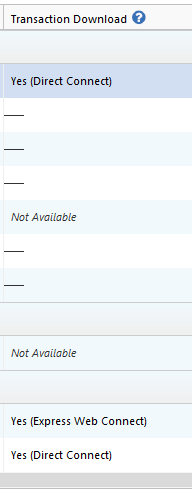
I look forward to your response!
Quicken Kristina
Make sure to sign up for the email digest to see a round up of your top posts.
0 -
@vernusald - This is a users forum and except for a few Moderators we are all users just like you. Responses to posts will come when a user who sees your post feels they have something to say or can provide some assistance. Sometimes it is just minutes but other times it might be hours or even days before a reply to a post is made.
If you need immediate assistance on something you should contact Quicken Support via Chat or Phone per this Support Article link: Contact Quicken Support.
Have you tried clicking on the Date column header in the Account Register? Sometimes something happens where the order in the Register gets changed (either intentionally but then forgotten about or unintentionally). Clicking the Date header once or twice will then restore the correct date order in the register. .
Quicken Classic Premier (US) Subscription: R66.23 on Windows 11 Home
0

