Connection to Target CC not working for months, when will it be fixed??

For the last several months, the connection capability for Target CC has been on and off. It now requires 2FA for every connection, unlike ANY other bank that Quicken connects to. Sometimes it will download transactions and sometimes not. It stopped downloading back in May and then worked for awhile. Now, it won't download anything after 6/30/25.
As a side effect, after responding to the 2FA prompt for Target, and downloads for all accounts finishing, the Connection Status Window always says 0 downloads for all accounts, like it was reset between downloading other accounts and trying the Target download.
Comments
-
Hello @riverrunner2,
Thanks for the detailed post—sorry to hear you’ve been running into this ongoing issue.
Regarding the 2FA prompts:
The requirement for two-factor authentication (2FA) with each connection is set by the financial institution—in this case, Target—not by Quicken. Some institutions enforce 2FA on every login attempt for security reasons, and unfortunately, Quicken cannot bypass those requirements.You can try disconnecting and then reconnecting the Target account in Quicken to see if that helps reset the behavior. When reconnecting, be sure to link to the existing account in your file to avoid duplicates. However, if the repeated prompts continue, we recommend reaching out to Target directly to see if there’s any way to reduce the frequency of the 2FA requirements on their end.
For the download issues you're experiencing, can you provide a few more details to help us better assist?
- Where is your Quicken data file stored? Is it saved locally, or on a cloud service/external drive (iCloud, Dropbox, USB, etc.)?
- Have you already tried any troubleshooting steps? If so, which ones?
- Are you using a VPN when updating your accounts? If so, does disabling it make a difference?
- Do you have antivirus or malware protection software running that could be interfering with Quicken? Have you tried temporarily disabling it to test?
- Were there any significant system or software changes (Quicken updates, OS changes, new installations, etc.) right before the issue started?
Check back and let us know!
-Quicken Anja
Make sure to sign up for the email digest to see a round up of your top posts.0 -
Hello again,
We haven't heard back from you in a while. Do you still need assistance?
Thank you!
-Quicken Anja
Make sure to sign up for the email digest to see a round up of your top posts.0 -
Target Credit card one step update transaction download started working for me on Windows today after being broken for a very long time. Seems to be all fixed.
0 -
Thanks for chiming in and sharing this! Glad to hear it is working for you now.
-Quicken Anja
Make sure to sign up for the email digest to see a round up of your top posts.0 -
_Not_ working for me. I disconnect, go through set up account, log in successfully—then get the box for the proper account stating "Don't Add to Quicken" with no other option. I blanked out the account number in Edit and got the same result. What do I do now?
1 -
Hello @erwiest,
Thanks for providing these details. I checked your account, and there don’t appear to be any internal errors occurring. To help troubleshoot further, could you clarify how you are reactivating the account?
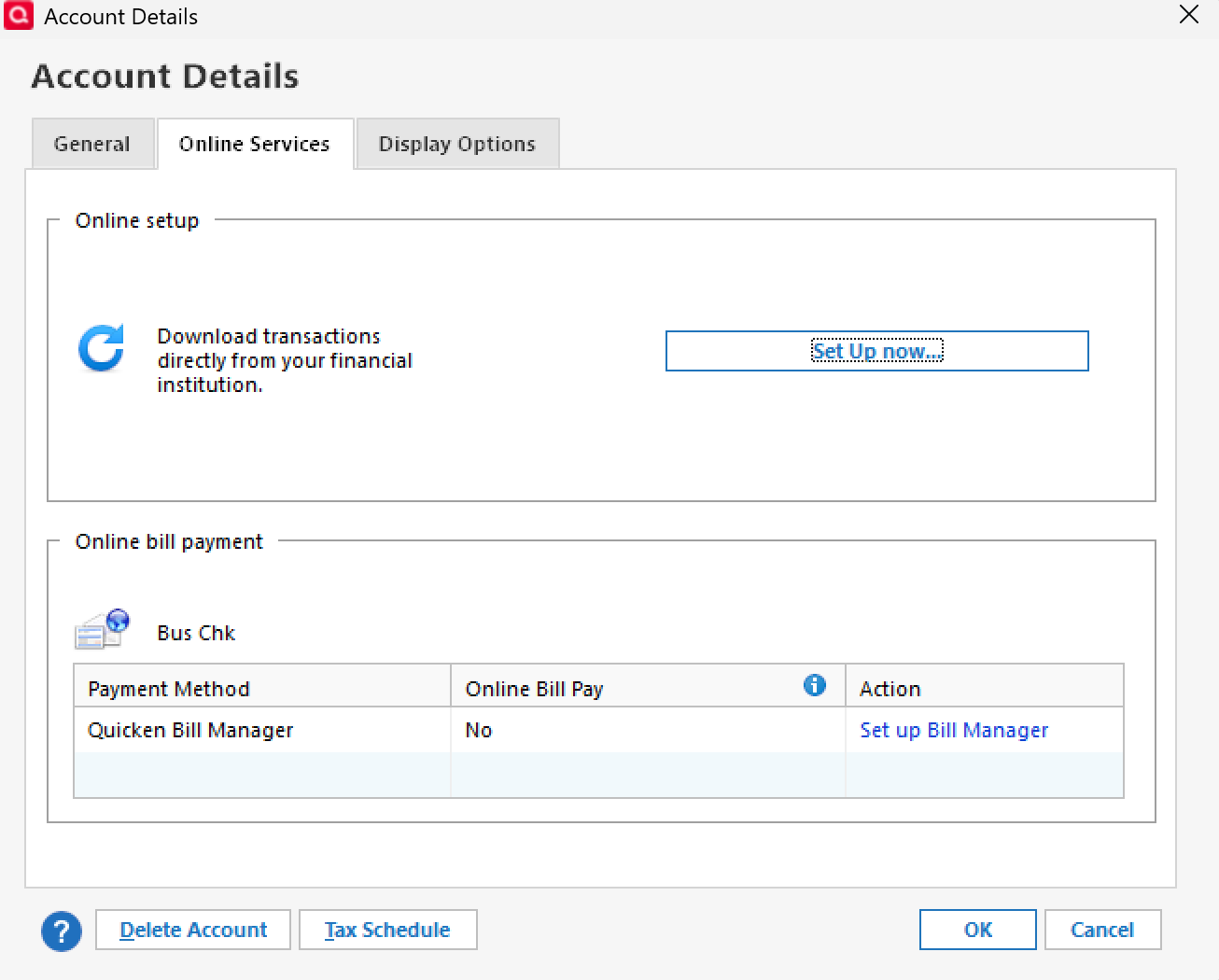
Are you using the Set Up now… button in Account Details > Online Services—
or are you going through Tools > Add Account?
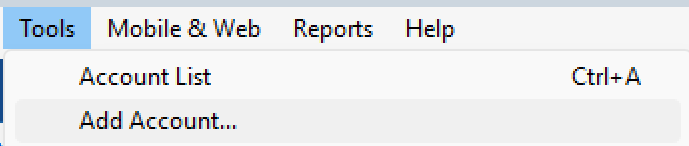
This will help us pinpoint the next steps and provide more targeted guidance.
Thank you!
-Quicken Anja
Make sure to sign up for the email digest to see a round up of your top posts.0 -
I've tried both. Set UP Now would be my preferred.
0 -
I've tried everything including downloading transactions from the Target site in qfx or ofx files and Quicken cannot open them. Beyond frustrating.
1 -
Hello @MYD60659,
Thank you for letting us know you're seeing this issue. Both the issue with transactions not downloading and the issue with QFX files not importing have been reported to the proper channels for further investigation and resolution.
In the meantime, there is a work around that has worked for some customer to import Target QFX files:
I hope this helps!
(CTP-13044/CTP-13118)
Quicken Kristina
Make sure to sign up for the email digest to see a round up of your top posts.
0 -
I have had this issue for months, trying to troubleshoot and correct on my own to no avail. I can download the transactions in QFX format and I either get a financial institution mismatch or a FI is inactive error message. When I try to set up the account in Quicken for Mac (the very latest version (802.57282.100)) and choose Target National Bank (yes, I know that the card says TD Bank, but the Target Card support told me they were always TD Bank), it doesn't recognize my credentials, the same credentials exactly that I used to access the Target website and download the QFX file. This is beyond frustrating.
I'm looking at the QFX file in a text editor, and I don't see anything that looks like the workaround described above.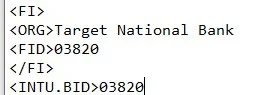
I spent 45 minutes talking to a Target representative who had no knowledge about Quicken. Someone from one side or the other must know what's occurring, even if they can tell me they're working on a fix. Keep in mind, though, that it's almost been 6 months since this last worked.
0 -
This workaround
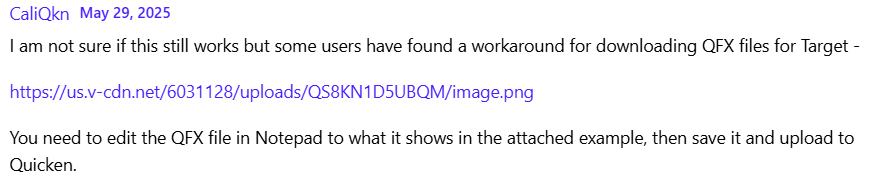
worked for me but what an annoyance! and if that is indeed the only issue, why can't the problem be fixed so that the proper text or code is downloaded in the file?
Is there no better way???
1 -
Sorry, to answer your questions from July 19, I store my data locally, don't use a VPN, have tried reconnnecting. It finally started downloading a few weeks ago (without an extra MFA prompt!) and then about a week or so ago said NO_ACCOUNTS_FOUND and several Reconnects still didn't find the account though I can log in through the Target portal and find it. So, it's now worse than before.
0

