Edward Jones Transactions

I am a long time Quicken user.
Version R63.21 build 27.1.63.21 Windows 10 Enterprise
I went a week during a recent move without logging in to Quicken. When I did launch one step update my accounts except for Edward Jones accounts updated normally. Ed Jones account do not show any transactions windows although they show balances in the side bar AND snapshot of account and pie graph.. I reset the accounts. I then deactivated and reactivated. Nothing has worked. Any suggestions?
Windows 10 * Quicken Premier user.
Quicken user since 198x something. Started with Quicken for DOS 5.X
Comments
-
Hello @tbf47,
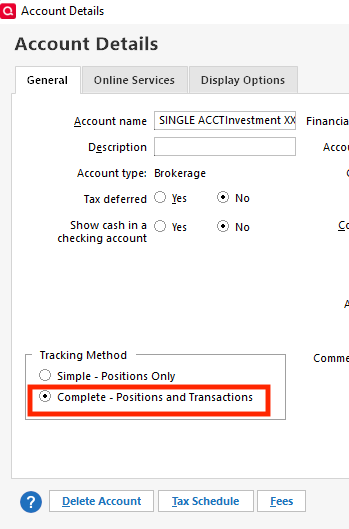
Thank you for letting us know you're encountering this issue. What you describe sounds like your investment account ended up in Simple Investing instead of Complete investing. If that is what happened, then to fix it, when you're in the account, click the gear icon near the upper right, select Edit Account Details, and on the General tab, near the lower left, click the radio button next to Complete - Positions and Transactions, then click the OK button.
Please let me know how it goes!
Quicken Kristina
Make sure to sign up for the email digest to see a round up of your top posts.
0 -
Quicken Kristina
Make sure to sign up for the email digest to see a round up of your top posts.
0 -
I have same issue as @tbf47 - per Kristina suggestion above, I tried to change to 'Complete' but it is 'greyed' out and I am unable to change from 'Simple' to 'Complete'. What's happened to Quicken vis a vis EJ, since this has been working for over a year now.
0 -
Hello @gvalspoke,
Thank you for letting me know you're seeing the same issue. To help troubleshoot, I checked our internal tools, and can see you're connected to Edward Jones via Express Web Connect rather than Direct Connect. That is why you're not seeing an option to switch to Complete tracking.
The way to resolve that issue would be to backup your file and switch to Direct Connect, however, currently, Direct Connect is not working. See this alert for more details:
Once that known issue is resolved, I recommend that you backup your file, deactivate the problem account(s), then navigate to Tools>Add Account. Search for Edward Jones. Click the Advanced Options link.
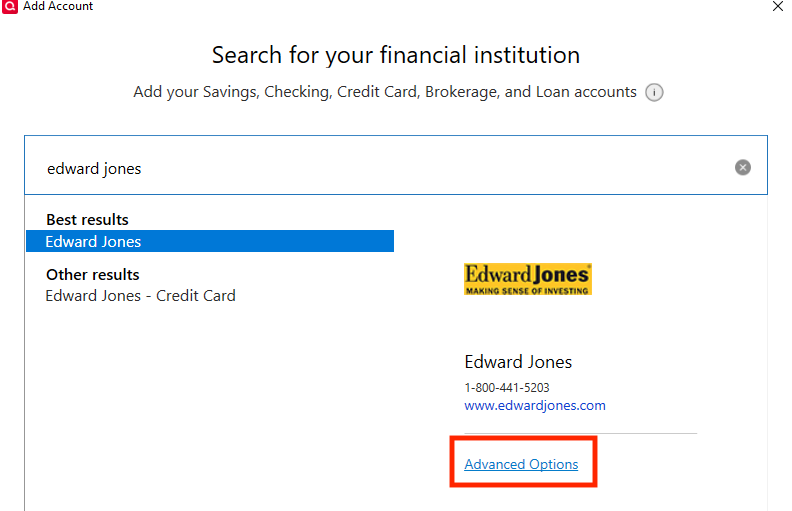
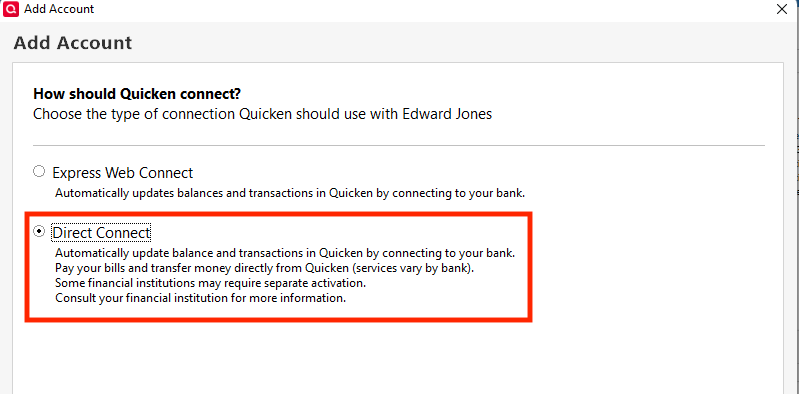
Read the information screen, click continue, then make sure Direct Connect is selected, and click Next.
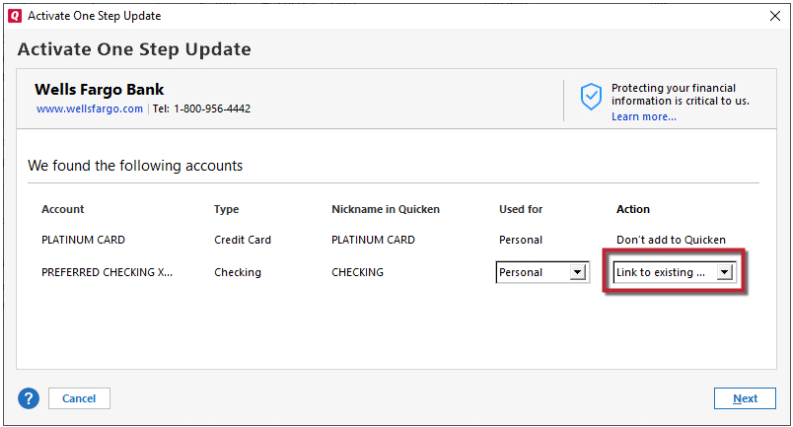
Follow the prompts. When you get to the Add/Link screen, make sure to carefully link your account(s) to the correct nickname in Quicken.
I hope this helps!
Quicken Kristina
Make sure to sign up for the email digest to see a round up of your top posts.
0

