zzz-Fidelity Updates
Comments
-
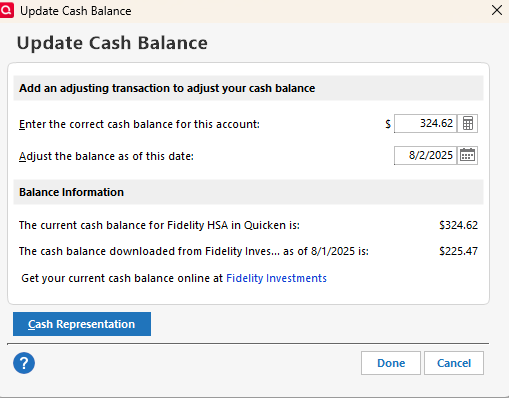
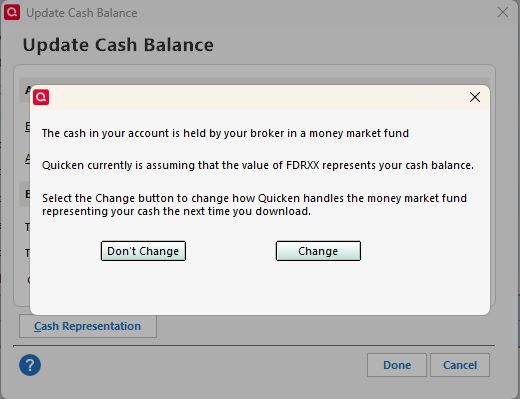
Thanks AZIGGY for your comment about the Cash Representation button. I looked and my HSA (the one that asked me while I was converting) shows this button and the ability to select how CASH is treated. My other Fidelity accounts (IRA, ROTH and BROKERAGE) do NOT show this button. Here are the various dialog boxes:
HSA:
HSA button pressed:
IRA:
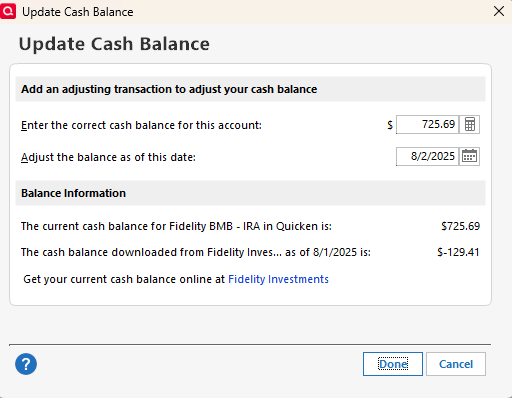
So, as I stated above, the code to select how CASH is treated does exist, we just need Quicken to update things to give this option for all types of accounts and Money Market Funds used (FDRXX, SPAXX, FCASH, etc).
AND, once you select "Securities", don't hide the button to prevent you from switching back to CASH (which may explain why my other accounts don't show this button).
1 -
If the connection shown on the Online Services tab of Account Details looks like what is highlighted in yellow in the following picture then your accounts are correctly set up with DC. This is the connection setup that you should be using on both of your laptops until the EWC+ issues are resolved or until the hard cut-in to EWC+ occurs.:
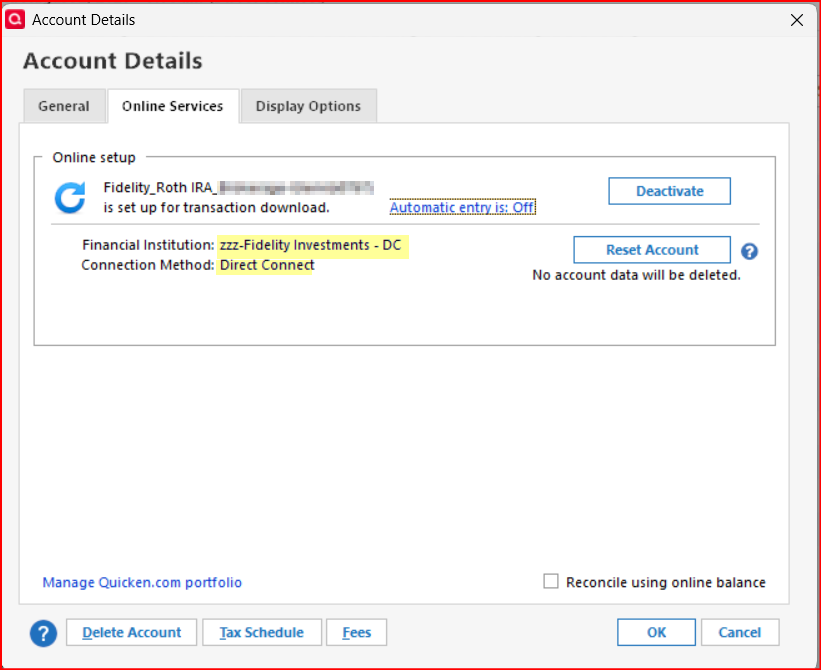
There is an issue, as you indicated, when restoring a backup file. While the DC connection remains intact through the restoration process, all EWC and EWC+ connections will be broken and these are the connections that most credit cards and many bank accounts use. So, yes, you will need to set up those connections again via Add Account or Set Up Now.
I hope this answered your questions.
Quicken Classic Premier (US) Subscription: R66.23 on Windows 11 Home
0 -
I wonder how linked cash accounts are being handled?
Deluxe R66.23, Windows 11 Pro
1 -
A side issue, but one I've seen in several comments lately. You wrote:
"There is an issue, as you indicated, when restoring a backup file. While the DC connection remains intact through the restoration process, all EWC and EWC+ connections will be broken and these are the connections that most credit cards and many bank accounts use. So, yes, you will need to set up those connections again via Add Account or Set Up Now."
I've done a fair number of backup restorations over the years, including one just last night (to correct an issue with a Fidelity download unrelated to the EWC+ transition), and I've never had to reset any EWC/EWC+ or DC connections. Is this something recent or related to the Fidelity (or ML) transition(s)? I haven't attempted either yet, nor will I try until the last possible moment.
0 -
I just cracked the case and now see why CD's are being priced at $1.00 and change when downloading.
Fidelity has always priced them at $1.00+ per quantity unlike bonds priced at $100 (plus or minus )
However, Quicken would always bring the price over at $100(plus or minus)
Now, Quicken is downloading at Fidelity's closing price of $1.00
0 -
The fix is simple
Just adjust the shares for all CD's and price.
0 -
Fidelity's closing price for CD's is $100+, but Quicken is downloading all CD's at $1.00+
Hope this sense—
0 -
Thanks for pointing this out. I should have stated that the EWC and EWC+ connections might have been broken during the restoration process, not that they will be broken. I've edited my previous post to reflect this.
I don't remember when that possibility started occurring but it was a while ago. I think it might have something to do with how old the backup file is that is being restored but I'm not sure of that. All I know is that it does sometimes happen.
Quicken Classic Premier (US) Subscription: R66.23 on Windows 11 Home
1 -
Deleted, already answered
0 -
The Cash Representation dialog seems quite odd (Don't Change & Change buttons). Why not simply radio buttons?
And it does seem to indicate FDRXX may be hard coded. This choice should be available for the multitude of money market funds (and FCASH) from Fidelity (or at least all that can be used as core positions, such as SPAXX, FZFXX, and FCASH; are there others?).
1 -
I had an issue a while ago whereby if mutual fund symbols were not included, then it wouldn't price the stocks correctly at the end of the day.
Barry Graham
Quicken H&B Subscription0 -
It is very odd that Fidelity has always priced brokered CDs at 1.00. The industry standard for brokered CDs is to price them at 100.00. Does your Fidelity account show the 1.00 price?
0 -
Which MMF is identified here is because Fidelity tells Quicken which MMF is the Core Account. That is what the Quicken Developer told me the other night.
The election of which MMF is the Core Account must be done in the online account at Fidelity. Fidelity then notifies Quicken. We users cannot nor, IMO, should we have the option to select which MMF is to be treated as cash because of the possibility that our action in Quicken might not then match what Fidelity is downloading.
BTW, FCASH is not a MMF. It is more of a High Yield Bank Savings sweep account with no actual shares like a MMF would have. So, what Fidelity told me is that FCASH should always be downloaded as Cash with no shares transactions. (Unfortnately, FCASH's yields are about 1/2 of the MMF options. IMO, this was nothing more than an approximate 2% money grab by Fidelity to improve their financials by taking more money from their customers. But that's another story).
Quicken Classic Premier (US) Subscription: R66.23 on Windows 11 Home
1 -
I agree. I don't recall ever seeing any of my brokered CDs download as anything other than $100/CD share except once for a couple of days last winter where they started downloading the shares and prices like what is happening now. I think at that time there was an issue where Fidelity's system started confusing fractional CD sales with their standard CD sales.
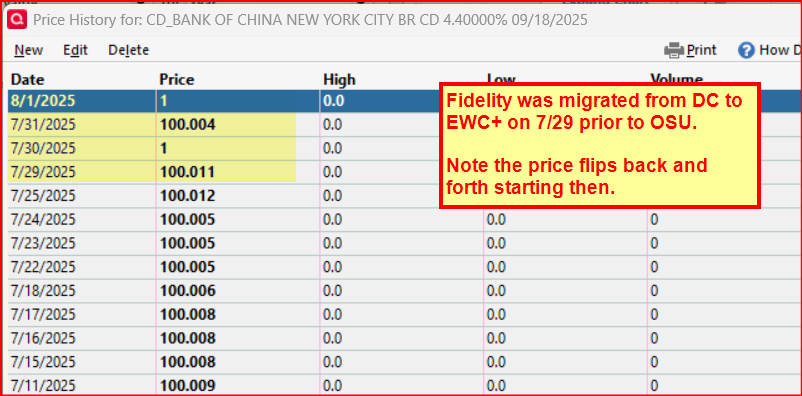
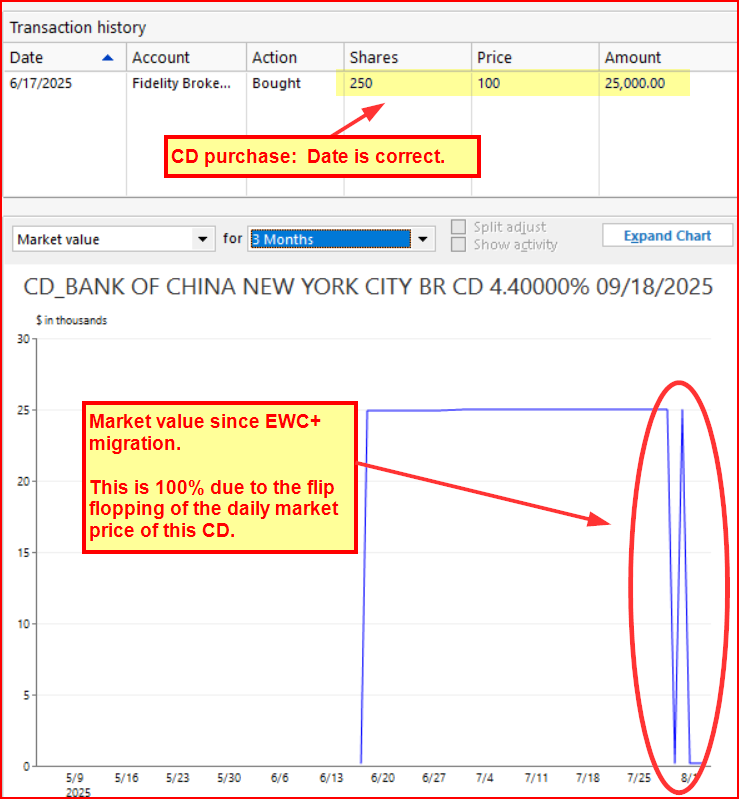
And I'm wondering if that is what is happening now, too. In a test file I created (from a Quicken copy of a primary data file) on 7/29 (the first day of this migration) I added a brokerage account that has CDs in it. Here is a snapshot of what the daily quotes looks like for one of those CDs. Note how up through 7/28 the CD prices were right where they should be…about $100/CD. But look at how it has flip-flopped each day since 7/29.:
Also, here is how this CDs purchase looks like: $100/CD share for 25 shares….just like it should.
Quicken Classic Premier (US) Subscription: R66.23 on Windows 11 Home
1 -
After installing the latest update to 63.21, I was successful in connecting/reconnecting to all my bank and credit card accounts. I thought I was successful connecting to Fidelity at connecting my accounts - but no. No transactions (dividends, etc..) are downloading. Share prices seem to be updating.
This is very frustrating. It seems like every other update breaks more than it fixes. I am interested in fixing this AND you folks concentrating on improving reliability rather than adding new features.
0 -
Hello @Mark McIntyre,
Thank you for letting us know you're seeing this issue. So that we can investigate this, please provide the following information:
- How did you go through the transition to Express Web Connect+ (EWC+)? What steps did you follow?
- Did you deactivate/reactivate your accounts? Did you go through the fix-it flow? If you got the reauthorization prompt, did you use the Reauthorize button?
- For missing/incorrect transactions, what is the date range for the affected transactions?
- How many transactions are missing? How many are there, but incorrect?
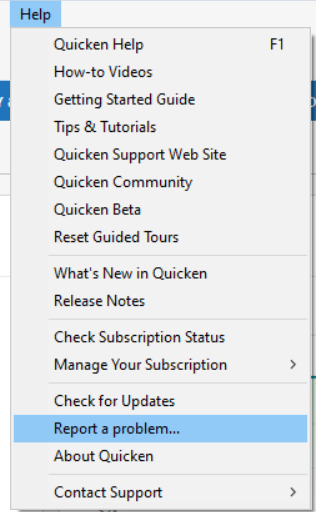
- Please navigate to
Help>Report a Problemand send a problem report with log files attached.- Please include a screenshot of the problem transactions, as they appear on the financial institution website.
- Please also include a screenshot of how the problem transactions appear (or don't appear, if they're missing transactions) in Quicken.
- If you fill in the missing transactions manually, please send the logs before manually entering the transactions in your Quicken.
- Problem Reports allow a maximum of 10 attachments. If needed, you can unselect any files with OLD in the file name to make room, or you can send a second problem report with the additional attachments.
Thank you!
Quicken Kristina
Make sure to sign up for the email digest to see a round up of your top posts.
0 - How did you go through the transition to Express Web Connect+ (EWC+)? What steps did you follow?
-
I don't have a recent enough backup that wouldn't involve a couple of hours of work re-entering transactions, unfortunately. I have recreated this issue again today.
Barry Graham
Quicken H&B Subscription0 -
- How did you go through the transition to Express Web Connect+ (EWC+)? What steps did you follow?
- I followed all the steps that were prompted by Quicken.
- Did you deactivate/reactivate your accounts?
Yes, I did. I have done that several times. - Did you go through the fix-it flow? If you got the reauthorization prompt, did you use the Reauthorize button?
"Fix-it flow" seems like a bit of an in-house term. I find no "fix-it flow" in any menu or option. Do you mean File: Validate and Repair or Help: Report a problem or…?
- Did you deactivate/reactivate your accounts?
- For missing/incorrect transactions, what is the date range for the affected transactions?
The missing transactions are from the last 6-9 days. End of month distributions in a money market account and reinvestment of dividends or repurchase of shares in other mutual fund accounts.
- How many transactions are missing? Between 4 and 10. How many are there, but incorrect? None.
I will note another issue that I failed to mention in the previous note. All my Fidelity accounts had been switched to Tracking Method - Simple - Positions only vs. the Complete Transactions and Positions
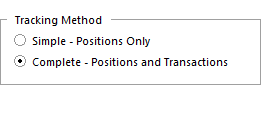
I had never seen this option until today. I converted all accounts to complete and then reauthorized and and tried downloading. Still no new transactions.
For people like me that have been using Quicken for over 33 years it is troubling and time consuming when you break connections. Again, I ask that your development team focus on reliability over additional features.
1 -
Only one of the 4 stock purchases was downloaded for my 401k account, and the one that was downloaded didn't show important information like the stock, number of shares and price per stock. It was simply downloaded as a contribution not a share purchase.
Barry Graham
Quicken H&B Subscription0 -
How are you able to talk to the development team?
Barry Graham
Quicken H&B Subscription0 -
Deleted
Barry Graham
Quicken H&B Subscription0 -
My HSA account has a linked cash account. Today, the HSA count downloaded a new transaction to add mutual funds to match the amount of cash in the linked cash account. So now the cash is basically showing twice, once as a fund in the HSA account, and once as cash in the linked cash account.
Barry Graham
Quicken H&B Subscription0 -
Ah, that is unfortunate. Just as unfortunate: As far as I know, there is no fix currently available for any of the EWC+ issues that have been identified other than to revert to the DC connection. And the only way to revert to the DC connection is to restore a backup file.
So, I guess you need to decide which option is more "palatable" to you. Continue with EWC+ and manually enter or edit the transactions and other data that is messed up which could be quite time consuming (especially since we do not know how long it will take Fidelity/Quicken/Intuit to fix those issues) or restore that older backup file and spend a couple of hours entering transactions. Only you can decide which option is best for you.
I wish I had better news for you.
BTW, you might want to consider setting your Automatic Backup preferences to backup after each session and to save at least enough backup files so that you always have at least 1 calendar month of backups on file. I don't often need to restore backup files that far back but when I do they are usually a godsend.
Quicken Classic Premier (US) Subscription: R66.23 on Windows 11 Home
1 -
You said:
- For missing/incorrect transactions, what is the date range for the affected transactions?
The missing transactions are from the last 6-9 days. End of month distributions in a money market account and reinvestment of dividends or repurchase of shares in other mutual fund accounts.
Were all the missing transactions part of one download attempt? If yes, was it done somewhere between 11PM-2AM Eastern time? If yes to both questions, this particular problem is possibly unrelated to the transition.
It looks to me that Fidelity does a multi-step process in preparing transactions for downloading, particularly at month's end. I've found that if I've initiated a download pull before all the steps (which are invisible to us) are completed, either Fidelity says it's downloaded them when it hasn't and/or Quicken thinks it's received them when it hasn't. The net effect is that the transactions never arrive. The fix is to restore a prior backup (I backup every day so its not a big deal for me), which resets Quicken's download received flag and allows them to be received again. As I said, I don't know if this is what you experienced, but if it is, the fix works every time.
3 - For missing/incorrect transactions, what is the date range for the affected transactions?
-
As a longtime Quicken user and Super User I have sometimes (not often) been contacted by them to discuss issues, opportunities or to do some live testing with them in real time. I do not contact them. They contact me. I was contacted last week because there were questions they had regarding the issues we are seeing with Fidelity's EWC+.
Quicken Classic Premier (US) Subscription: R66.23 on Windows 11 Home
2 -
I do automatic backups every time I close Quicken. The reason I don't have one with DC is because I noticed a week or two ago that my data file was showing corruption when I did a super validate, and so I did one of these, which fixed the corruption while keeping everything the same with all my accounts - except that it deactivated the online connection.
When I reactivated Fidelity, I wasn't aware of the migration and so I let it choose the default, which is why I don't have a recent backup with DC even though I do backups every day.
However this actually allowed me to resolve the issue being discussed! I realized that there was something in the data file that "knew" that I had switched to EWC+ even though the connection was DC - so I did another copy, which deactivated the online setup so Quicken no longer knew that I had been using EWC+ with Fidelity, and manually typed in "zzz-Fidelity Investments - DC" as the FI on tab 1, set up the connection again, and now I have DC with Complete Tracking! The downside is that if I stick with this new copy, I'm going to, once again, have to set up all the online connections and all the bills in bill manager all over again. So I have to decide whether it's worth doing this when we're all going to have to switch to EWC+ soon anyway.
Barry Graham
Quicken H&B Subscription0 -
That's great! You should sign up to be a beta tester if you haven't already.
Barry Graham
Quicken H&B Subscription1 -
@BarryGraham I also keep a backup after every run of Quicken. I keep 30 days of local backups and the 30th day is sent encrypted to cloud backup. It's recovered me out some operator errors.
Deluxe R66.23, Windows 11 Pro
0 -
That's great. In my case the issue wasn't not having a backup, it was the fact that I stopped using DC before I realized there was an issue with EWC+, so my most recent DC backup would require too much data re-entry although, as I said above, I did find a way to get DC working again with Complete tracking.
Barry Graham
Quicken H&B Subscription1 -
There are >100 posts on this topic. So, Quicken can you clearly let everyone know if this problem is resolved or not? Kind of hard to determine without reading all the posts; some of which are off topic.
If so, what do users need to do to have Fidelity transactions download. As of this morning my transactions aren't downloading.
2



