Capital Group - American Funds [Edited]

I can't get my Capital Group - American Funds to work in the one step download. It has been working until this week. I get the usual OL-220 or whatever it is. When I try to deactivate and reactivate that won't work either. I have a user id and pw for Capital Group but it doesn't seem to accept that through Quicken. It accepts it on the actual Capital One page however. Hmmm. Any thoughts as to what is going on with Capital Group funds?
[Edited to Correct FI Name]
Comments
-
Hello @Steve Sprauer,
Thanks for reaching out!
First, to clarify—when you mention “Capital One - American Funds,” did you mean Capital Group - American Funds? Please confirm.
As for the error your experiencing, if you are in fact receiving OL-220, then please review and follow the guidance outlined in this support article.
Thank you!
-Quicken Anja
Make sure to sign up for the email digest to see a round up of your top posts.1 -
Yes, sorry, Capital Group.
I called Capital Group and, after a little discussion, it was determined that my logon through quicken is not the same as it is on their website. The logon id through quicken, in case anyone else has issue, is the fund number then a comma then account number. Password is same as you would usually use so for example 99,99999 would be the user id. Not what I've been using. Not sure if it changed recently. Works now.
2 -
@Steve Sprauer Thanks, Steve. That's the login I was using all this time, so at least for me, this isn't the issue. If it persists, I'll try resetting the login info and reestablishing the connection.
0 -
Thanks for the update and sharing this information! Glad to hear it works now.
-Quicken Anja
Make sure to sign up for the email digest to see a round up of your top posts.0 -
I spoke too soon. It only works about half the time. About every other attempt to do one step update I have to go into Account Details then the Online Services tab and click Reset Account. This usually works except this time. See attachment. I still continue to get an OL-220-A error when updating this account. Something isn't right.
1 -
Thanks for the update!
Since this account is connected via Direct Connect, and you’ve already followed the guidance in the support article I previously linked above, this confirms that the issue lies on the financial institution’s side.
As noted at the bottom of the article, Quicken does not have access to Capital Group’s servers to resolve Direct Connect errors. You’ll need to contact Capital Group directly and ask to speak with an online services specialist or someone familiar with Direct Connect and Quicken-related issues. If they’re unable to assist, it may help to request a supervisor or Tier 2 agent, as they tend to have more experience with third-party apps like Quicken.
Please feel free to keep us posted with any updates—hopefully they’re able to get this resolved for you soon!
-Quicken Anja
Make sure to sign up for the email digest to see a round up of your top posts.0 -
(Same symptoms here; also occurred starting about a week ago. Haven't connected with a Capital Group rep yet to diagnose)
1 -
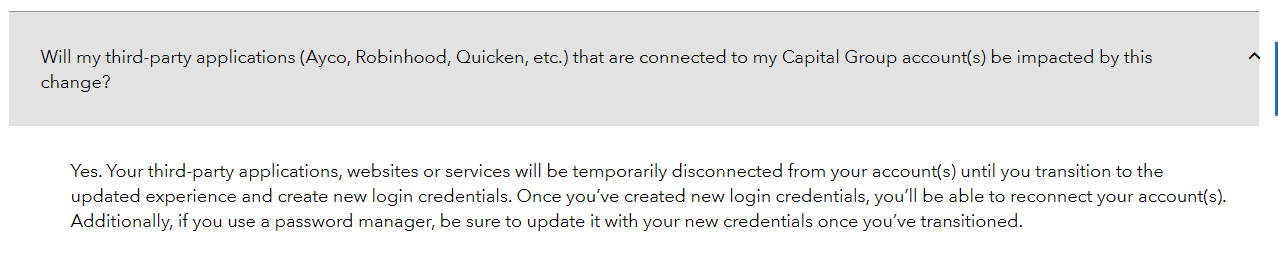
I found this when I logged in to my Capital Group account and did a 'help' search for quicken. It appears that Capital group is updating their website and logins
1 -
Thanks for that! It would've been helpful if they actually sent the notice to the email on file for those of us who don't log into the account very often. I never would've known had you not posted this, at least until I called them…maybe.
(It's funny that one of the other users posting to this thread said he contacted them, but they had no idea what he was talking about when he mentioned Quicken, let alone providing a warning about login changes. Seems customer service needs to be informed as well.)
With that said, they must be doing tweaks in the background, because even though they say this is a "future" thing, and they will be slow-rolling these changes out over the next few months. Today, for example, the initial downloads failed, but when I did a couple of retries, the errors resolved themselves.
I guess I'll stop posting any updates for now.
0 -
This is a link to their overview of the 'new online account experience'. Wouldn't it be great if they could keep things working until it was rolled out or, at least, provide a planned date?
https://www.capitalgroup.com/individual/service-and-support/account-updates/new-account-experience.html
1 -
My update with Capital Group - American Funds was working until recently when I started receiving the error noted above. Today, I logged into my Capital Group - American Funds account directly and had to agree to some additional login prompts. After logging in succuessfully directly to Capital Group, I tried my Quicken update again and it worked.
0 -
Hello @mtyler1115,
Thanks for the update and for sharing what worked! I’m glad to hear that logging directly into Capital Group and completing the additional prompts resolved the issue and allowed your Quicken update to work. Hopefully, this solution helps others experiencing the same problem as well.
Thank you!
-Quicken Anja
Make sure to sign up for the email digest to see a round up of your top posts.0 -
I'm getting this error from Capital Group/American Funds. I've contacted them but their only suggestion was to reinstall the current version of Quicken. I did that but Quicken is still not letting me do a One Step update for these accounts. Tried to reset one of the accounts but Quicken said it was unable to complete the task.
0 -
Hello All,
Thank you for taking the time to report this issue.
We have forwarded this issue to the proper channels to have this further investigated. However, we request that you please navigate to Help > Report a problem within your Quicken program and submit a problem report with log files and screenshots attached in order to contribute to the investigation.
It would also aid the investigation to include a sanitized file when submitting the problem report. A sanitized file is a data file that removes personally identifiable information so you can comfortably share this file with the Quicken team.
While you will not receive a response through this submission, these reports will help our teams in further investigating the issue. The more problem reports we receive, the better.
We apologize for any inconvenience in the meantime! Thank you.
(CBT-757)-Quicken Anja
Make sure to sign up for the email digest to see a round up of your top posts.0 -
An interesting development - If I used One Step Update, the program gives me the error message indicated above. If I just select one of the accounts and then click on the gear icon in the upper right corner and click to update, it works just fine. Hopefully this might help with isolating the issue?
1


