Assign specific budget for any transaction

I have been using Quicken since 1993 and I have never used the budgeting function as I have always found it too restricting. I have a high level budget that I keep in a spreadsheet. A few of the budget categories are catch all and can have transactions from numerous expense categories.
It would be great if for each expense transaction I enter, if I could assign that transaction to any given budget category.
Comments
-
re: those Catch-all categories, and the sub-cats … are those sub-cats unique? Do they always fall under the catch-all cats?
OR, is transaction X sometimes under a catch-all and sometimes elsewhere?
Because, usually, categories are defined within budgets and transactions are assigned to categories, so I don't understand your reference to "specific budget", which is a collection of categories for a defined period of time.
Q user since February, 1990. DOS Version 4
Now running Quicken Windows Subscription, Business & Personal
Retired "Certified Information Systems Auditor" & Bank Audit VP0 -
In the strictest sense there isn't any such thing as a " budget category". There are just categories that you choose to include in your budget (which in turn are assigned to transactions).
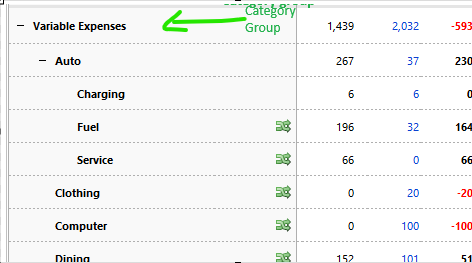
What I think you are really looking for is a way to group certain categories. This is provided that say "Dining" always goes into the same "budget category/group"
If I have that right, then maybe category groups are what you are looking for, except with the ability set a budget for the category group instead of the individual categories. That doesn't exist right now, but that might what would be possible for the idea. (I don't think having a separate "budget category" for every transactions would ever be implemented. It would require a new field for every transaction and be very confusing in both the entering of transactions and in other parts of Quicken like reports.)
As for currently, you could just assign budget amounts to the individual categories to get the category group total to be what you want.
This is how that looks:
 0
0 -
It is the later (sometimes under a catch-all, sometimes elsewhere).
0 -
" (I don't think having a separate "budget category" for every transactions would ever be implemented. It would require a new field for every transaction and be very confusing in both the entering of transactions and in other parts of Quicken like reports.)"
This is what I was asking for.
However, your comments have led me to realize that I either need to modify my current expense categories and sub categories to align with my budget, or vice versa.
0 -
When looking at your Cat list, you might want to also reference your most recent tax returns … to see if there's a category for every line that you use on your Federal, and any state, returns.
Because I did that many years ago, the first pass at my returns to be filed this year was completed on 1/2/25. Then I just needed to receive the various 1099's, etc to confirm the figures that I'd recorded in Q.
I received my refund on 2/5/25.
Had I owed, I still would have filed early, but told the IRS to only take the payment on the last possible day.
Q user since February, 1990. DOS Version 4
Now running Quicken Windows Subscription, Business & Personal
Retired "Certified Information Systems Auditor" & Bank Audit VP0

