Online billers in PENDING Status

Every biller I have connected with the new process remains in PENDING status for a week now, is this a normal workflow for connecting online billers?
Comments
-
Hello @Rich Burke,
Thanks for reaching out! I attempted to check your account internally, but currently don’t see any bill presentment set up, which is why I’d like to gather a bit more info to help us troubleshoot.
Could you please provide the name of each biller that’s showing as Pending on your end? Also, if possible, can you share a screenshot of what you're seeing? If needed, please refer to this Community FAQ for instructions on how to attach a screenshot. Alternatively, you can also drag and drop screenshots to your response if you are not given the option to add attachments.
Let us know if the Pending status looks the same across all billers or if there are any differences.
Looking forward to your reply!
-Quicken Anja
Make sure to sign up for the email digest to see a round up of your top posts.0 -
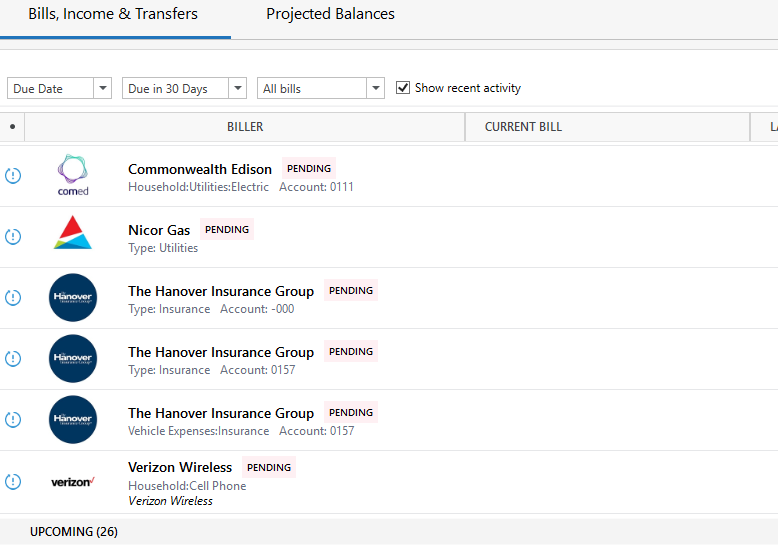
I have a few others that say they are connected but are not accurate in payment and balance, but these are the ones I am most interested in getting resolved. Thank you
 0
0 -
@Richard Burke Thanks for your reply and for providing those biller names!
I checked each one internally, and all appear healthy on our end except for Commonwealth Edison, which no longer shows up in our system or in-product. It looks like this biller has been removed, so unfortunately, it likely won’t be able to connect going forward.
Also, just to confirm—have you recently restored a backup? The reason I ask is that doing so disconnects all online bills, and they must be reconnected afterward (even if they appear as though they stayed connected). As mentioned previously, we currently show no bill presentment for your account internally, which appears as though Bill Manager hasn’t been set up in your current data file, or that the online bills were never added. That could explain both the Pending status and why other bills are showing incorrect information.
To start troubleshooting, please follow these steps:
- First, save a backup of your data file (just in case).
- Then go to the Bills & Income tab.
- Click the gear icon in the top-right corner.
- Select Review and Repair > Review and Repair Online Billers.
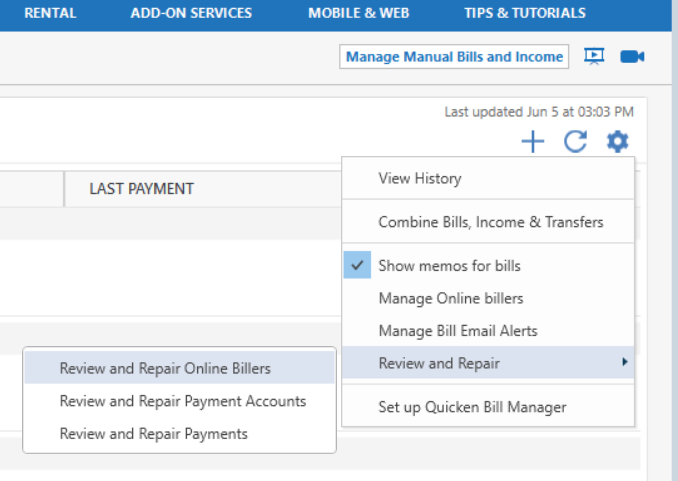
Let us know how it goes or if you notice any changes after running the repair!
Looking forward to your update.
-Quicken Anja
Make sure to sign up for the email digest to see a round up of your top posts.0 -
I have done the repair and it removed some "orphan billers" but the remaining are still showing "pending" and comcast shows "failed" without further context.
0 -
Be sure to avoid late fees and penalty interest rates
Are you about to be late with making your bill payment due to problems or unexpected delays in Quicken Bill Manager (Quick Pay or Check Pay) that cannot be resolved in a timely fashion?
Due to the complexity of the matter, it can take apparently forever to identify and fix a problem. While you're fighting the Bill Manager windmill, waiting for the problems to be resolved, to avoid missed or late payments I recommend you logon directly to the biller's website and authorize them to direct debit (aka PAC Draft, Autopay, APS, etc.) the next and all future payments from your checking account or a credit card. The biller's computer system will do all the work for you to make an electronic debit on the due date and you don't have to worry about being late.
In Quicken unlink the bill and just record a scheduled reminder which does not execute as an online payment into your account register on or before the Due Date and before you download transactions from the bank or credit card containing the payment transactions. That will allow Quicken to match your register transaction to the downloaded data and not cause any further issues.
0 -
@Rich Burke Thank you for the update and for trying the repair process. I’ve checked internally again, and it still shows no bill presentment set up for your account.
At this point, I recommend saving a backup of your data file (just in case), then removing the billers that are stuck or showing errors and re-adding them fresh. Here’s how to remove online billers:
- Navigate to the Bills & Income tab.
- Click the Gear icon in the top-right corner, then select Manage Online Billers.
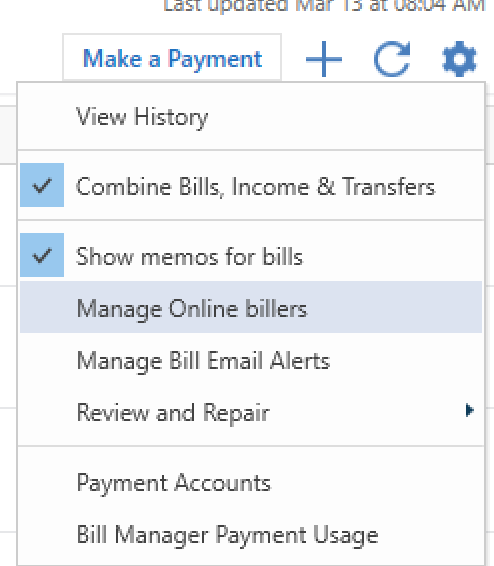
- In the list of your Online Billers, click the downward arrow next to Edit Password for the biller you want to remove, then select Remove.
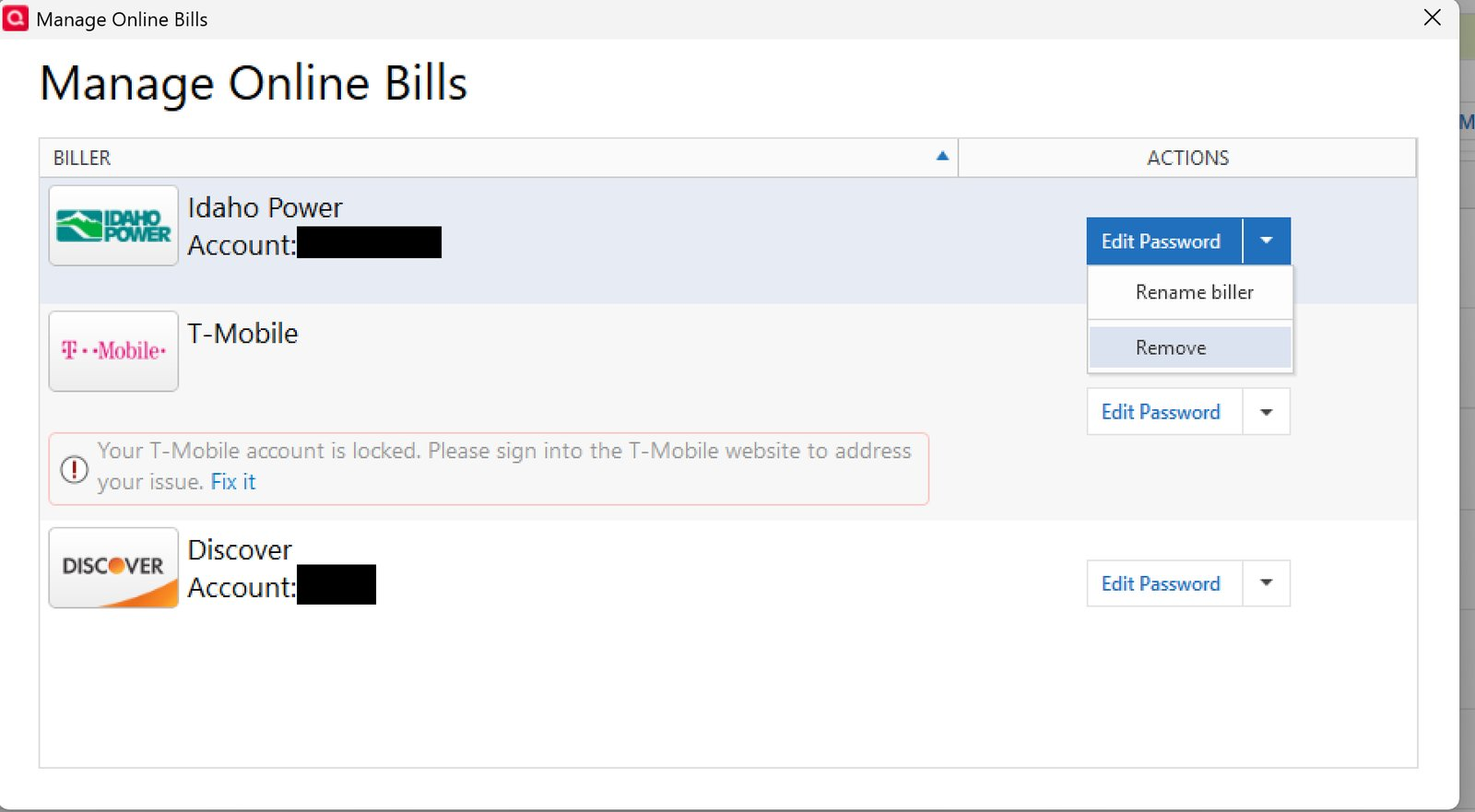
After removing the problematic billers, try adding them again to see if they properly connect and update.
Please let us know if you run into any issues during this process or if the billers still show “Pending” or errors afterward.
Looking forward to your update!
-Quicken Anja
Make sure to sign up for the email digest to see a round up of your top posts.0 -
Now have several FAILED connections. I don't think the new process is working
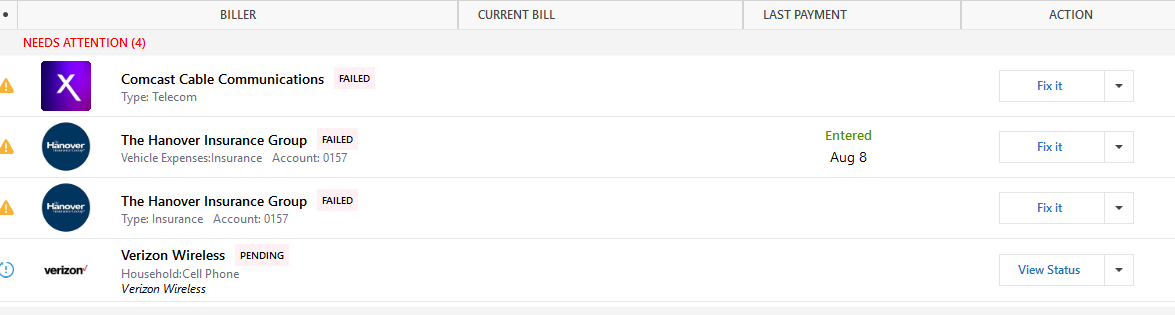 0
0 -
@Richard Burke Thanks for the update and for trying the troubleshooting steps so far.
Since you’re now seeing several failed connections even after repairing and re-adding the billers, it looks like this issue will require more in-depth assistance. At this point, I recommend contacting Quicken Support directly. They will need to further investigate and may likely be required to escalate this further.
I apologize for any inconvenience!
-Quicken Anja
Make sure to sign up for the email digest to see a round up of your top posts.0 -
Several billers remain in "PENDING" state after 2 weeks.
- Commonwealth Edison
- Hanover Insurance
- Verizon Wireless
This is an obvious bug with the new vendor.
0

