TD Bank no longer connects online version, only web, only web connect

Until a couple of months ago I was able to connect to TD Bank Online and pay bills through Quicken. This stopped working with different error messages, the latest being TD Bank is reporting connection issues, we are investigating and it’s not your fault.
I have been able to connect using web connect and keep checking since I can’t use bill pay.
As I said this has been going on for months. Anyone else having this problem and is there an ens in sight?
thanks in advance,
Rick
Quicken for Windows
Version R63.21
Build 27.1.63.21
Comments
-
Hello @rlroberts,
Thanks for sharing those details.
I’d like to gather a little more information to better understand what’s been happening:
- When you were paying bills directly from Quicken before, were you set up using Quicken Bill Manager or TD Bank’s Direct Connect Bill Pay service?
- Have you noticed if the connection issue occurs at a specific point — for example, during the sign-in step, while updating transactions, or only when attempting to send a bill payment?
- You mentioned you’re using Web Connect as a workaround — are downloads from TD through Web Connect fully up to date and accurate, or are there missing or delayed transactions?
- Did you make any recent changes to your TD Bank online banking settings, passwords, or security preferences around the time this stopped working?
- Have you received any direct communication from TD Bank about changing or discontinuing Quicken connectivity?
Looking forward to your response!
-Quicken Jasmine
Make sure to sign up for the email digest to see a round-up of your top posts.
0 -
Hi, Thanks for following up.
I was using TD Bank's Direct Connect Bill Pay Service
I get an error message when I try to reactivate using TD BANK Online Banking
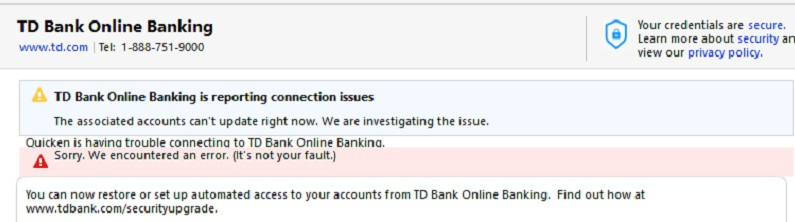
Web Connect has been working fine. Updating as expected
No recent changes to either account
No information from TD Bank,
Since I have a personal and business account with TD Bank, I can log into to either account and see both.
The above is when I try to log in with my business login
When I try to log in with my personal account, it does let me add the accounts, but when I try to do online payment I get an OL-393-A error.
Thanks again,
Rick
0 -
Hello @rlroberts,
Thanks for sharing the details and screenshots! You’re seeing two separate errors, so below are some helpful resources for each.
“It’s not your fault”
The first error in your screenshot is a CC-501, commonly labeled as “It’s not your fault.” This happens when Quicken can’t connect to your bank account for recent transaction information, usually due to an issue on the bank’s side. This type of error often resolves itself within 24 hours, but if it continues, Quicken Support can review your logs and escalate as needed. For more details, see this support article.OL-393 Error
The OL-393 error that relates to online bill pay. It can occur if account information is incorrect, is hidden, if the bank no longer provides online services for that account, or online bill payment has not been signed up for at the financial institution. Since this involves settings that Quicken cannot directly control on the bank’s side, it’s best to review this support article for guidance on how to verify your account and work with your bank if needed.These articles provide context on why these errors happen and outline the next steps, either through self-verification or contacting the bank/Quicken Support if the issues persist.
Hope this helps!
-Quicken Anja
Make sure to sign up for the email digest to see a round up of your top posts.0

