zzz-Fidelity Updates
Comments
-
Fidelity electronic channel support told me they were flooded with calls about this problem. And that Quicken was initially directing complaints to them, but finally agreed to stop doing that, acknowledging the problem was on Quicken’s end. Maybe someone else here can also attempt to escalate to Fidelity support and see what they are told.
Even if they can just get EWC+ to start working correctly with new transactions going forward, I would be OK. All but one of my accounts has mostly end of month transactions, and I’ve already manually fixed those. And with my on account that sees daily activity, I’ve been doing the “reset account” nonsense after every OSU. account that sees activity, I’ve been doing the “reset account nonsense after every OSU. (that’s just inexplicable to me that reset account is necessary to bring in new transactions, clearly something still very broken)2 -
To my knowledge, Quicken is simply an end user of a service provided by Intuit and the Financial Institution. I have several FIs using EWC+ that are working without having to reset the account each day, so I don't see how it can be Quicken's fault. Quicken simply processes the information that is being sent by Fidelity. Nice try Fidelity.
Barry Graham
Quicken H&B Subscription0 -
This content has been removed.
-
Also it's DTSTART - and you are right, it doesn't help! But if you want to try anyway, after making sure you have no downloaded transactions, go to "Online" menu and press CTRL+ALT then click on Contact Info. Select the account you want to do this to.
Barry Graham
Quicken H&B Subscription0 -
This content has been removed.
-
Off-topic, but for what conditions is it useful? If it exists, it must have (or must have had) a purpose.
0 -
When fidelity would not download my 7/31 dividends and reinvestments, I set DTSTART to 7/25 and there they were. I have used this maybe 6 times in 18 years. But when it is needed, I see no substitute. Quicken MAC does not have this.
0 -
If for some reason your transactions are missing in a certain account or you deleted them, this would allow you to download them again.
Barry Graham
Quicken H&B Subscription0 -
I would guess that most customers are blissfully unaware of the issue as they don't have Fidelity accounts. I wouldn't be e-mailing all my customers - if I were the recipient of such an e-mail for, say, Charles Schwab issues, I would be wondering why Quicken is e-mailing me about this when they should know I don't have an account with Schwab. Going through all the e-mails in this thread is taking more of my time than the time that I'm wasting with my Fidelity accounts.
Barry Graham
Quicken H&B Subscription0 -
If you don't want to risk and fix the issues that we have had and fixed, your best bet is not to download until this is fixed, and use the web site to check on your transactions. To be honest, that's what I do most of the time anyway if I want to check on my investments.
Barry Graham
Quicken H&B Subscription0 -
Re the Simple vs Complete, that's interesting - the mystery deepens! Glad it worked for you!
Barry Graham
Quicken H&B Subscription0 -
I've had zzz- showing in multiple Fidelity accounts for weeks now. Downloads still occur but there have been some old transactions removed by Quicken. Not cool.
0 -
RE: "Missing Cash and erroneous historical data."
Have you seen any particular pattern to this like date cutoff, etc.? This change has made a bit of a mess to my Complete tracking registers for 3 accounts. The CMA account was easy to find/fix and was only a single missing journal cash entry. The trading and 401K account is going to be impossible to sort out. FWIW, I haven't done anything except continue to use Update to DL transactions.
1 -
I'm new to the party. I just noticed that no Fidelity transactions had downloaded since late July. Silly me, when Quicken said to "upgrade" the Fidelity connection, I just did it.
I use the complete tracking method for my Fidelity 401K, mainly because I like to see the transactions, although I'm not "doing" anything with the information. My main desire is for the two numbers in the screenshot below to match, and they do not right now. I assume this is because, although I have input my contributions from my paycheck, the transactions showing the fund purchases are not downloading.
I'm not really willing to go to a backup, because my use of Quicken really revolves around bank accounts and credit cards, rather than investing, and I don't want to have to go redo all of THOSE transactions for the last month. So, in the meantime, I'm guessing I should just not update Fidelity for a while?
Also, if I were to have to delete my Fidelity account and re-add it (not sure under what circumstances I would need to do this…), what would happen to all of the paycheck contributions over the past X years? Would I have to go and reassign them all to the new account?
Thanks. 1
1 -
Long time Quicken user, but I'm afraid I will not renew:
Quicken reports as cash money stored in government money market funds, rounds shares exchanged or purchased causing a discrepancy and in some cases leaving a position with a negative balance where in fact the position has been completely liquidated.
[Removed - Rant]
0 -
I have about 15 accounts that have not downloaded transactions since July. I've tried some of the fixed suggested in this thread and others, none work. In hindsight, I shouldn't have "upgraded" the connection. Direct connect worked great; if it isn't broken, don't fix it…
Now we have to wait for Quicken to fix this. I'd really like to get a better timeline on when this will be corrected. Very frustrating to lose the ability to track these accounts.
0 -
Quicken to Fidelity has not downloaded any transactions since 7/29. After I selected to upgrade (?) the connection type as prompted.
I manually entered end of month transactions, so I could track cash balance in my CMA,
I have new transaction on the Fidelity site that are not showing up in Quicken.
I am receiving a message that my share values are not matching; it appears to be rounding issue.
It is also telling me that SPAXX is not matching. Although I have a SPAXX fund at fidelity it is treated as cash on Fidelity site, and it has always been treated as cash in Quicken. It appears that Quicken wants to change how this is treated, and not as cash, but as a separate MM fund.
I don't want to go to a backup and have to rebuild the entire month for all other accounts.
Waiting for Quicken to resolve this issue. Hopefully soon. At this point I don't feel that I have any other options.
1 -
My main desire is for the two numbers in the screenshot below to match, and they do not right now.
The numbers you show look correct. The Total Market Value is the Securities Value (all the stocks, ETFs, Mutual Funds, bonds, etc) plus the uninvested cash in the Cash Balance.
Or is the cash in your account also in a money market fund that is included in the Securities Value and thus being counted twice?
QWin Premier subscription0 -
Hello @alocksley,
Thank you for letting us know you're impacted by these issues. They have already been identified, and we are working with Fidelity to resolve these issues.
Thank you!
(CTP-13955)
Quicken Kristina
Make sure to sign up for the email digest to see a round up of your top posts.
-1 -
Kristina,
I want to manually download my transactions directly from my Fidelity account website but I only see .csv as an option. I contacted Fidelity by phone and was told they have temporarily removed the .qfx option. Is this because of the same issues Quicken is having with Fidelity and One Step Update?
0 -
Hello @shtevie,
Thank you for reaching out with this question. I contacted our teams about this, and they confirmed that Fidelity removed support for QFX. However, Fidelity did not share the reason with us. I recommend reaching out to Fidelity for more information, since this was a decision made on their end.
Thank you!
Quicken Kristina
Make sure to sign up for the email digest to see a round up of your top posts.
0 -
They said it was temporary but were not able to tell me the reason or for how long. Wouldn't Quicken management be concerned about this and press Fidelity for a reason considering how much it affects their product and their customers who are paying subscribers?
0 -
That directly contradicts what I was told by a senior associate in the Fidelity Electronic Channels Support Group.Apologies, in my rush, I was conflating DC with QFX. As far as DC is concerned though, according to Fidelity, that should still work — except that it doesn't for those (some?) of us already forced down the EWC+ path.They said Fidelity had changed nothing on their end — and that the change from Quicken had been as much a surprise to them as the end users. This was not general customer service at Fidelity — but someone quite conversant and familiar with Fidelity's internal integration with you.
I opened up an escalation with Quicken engineering on August 4, and they acknowledged that the problem was Quicken's, gathered a lot of data — and I haven't heard from them since.
This finger pointing is simply not helpful.And a supervisor at Quicken Phone Support (650-250-1900) just confirmed that there's nothing they can do — they expect this to be fixed by Quicken engineering on Aug 20th still. What a ridiculous mess.
0 -
Well, it is quite obvious in this case that Fidelity, not Quicken, removed the .QFX download option on the Fidelity website, specific reasons apparently unknown. Fidelity does love the new download option and consortium format they will be exclusively providing, going forward.
0 -
@bdantes No problem whatsoever, trying times for many Quicken users with few/no options to resolve from our end. Still facing Fidelity Netbenefits transaction download issues (Simple instead of Complete) that each time require manual intervention, pretty annoying.
2 -
Fidelity does provide the CSV download option and has saved me in the past when Vystar connections was out for several weeks.
It takes some analysis to get the setup correct though.
Deluxe R66.23, Windows 11 Pro
0 -
The other option to import CSV files into Quicken is to use Quicken's own built in CSV import function. Quicken has made some really good enhancements with R64.19.
File → File Import → Banking Transactions,
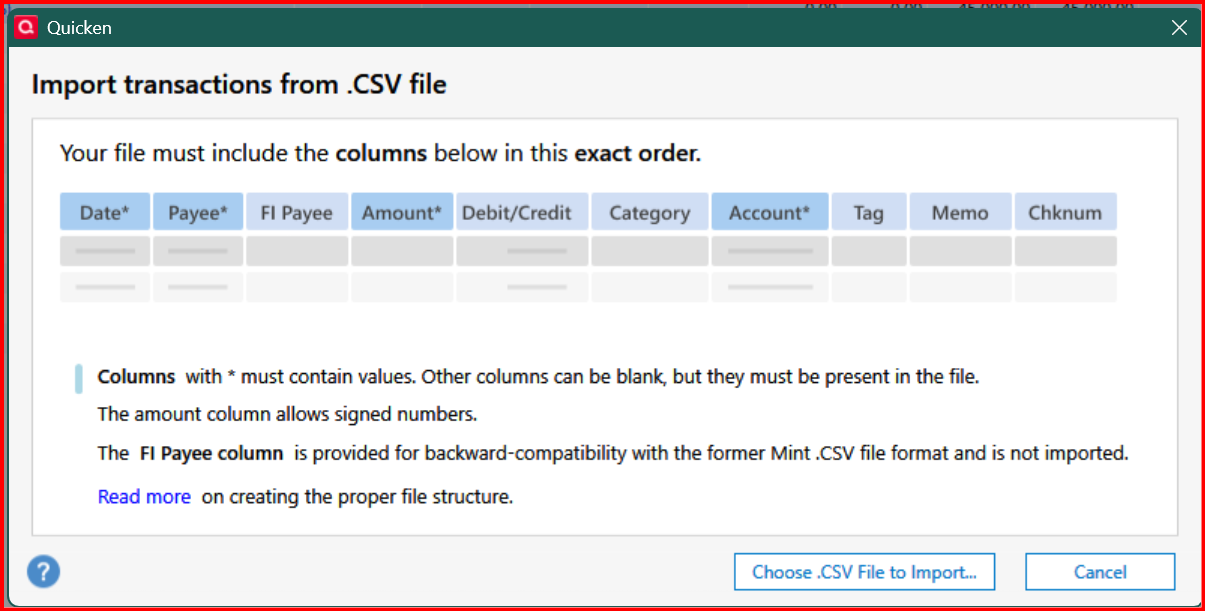
You can also create a sample CSV file.
There is also a menu option to import a CSV file for investment transactions which is new and seems to be a "work in progress". There are no instructions but you can download a sample file, but the formatting makes it hard to read.
0 -
I am not on that version yet of Quicken yet. Good to know. Does it import investment transactions as well as banking transactions?
Deluxe R66.23, Windows 11 Pro
0 -
They just added the ability to import investment transactions from a CSV file with R64.19, but it looks like a "work in progress". There is no documentation for it, except to create a sample file. Also a lot of the documentation for importing banking transaction CSV files hasn't been updated.
0






