CitiBank transactions not downloading

I have 4 Citi Card credit card accounts and they are all downloading correctly. I have one CitiBank checking account that has issues. Starting in mid-July I was getting a notice in the OSU summary (yellow highlighted text) that Citi was reporting a connection issue that is being looked into, but there is no Quicken server error number. Looking into the register, the last successful download of data was June 28. Today on trying to download transactions the process finishes without reporting an error and says there are no new transactions. However there actually are 3 transactions, all complete on the bank side, that repeatedly won't download. I tried resetting the account but no luck. Any recommendations?
Comments
-
Hello @MartinRubenstein,
We appreciate you taking the time to let us know about this issue!
To start with, please take a moment to review and follow the guidance outlined in this support article.
This article outlines common reasons why certain transactions may not appear during downloads—such as pending vs. posted status, date range filters, or issues with the bank’s connection—and provides steps to resolve or work around the problem.
Hope this helps!
-Quicken Anja
Make sure to sign up for the email digest to see a round up of your top posts.0 -
there actually are 3 transactions, all complete on the bank side, that repeatedly won't download.
Once downloaded and incorrectly processed, a transaction cannot normally be downloaded again.
Are you automatically accepting downloaded transactions into your checking account register?
What kind of transactions are these?
If these are recurring income or expense transactions, is it possible that these transactions were actually downloaded and automatically matched to a previous instance of the transaction, e.g., this paycheck was matched to last month's paycheck transaction instead of creating a new transaction0 -
There are payments and deposits that are not showing up and the current balance is not updating. I keep getting this error in OSU:
 1
1 -
Thanks for the screenshot. When reviewing your account, I do not see any error messages/codes occurring internally. To troubleshoot this issue, please follow these steps:
- Run One Step Update (OSU) first to see if the issue resolves.
- If the issue persists, rename the runtime.dat file located at: C:\ProgramData\Quicken\Inet\FILENAME\
- (For example, add a 1 at the beginning of the file name so it reads 1runtime.dat.)

- (For example, add a 1 at the beginning of the file name so it reads 1runtime.dat.)
- Run One Step Update again to check if the problem is resolved.
- Close and reboot Quicken to ensure changes take effect.
📌 Note: The ProgramData folder is hidden by default. If you need help accessing it, Microsoft's support site has instructions on how to unhide folders.
Hope this helps!
-Quicken Anja
Make sure to sign up for the email digest to see a round up of your top posts.0 -
I ran OSU and got the CitiBank communication error. I then exited Quicken, renamed the runtime.dat file, re-started Quicken and ran OSU again. This time the error message did not appear. Hopefully the problem is solved.
0 -
Thanks for the update and letting us know that renaming the runtime.dat file resolved the Citibank communication error. Glad to hear it’s working now! If you encounter any further issues, don’t hesitate to reach out.
-Quicken Anja
Make sure to sign up for the email digest to see a round up of your top posts.0 -
I tried this advice and it was terrible. After renaming, OSU only downloaded 5 of 35 accounts, and subsequent OSUs did absolutly nothing. Resetting it back to just "runtime.dat" (after removing the new one) seems to have helped, but still clicking OSU does nothing after the first try.
0 -
The renaming of runtime.dat cleared the error only for the next few OSU attempts. It again is consistently appearing, i.e. CitiBank is reporting connection issues.
1 -
Thank you for the follow-up @MartinRubenstein,
This issue has been reported to the proper channels for further investigation and resolution. If you would like to assist with the investigation, please navigate to Help>Report a Problem and send a problem report with log files attached. Please include ATTN: CTP-14158 in the subject line.
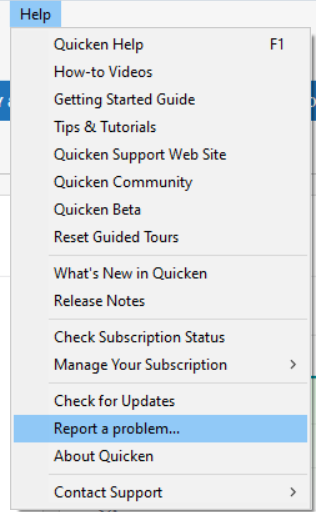
Thank you!
(CTP-14158)
Quicken Kristina
Make sure to sign up for the email digest to see a round up of your top posts.
0 -
August 25, 2025
My Quicken displayed the "Citibank is experiencing connection issues" message on every update for the last few days. Today, I followed the August 9th steps by Quicken Anja and so far I've run two Citi bank updates with no errors. The old runtime.dat file had a size of 59 KB and the new one is showing a size of 3 KB — probably no significance to that.
Update: August 26, 2025
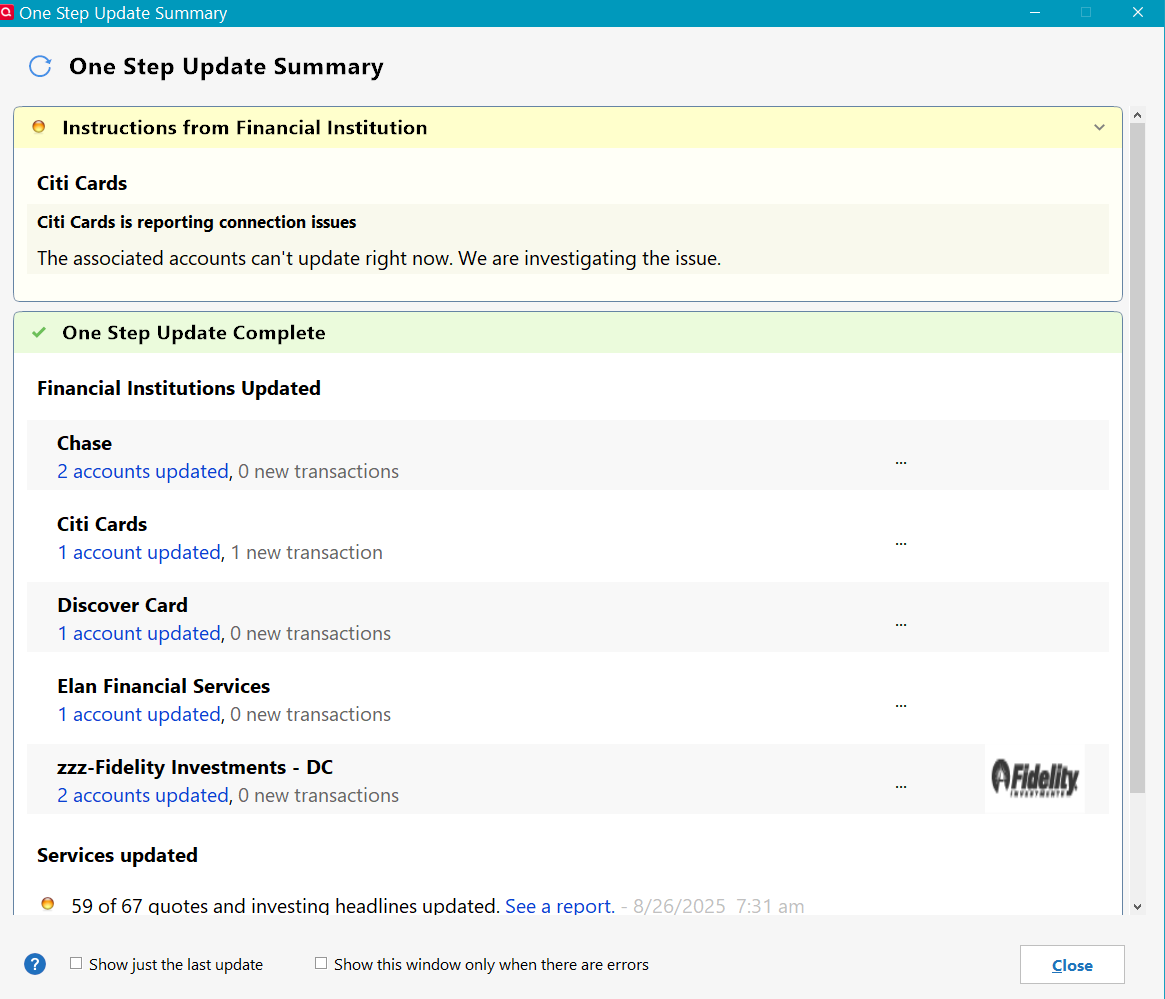
Well, the fix described above lasted almost one whole day. But, note that although the error message stating that "accounts can't update right now" did appear, a transaction did successfully download and I was able to accept it in the register. Also, the register's Online Balance updated correctly.
 1
1 -
Hello @Richard Smith,
Thank you for sharing your experience. I'm glad to hear that it's been updating without errors since you followed the steps posted earlier in the discussion!
If you need further assistance, or if the issue returns, please feel free to reach out!
Quicken Kristina
Make sure to sign up for the email digest to see a round up of your top posts.
0



