Feature Not Working: "Automatically create rules when I rename payees "

I have never seen this work properly in all the years I've been using Quicken for Windows (i.e., ever since Microsoft abandoned Money). Does anyone out there know how it's supposed to work?
Specifically, Quicken does not create a new rule when I edit the name of the payee in any register. Also, it does not offer to let me see the record it would have created — in other words, the "Let me review…" feature is never invoked either. Nothing pops up at all when I save the change to the register. Have I got something misconfigured or is this just a broken feature?
I'm running Version 63.21, Build 27.1.63.21.
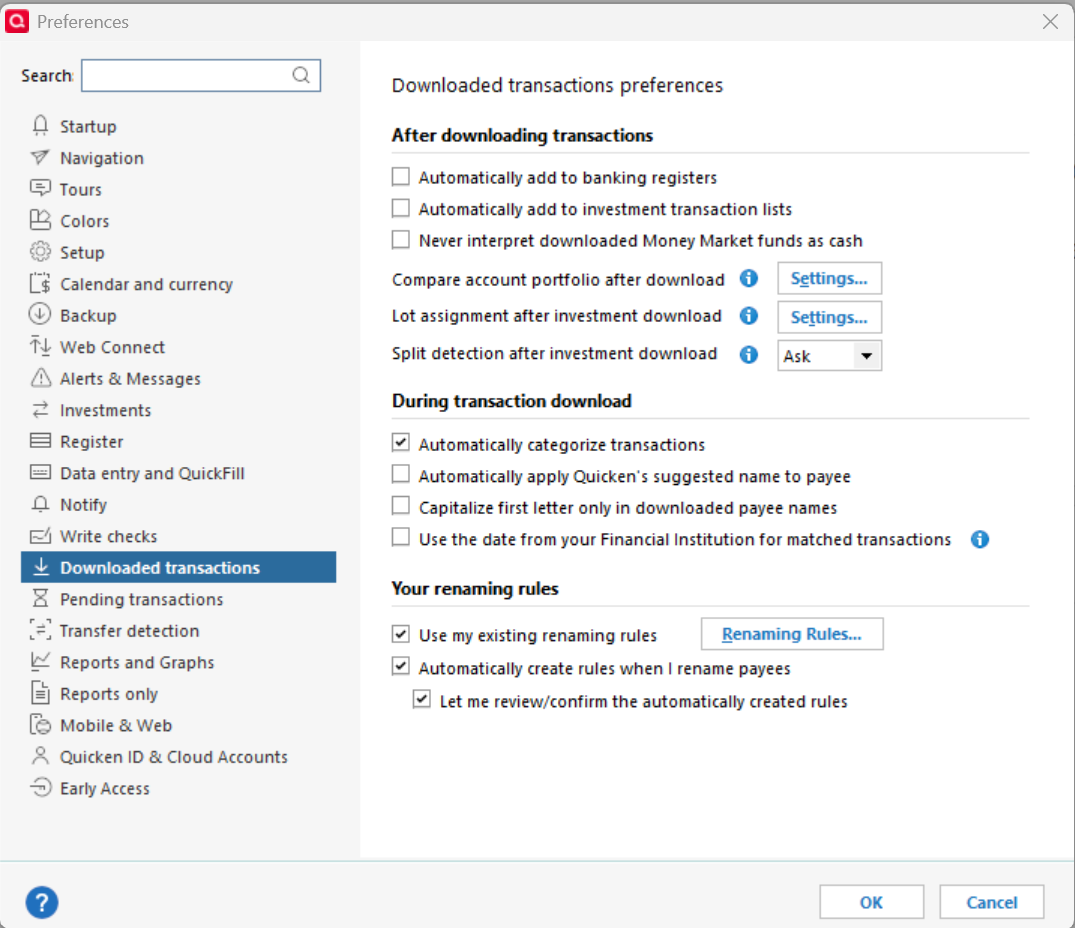
Here is a screen grab of my downloaded transactions preferences settings:
Comments
-
Hello @Carl Davidson,
Thanks for reaching out!
I’d like to dig in a bit to see if this is a settings issue or if the feature simply isn’t triggering as expected:
- When you’re renaming a payee, are you doing it on a downloaded transaction (one that came from your bank) or on a manually entered transaction?
- Have you ever manually created or edited a renaming rule in Tools > Renaming Rules, and if so, does that list currently contain any entries?
- Does this behavior occur across all accounts, or only in certain financial institutions’ downloads?
- In your screenshot, I see the “Automatically create rules when I rename payees” option checked — do you also have Automatic Transaction Entry enabled, or are you reviewing transactions before they enter the register?
- After renaming, does the transaction still keep your edited payee name in future downloads, or does it revert to the original downloaded name each time?
Looking forward to your response!
-Quicken Jasmine
Make sure to sign up for the email digest to see a round-up of your top posts.
0 -
Hi Jasmine,
Thanks for the quick reply. In answer to your questions:
- I almost never enter manual transactions. I am doing the renaming on downloaded transactions. When I do rename a transaction in the register, I do not get a new renaming rule in my existing renaming rules list, and I do not get any pop-up asking me to review it.
- I have created manual renaming rules in the past. It has never seemed to work well. Right now, the list contains one rule which reads as follows:
IF Downloaded payee name contains AMAZON MKTPL
THEN Rename the downloaded payee to Amazon Marketplace - I just created this rule this morning and will have to see if it works the next time I have a matching transaction.
- The behavior occurs across all accounts.
- I do NOT have Automatic Transaction Entry (ATE) enabled. I review each transaction before accepting it into the register.
- I had ATE enabled for many years and it made no difference. It just made keeping things balanced more difficult, so I turned it off.
- To the best of my recollection editing a payee in a transaction has NO effect on future downloads from the same payee. (edited to insert NO between has and effect)
Is there any way for me to see all of the renaming rules that Quicken may possibly be applying?
Thanks,
Carl
0 - I almost never enter manual transactions. I am doing the renaming on downloaded transactions. When I do rename a transaction in the register, I do not get a new renaming rule in my existing renaming rules list, and I do not get any pop-up asking me to review it.
-
Is there any way for me to see all of the renaming rules that Quicken may possibly be applying?
There are two sets of Renaming rules that may be applied:
Your rules, which you can see by going to Tools < Renaming rules. These are enabled with the "Use my existing renaming rules" option in your screenshot above.
Quicken's built-in rules. You can't see these. They are enabled with the "Automatically apply Quicken's suggested name to payee" option in the screenshot above, and are applied if none of your rules applies.
QWin Premier subscription0 -
In reference to the specific case of renaming rules for Amazon transactions, you may need to set up and use Renaming Rules like this:
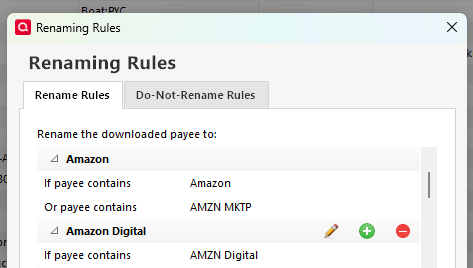
Keep an eye open for additional variations used by Amazon and update the rule as needed.
0 -
Thanks, UKR. I understand what you're saying. I am taking an incremental approach to the problem. What puzzles me is that the documentation says that editing a transaction in the register should create a renaming rule, and that I should be able to review it. Neither of those is happening.
1 -
Carl, I have very similar problem with Quicken, but with a twist… The "Automatically create rules when I rename payees" and "Let me review/confirm the automatically created rules" options DO work for me, but only on SOME of my bank accounts. I've found it very frustrating, which is why I was searching for answers when I found your post. I have never been able to find any "per account" options that might affect this. It appears that these options are either globally ON or OFF. I'm hoping someone might be able to shed some light on this as well!
0 -
Hi @DSCoe. Is there any rhyme or reason to the kinds of accounts that work and don't work ? I'm hoping to hear back from Quicken Jasmine, but she hasn't chimed back in yet.
0 -
I replied to your earlier questions on 8/14, but neglected to properly tag the reply so you would see it. If you have a chance to respond to my answers, I would really appreciate it.
Thanks,
@Carl Davidson0


