Bank of Montreal (BMO) Unable to use MFA in Quicken Mobile and Web

For the past few days I have noticed that I cannot update my transactions on my BMO accounts in Quicken Mobile and Web since the MFA option does not seem to appear while trying to refresh. This results in the msg "Connectivity Error - Swipe to fix" on each account I am trying to update. Trying to refresh repeatedly gives no MFA option.
After I update using One Step Update on Quicken Desktop, MFA option appears and transactions are downloaded and matched.
The "Connectivity Error" on Mobile and Web disappear after syncing. However if I try to refresh the error appears again.
Is anyone else experiencing this? Has BMO made some changes recently?
Comments
-
Hello @Gautam Tupil,
Thank you for letting us know you're seeing this issue. To clarify, you're able to successfully update your BMO accounts in the desktop application, but not in the companion apps (Quicken Mobile and Quicken on the Web) due to the multi-factor authentication (MFA) prompt not coming up?
If that is what is happening, then to start troubleshooting, please follow these directions from this article on troubleshooting online banking issues in the mobile app and on the web:
Try removing the account from Mobile/Web sync then syncing it again
In the desktop program:
- Go to the Mobile & Web tab.
- Click the # Accounts synced successfully link in the Accounts card to edit your account settings.
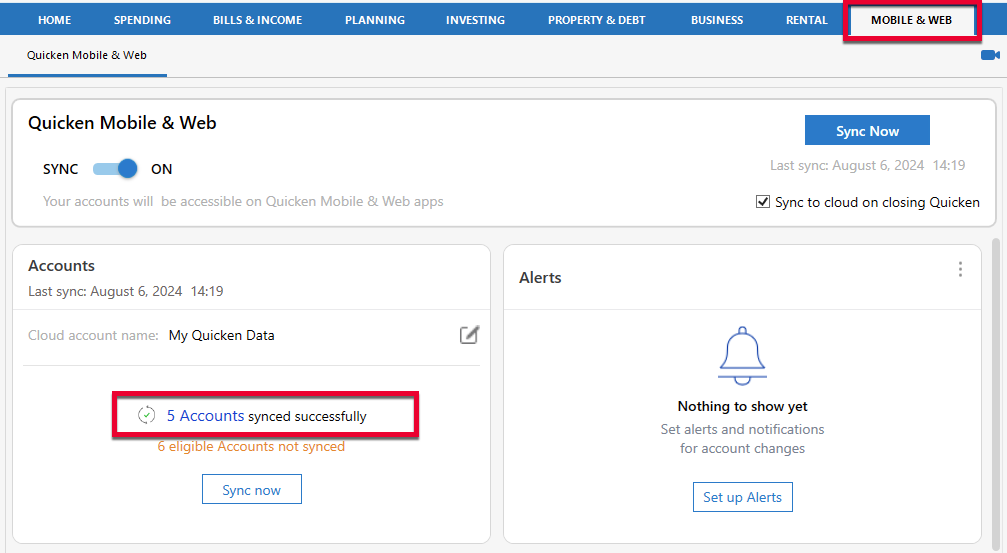
- Uncheck the account(s) that are not syncing correctly.
- Click Update Accounts.
- Close and re-open the Accounts for Mobile & Web window.
- Re-check the accounts and click Update Accounts to sync again.
Please let me know how it goes!
Quicken Kristina
Make sure to sign up for the email digest to see a round up of your top posts.
0 -
Thanks @Quicken Kristina. Will resync the Bank of Montreal accounts and let you know.
1 -
Hello @Quicken Kristina: I tried removing the accounts and tried resyncing again - did not work. Next, I tried a complete cloud reset for all the accounts - did not work. As mentioned earlier, on quicken mobile and quicken web if I try to update my bank accounts I used to get a MFA prompt and after I entered it it would download and check and match my transactions (if I have entered them manually previously).
The MFA prompt does not appear at all and the error continues until I update quicken desktop. This started happening about a week ago with no other changes on my part. Not sure if Bank of Montreal has made any changes??
0 -
Update: I also deactivated and reactivated the accounts. Did not work. Same error message - "3 accounts need attention". If I go to the accounts I see "Connectivity Error: Swipe to Fix". When I swipe it prompts me to indicate that MFA is required and to try again. When I try to update nothing happens.
0 -
Thank you for your reply,
Since you followed the troubleshooting in the article and the issue is still not resolved, I recommend contacting Quicken Support directly for further assistance. They have access to tools that we can't access on the Community, and they're able to escalate the issue as needed. The Quicken Support phone number can be found through this link here. Phone support is available from 5:00 am PT to 5:00 pm PT, Monday through Friday.
I apologize that I could not be of more assistance!
Quicken Kristina
Make sure to sign up for the email digest to see a round up of your top posts.
0
