Vanguard Accounts Doubled in Value After Change to Complex Download (Mac)

I changed my download type to COMPLEX for my Vanguard accounts and now they have all doubled in value (showing same securities but in each case there is a copy of security with the name and one with the name and the stock symbol). How do I fix this? Anyone have any ideas? Thanks for any input.
Answers
-
Hello @MarkieT,
Thanks for reaching out!
Switching to complex downloads can sometimes cause Quicken to duplicate securities, displaying them twice—once with the symbol and once without. To resolve this:
- Backup your file – Always a good first step.
- Check your holdings – Navigate to Investing → Holdings and identify any duplicate securities.
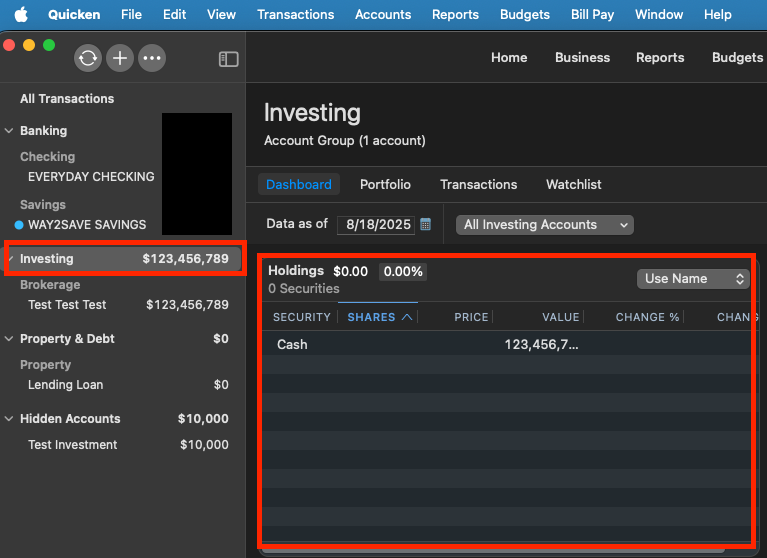
- Delete the duplicates – Remove the extra entries, ensuring you keep the correct one.
- Verify transactions – Ensure no duplicate transactions have been imported.
- Reconcile balances – Confirm your account balances match those at Vanguard.
If the issue persists, consider switching back to SIMPLE download, cleaning up the duplicates, and then reattempting COMPLEX download.
Let me know if you need further assistance.
-Quicken Jasmine
Make sure to sign up for the email digest to see a round-up of your top posts.
0 -
I haven't heard from you yet, are you still needing assistance?
Let me know!
-Quicken Jasmine
Make sure to sign up for the email digest to see a round-up of your top posts.
0 -
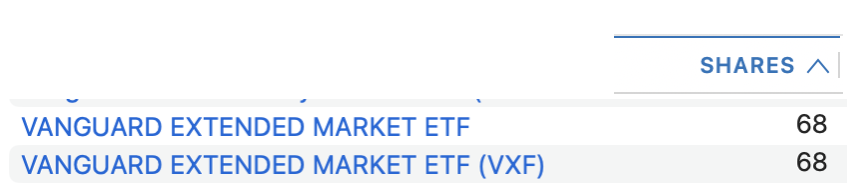
Thanks Quicken Jasmine. The challenge doesn't seem to be duplicate transactions. If there were duplicate transactions they would go back decades. It's like it's indentifying the security but then having a slightly different name for the same security and counting it twice. If you see below the image I included, it shows 68 shares of VXF but it has two versions - one without the VXF at the end and the other without. Not sure how I fix this across seven different accounts with a probably 3-4 securities with transactions going back, as I said, decades. Any more thoughts from the support or engineering team?
 0
0 -
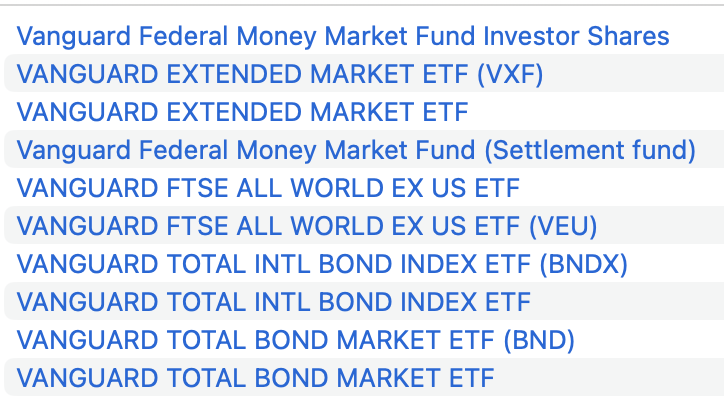
More examples Jasmine.
 0
0 -
Thank you for your replies,
Based on the information you provided, it looks like the issue is being caused by duplicate securities (the slightly different name causing the double counting). Fortunately, you should be able to fix this issue by merging those duplicates. To do this, please backup your Quicken file, then follow the instructions in this help article:
Please let me know how it goes!
Quicken Kristina
Make sure to sign up for the email digest to see a round up of your top posts.
0 -
Quicken Kristina, thanks for the response. That's the ticket. That seems to be fixing the problem. Just have one more situation I think I can fix but thank you very much for the answer. Been using Quicken since the DOS version and would hate to have to stop using it.
0 -
Thank you for the follow-up,
I'm glad to hear that merging securities is fixing the issue.
If you need further assistance, please feel free to reach out!
Quicken Kristina
Make sure to sign up for the email digest to see a round up of your top posts.
0

