Anyone having trouble with Chase connection? (QMAC)

Having a problem with Quicken identifying my chase account, although I get a message that the account is authorized
Comments
-
OMG! Now all my Chase bank accounts just went bad??!?!?! All Chase bank accounts are non-accessible! The credit cards still work!
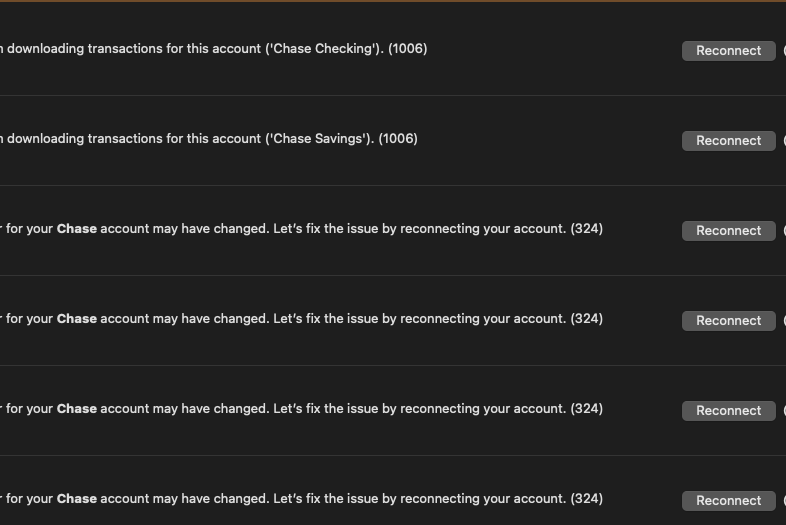
[Merged Post]
0 -
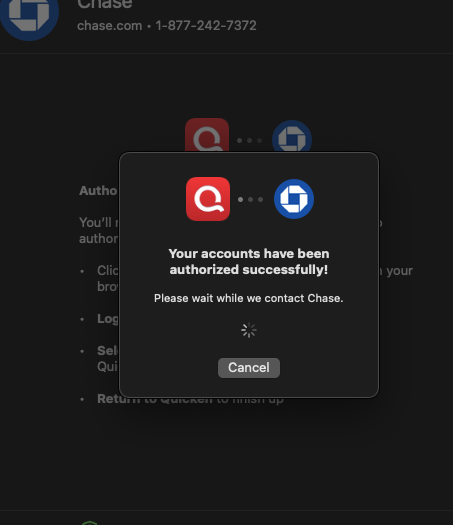
This is crazy, it says this, then fails the connection on one account! This software is a nightmare!
[Merged Post]
0 -
I’m having the same issue today. Also having it in QuickBooks, so it must be something on Chase’s end.
1 -
Same issue for me this morning on my Chase accounts with Quicken for Mac
0 -
Hello All,
Thank you for taking the time to report this issue!
Aside from being unable to connect—could you please provide an exact error code/message that you are receiving (if any)? Also, could you please provide a screenshot of what you are seeing? If needed, please refer to this Community FAQ for instructions on how to attach a screenshot. Alternatively, you can also drag and drop screenshots to your response if you are not given the option to add attachments.
Additionally, we will be forwarding this issue to the proper channels to have this further investigated. However, we request that you please navigate to Help > Report a problem within your Quicken program and submit a problem report with log files and screenshots attached in order to contribute to the investigation.
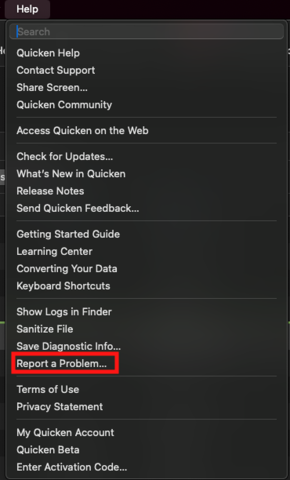
It would also aid the investigation to include a sanitized file when submitting the problem report. A sanitized file is a data file that removes personally identifiable information so you can comfortably share this file with the Quicken team.
While you will not receive a response through this submission, these reports will help our teams in further investigating the issue. The more problem reports we receive, the better.
We apologize for any inconvenience in the meantime! Thank you.
(CBT-773)-Quicken Anja
Make sure to sign up for the email digest to see a round up of your top posts.0 -
Chase credit cards do not connect and download transactions as of right now and it asked me to reconnect the accounts which I did but it gave me the same problem. Anyone else seeing this issue?
0 -
Having same problem.
1 -
I disconnected the accounts in the account settings for each chase card and bank account, restarted Quicken and then added them back. It’s working again now.
1 -
Reconnecting the accounts work now.
0 -
@chascarter & @dhammabob Thank you both for the update, glad to hear it is working now!
Can others in the thread also please confirm whether you're able to connect now or if the issue persists?
Thank you!
-Quicken Anja
Make sure to sign up for the email digest to see a round up of your top posts.0 -
I had this problem as well, but only with the checking and money market. When I attempted to authenticate those two accounts did NOT show up on the list of active accounts. The error message I got was that the accounts have been disconnected. I went to the Chase site and found all was well.
I disabled just the checking account's online access and re-authenticated. This time all accounts were shown and it worked.
0 -
One step update appears to work correctly but no new transactions are posted for Chase, Citi or Ally Bank. This started with R64.19.
0
