Como corrigir erro no relatório de transações diárias? Quicken for Windows 6 [Edited]

Utilizo o Quicken 6 para Windows e estou com problemas quando gero o relatório diário de contas, o quicken trás transações cruzadas e transações do ano de 2021 e 2022, assim não consigo gerar um fluxo de caixa correto e não sei como corrigir. Alguém saberia resolver esse problema?
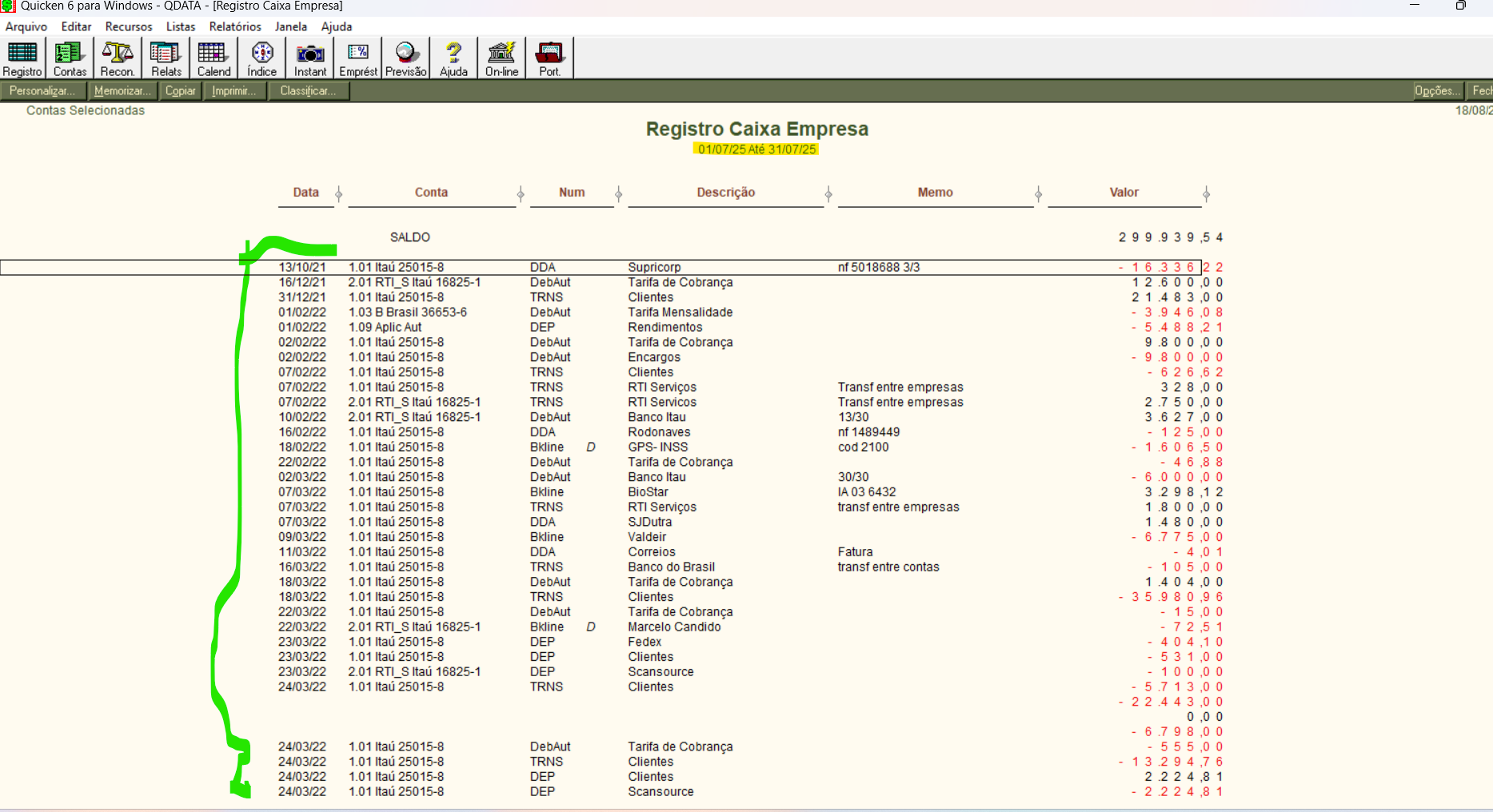
[Translation, from Google Translate - I use Quicken 6 for Windows and I'm having trouble generating the daily accounts report. Quicken displays cross-referenced transactions and transactions from 2021 and 2022, so I can't generate a correct cash flow and I don't know how to fix it. Does anyone know how to resolve this issue?]
Best Answer
-
Your data file might be corrupted. See if you can VALIDATE the file … but take a backup before you do that.
Q user since February, 1990. DOS Version 4
Now running Quicken Windows Subscription, Business & Personal
Retired "Certified Information Systems Auditor" & Bank Audit VP0

Answers
-
Your data file might be corrupted. See if you can VALIDATE the file … but take a backup before you do that.
Q user since February, 1990. DOS Version 4
Now running Quicken Windows Subscription, Business & Personal
Retired "Certified Information Systems Auditor" & Bank Audit VP0 -
Muito obrigado pela sua ajuda, mas como eu faço essa VALIDAÇÃO?
[Google Translate: Thank you very much for your help, but how do I do this VALIDATION?]
0 -
Hello @Financeiro RTI,
Thanks for reaching out!
Below you will find instructions on how to Validate and Super Validate, if needed.
Validate:
- File
- Validate and Repair File...

- Validate File
- Click OK
- Close the Data Log
- Close Quicken (leave it closed for at least 5 secs)
- Reopen Quicken and see if the issue persists.
If the issue persists, proceed to Super Validate. If the issue is resolved after performing validation, then please disregard the instructions to Super Validate.
Super Validate:- File
- Hold CTRL + Shift and click Validate and Repair File...
- Super Validate File

- Click OK
- Close the Data Log
- Close Quicken (leave it closed for at least 5 secs)
- Reopen Quicken and see if the issue persists.
I hope this helps!
-Quicken Anja
Make sure to sign up for the email digest to see a round up of your top posts.1 -
In older Quicken versions, the path was File | File Operations | Validate.
From google translate:
Em versões mais antigas do Quicken, o caminho era Arquivo | Operações de arquivo | Validar.
Quicken user since Q1999. Currently using QW2017.
Questions? Check out the Quicken Windows FAQ list1 -
Thanks for pointing this out, @mshiggins—that completely slipped my mind.
Appreciate you clarifying this for everyone!
-Quicken Anja
Make sure to sign up for the email digest to see a round up of your top posts.0

