Is there a way to exclude a specific security from updates (online downloads)?

I have two investments that consistently reflect a $0 value when I perform an update (the regular update of securities and accounts; not a software update). All other securities appear to be accurate. I know how to exclude an entire account from updating, but I would like to exclude these two securities from updating while continuing to update all the other securities. It appears to be possible to exclude a security that you don't hold from updating in your Watch List, but I can't figure out a way to exclude a security I DO hold from updating.
Any advice or suggestions would be appreciated. Thanks.
Answers
-
Hello @NotTechnical,
Thanks for your question! You can indeed exclude specific securities from downloading quotes while still updating the rest. Here’s how:
- Go to Window > Securities.
- Uncheck the option “Download quotes only for Watchlist, indexes & securities held.”

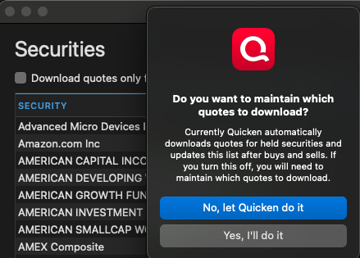
- You’ll see a message pop up (screenshot example below). Select “Yes, I’ll do it.”
- A new column will appear titled Download Quotes with checkboxes.
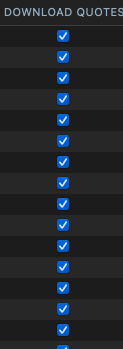
- Simply uncheck the box next to the security you want to disable updates for.
This way, all other securities will continue to update normally, while those you’ve deselected won’t.
Hope this helps!
-Quicken Anja
Make sure to sign up for the email digest to see a round up of your top posts.1 -
Thanks, @Quicken Anja, for the prompt and on-target response! I think the downside with that approach is that it appears from the screen shot for step 3 that I then would need to manually update the list of securities every time I purchased a new security. If I bought something and forgot to add it to the list, it wouldn't ever update quotes for that security. Any workarounds for that?
Much appreciated.
0 -
@NotTechnical I think you have it backwards - if you buy a new security it is automatically added to the Securities list with the Download option checked - you'd only have to go in & manually uncheck the option if you didn't want it to update prices for you. I've never had to go in & add a security to the list myself unless it was a made-up security that didn't have a real symbol. (For example, I create a security for each I-bill that I purchase; I also created securities for the funds inside my 401K that weren't publicly traded.)
I suppose if for some reason you wanted Quicken to download prices for a security that you didn't own and did not want to add to a watchlist then you'd have to add that to the list yourself; not sure why you'd want to do that.
2 -
Thanks, @Jon! That makes a lot more sense. Appreciate your clarifying. I'll give it a whirl.
0
