Chase Account Download Issues

I have two separate Chase Accounts. I have a credit card that shows up on both Chase accounts online, that's just how the accounts are linked. Right after the last Quicken update I have run into the following issue. I had to reset the account downloads. For Account A I will call it, all of the accounts download just fine (Check, savings, credit card A). When I try to setup the downloads for Account B, (Account B has Credit card A And Credit card B) I run into an issue where Quicken deactivates the downloads for my checking and savings from Chase because under account B, the checking and savings don't show up on Account B. On Account B only credit card A and credit card B show up.
Then when I go back to setup the downloads for account A, It deactivates the downloads for credit card B because credit card B doesn't show up on account A.
So it's a vicious cycle that I can't get out of. Any idea what I can do to get all of the accounts back downloading?
This was all working fine before the last quicken update.
Comments
-
Hello @RSW90,
Thank you for letting us know you're seeing this problem. To clarify, Account A and Account B are two separate sets of login credentials for Chase that each have their own banking/credit accounts associated with them? When you are adding/reconnecting accounts for Account A, are the accounts associated with Account B visible in the add/link screen?
I look forward to your response!
Quicken Kristina
Make sure to sign up for the email digest to see a round up of your top posts.
0 -
Yes, the login credentials are different for account A and account B. When I add/reconnect accounts for Account A, all but one credit card account is visible. That's the one account that then gets disabled for downloads in account B.
0 -
Thank you for your reply,
What sometimes happens when there are multiple logins trying to connect under the same Express Web Connect + connection option is that they end up fighting over the authentication token (enabling one deauthorizes the other).
Is this credit card one of the ones that has a separate connection option available?
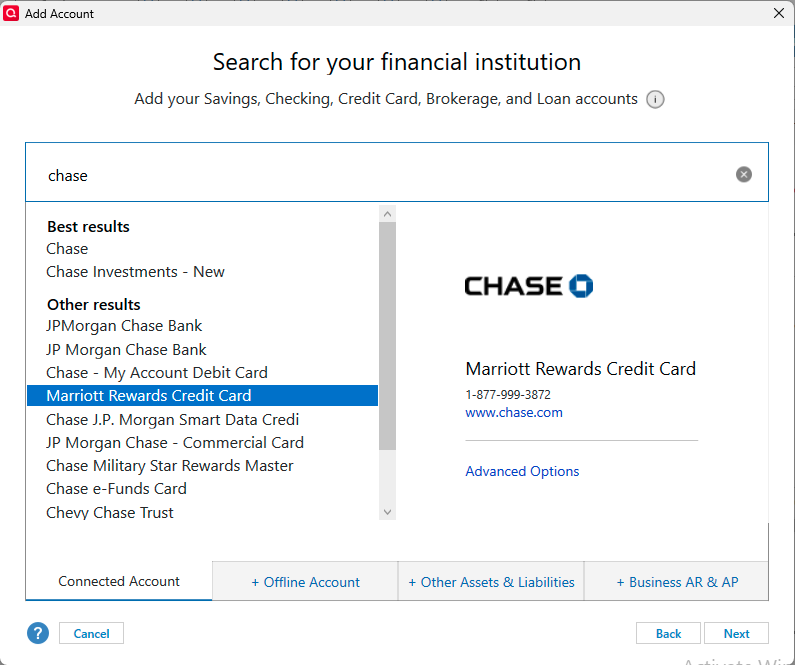
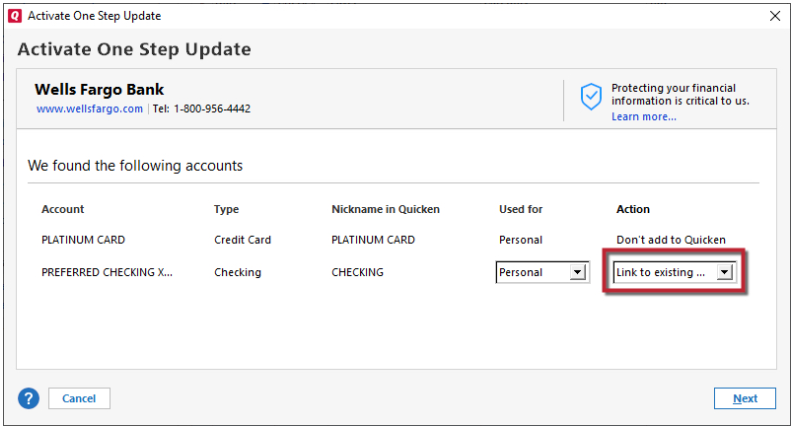
If possible, backup your Quicken file, deactivate the problem account, navigate to Tools>Add Account, select one of the other connection options with Chase (Chase Investments - New will not work with credit cards), carefully link the account to the correct nickname in Quicken, and test to see if the issue is resolved.
Please let me know how it goes!
Quicken Kristina
Make sure to sign up for the email digest to see a round up of your top posts.
0 -
No I cannot add the credit card using the suggested method above you provided since these cards are issued by Chase. (It's a Chase Freedom Card). Again, this was all working fine before the last update from Quicken.
0 -
I don't have any experience with credit cards since the two credit card accounts we have, are only in one of our Chase accounts. But we do share the checking account and a joint investment account and that works fine.
One possible cause of this problem is that in your account B you have selected for it to download credit card A.
If you select the menu and then Security & Privacy → Linked apps (Quicken should be listed) → See x app → Quicken via Intuit. This should give you a list of the accounts that are being share, and the ones that aren't, but are eligible to be shared. Make sure only the ones you want for "Account B" are shared, if they aren't correct select Edit sharing.
If that isn't the problem, then I'm not sure what is going on.
0 -
I checked the Chase account settings and everything looks fine indicating that the accounts I expected are tagged for download. So not sure why it's not working
0 -
Thank you for your reply,
Due to the nature of this issue, I recommend that you contact Quicken Support directly for further assistance, since they have access to tools that we can't access on the Community, and they're able to escalate the issue as needed. The Quicken Support phone number can be found through this link here. Phone support is available from 5:00 am PT to 5:00 pm PT, Monday through Friday.
I apologize that I could not be of more assistance!
Quicken Kristina
Make sure to sign up for the email digest to see a round up of your top posts.
0 -
I have the exact same issue. I have two separate accounts with different login credentials. They updated perfectly before one of the last app updates. I also deactivated each account, only to have Quicken flag the other. It is indeed a vicious circle and ridiculous.
Please help!
0 -
Hello @Ghassan Alfaqih,
Thank you for reaching out. If you are seeing the same issue with connecting accounts under one set of login credentials causing accounts under a different set of login credentials to get disconnected, then I recommend that you contact Quicken Support directly for further assistance, since they have access to tools that we can't access on the Community, and they're able to escalate the issue as needed. The Quicken Support phone number can be found through this link here. Phone support is available from 5:00 am PT to 5:00 pm PT, Monday through Friday.
I apologize that I could not be of more assistance!
Quicken Kristina
Make sure to sign up for the email digest to see a round up of your top posts.
0 -
Thanks Kristina.
0

